


September 9, 2019
How to Export Data from Tally into SQL Server? If you are wondering how to export data from Tally into SQL Server, the simplest way is by using a tool like Tally Connector. This tool connects your Tally software with SQL Server, automatically extracts data, and transfers it into the SQL database for analysis and reporting. Once your data is in SQL Server, you can easily use BI tools like EasyReports to create insightful dashboards and reports.
What Is Tally Connector?
Tally Connector is a data integration tool developed by Orchid Technical Consultancy Pvt. Ltd., Kolkata. It acts as a bridge between Tally ERP and SQL Server using the SOAP (Simple Object Access Protocol) API. This protocol helps different systems communicate through XML over HTTP, enabling smooth data exchange even across different operating systems like Windows and Linux.

Why Do You Need a Tally Connector?
Using a Tally Connector offers several advantages for businesses that want real-time access to Tally data in SQL Server.
Key Benefits:
- Exports transactions, masters, and inventory data directly into a database.
- Uses API, auto-scheduler, or file-based imports for flexible integration.
- Keeps data in its original form, ensuring accuracy and reliability.
- Provides table-based structured data for easy analysis and data mining.
- Supports auto data comparison between Tally and SQL to reduce manual errors.
- Has been tested for stability and integrity for over eight years across industries.
In short, the Tally Connector simplifies your workflow and makes your Tally data usable across different analytical platforms.
What Makes Tally Connector Unique?
The USP of Tally Connector lies in its automation and flexibility. With one click, users can import data through XML using the SOAP API. You can also schedule imports automatically, modify the open database format, and even compare data between Tally and SQL without manual effort.
Unique Features:
- One-click import of data from Tally ERP.
- Auto-scheduling of imports to ensure regular updates.
- Open database format for custom access and modifications.
- Data matching and auto-correction to maintain consistency.
- Continuous updates and technical support from the developer team.
How to Export Data from Tally into SQL Server? (Step-by-Step)
You can export data from Tally into SQL Server in three different ways:
direct import, file import, and auto-scheduling.
Here’s how each process works:
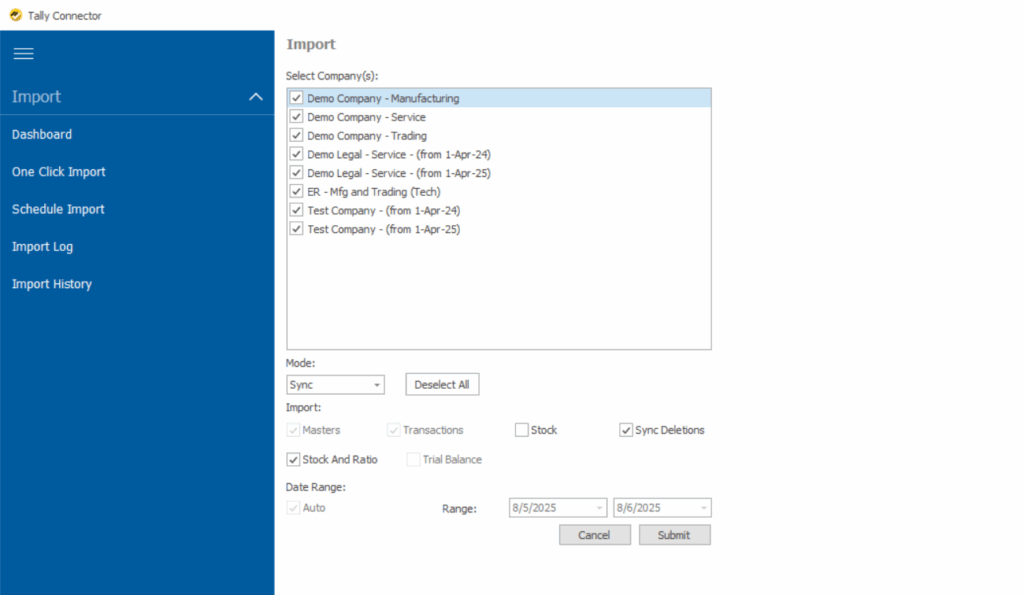
1. Direct Import of Data
- Open Tally Connector.
- Choose Direct Import and select the Tally company data.
- Import transactions, masters, or inventory records in just a few clicks.
- The connector automatically manages additions, deletions, and modifications for accuracy.
2. File Import of Data
- Export data from Tally ERP 9 or Tally Prime into XML files.
- Open Tally Connector and choose the file import option.
- Select the XML files and upload them into SQL Server.
3. Auto Scheduling Feature
- Open the Scheduler option in Tally Connector.
- Set the time and frequency for imports (daily, weekly, or hourly).
- Once configured, the tool automatically updates your transactions, masters, and stock data into SQL Server.
For to know more get the demo now!
People Also Ask
I) Can I export Tally data without using third-party tools?
Tally allows limited data export options (like Excel or XML), but exporting directly into SQL Server requires a connector or integration tool such as Tally Connector for automation and accuracy.
II) Is Tally Connector compatible with Tally Prime?
Yes, Tally Connector works with both Tally ERP 9 and Tally Prime, supporting data extraction and synchronization with SQL Server.
III) Can I schedule automatic exports from Tally to SQL Server?
Absolutely! Using the Auto Scheduler feature, you can set regular data imports from Tally into SQL Server without manual effort.