


January 22, 2026
How to automate daily sales reports from Tally Prime 7.0? Automate sales reports from Tally Prime by connecting Tally Prime with a reporting automation tool like EasyReports. The tool automatically extracts Tally data, generates sales reports and customer outstanding insights, and helps schedule and share reports automatically.
Managing sales every day becomes difficult when teams have to open Tally, check sales figures, prepare reports and then send them to management manually. As the business grows, this routine takes more time and makes it harder to get sales information when you need it. With Tally Prime connected to a BI reporting tool like EasyReports, you can turn your Tally data into ready-to-use reports and automate their generation and delivery. Let’s look at how you can set up this process step by step.
Steps to Automate Sales Reports from Tally Prime 7.0
You can automate reports by connecting Tally Prime 7.0 with a BI reporting tool like EasyReports.
Here’s the step-by-step process.
Step 1: Connect Tally Prime 7.0 to EasyReports
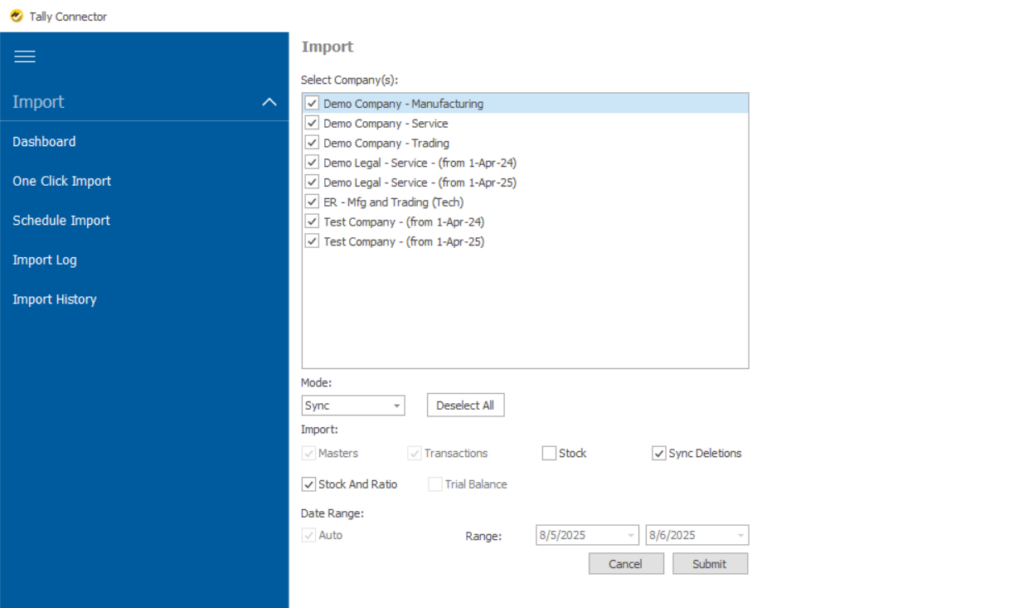
EasyReports Tally Connector connects directly with your Tally Prime 7.0 data without disturbing your accounting work. Using the Tally Connector, you can easily sync the required company from Tally Prime 7.0 to EasyReports for generating sales reports from Tally Prime.
Step 2: Select Required Sales Reports in EasyReports
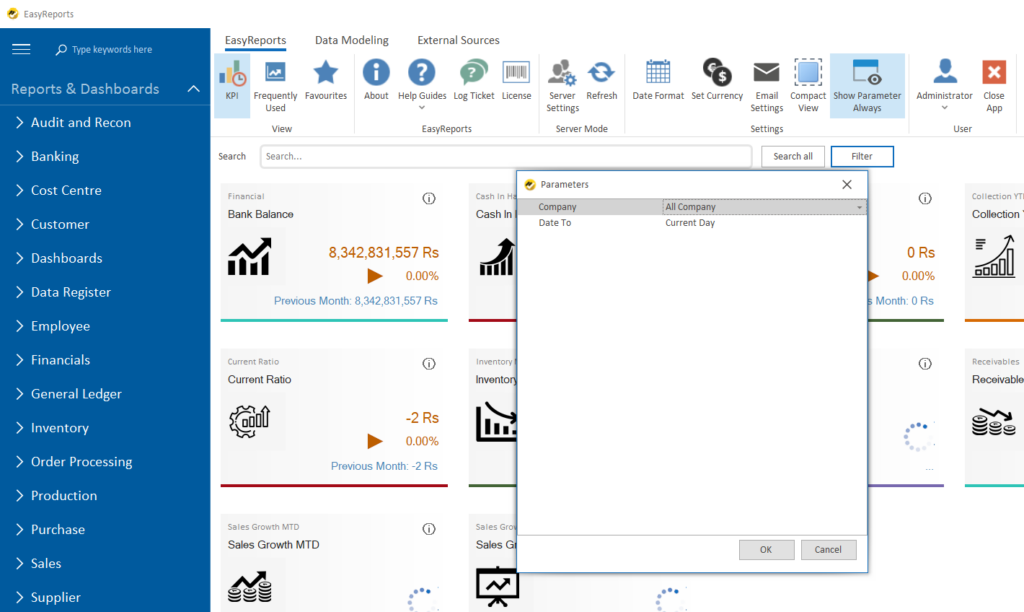
After completing the data sync process, open EasyReports and select the required sales reports or outstanding reports. Choose the necessary parameters and generate the reports instantly.
Step 3: Schedule Daily Sales Reports
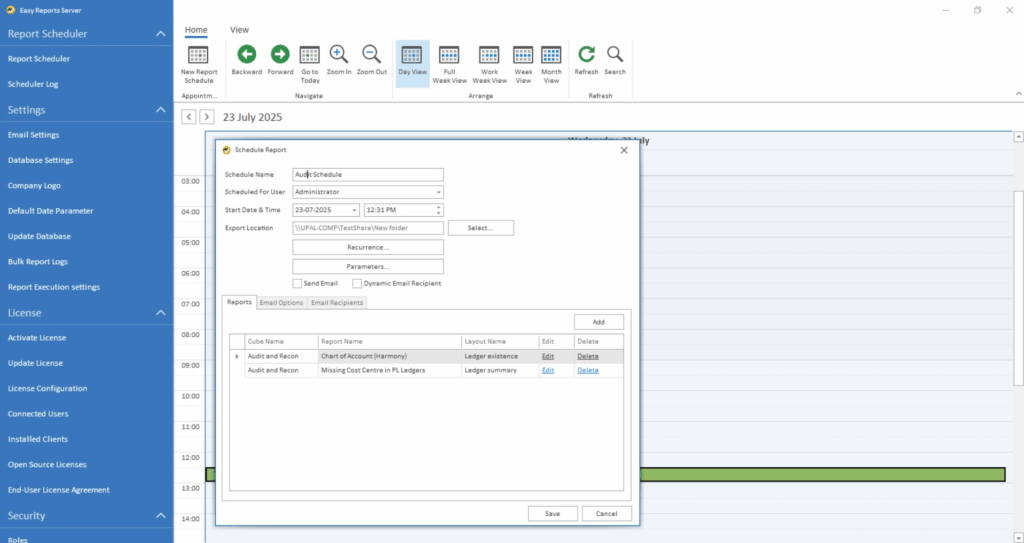
To automate these reports, configure your email in the EasyReports report scheduler. Then select the sales and outstanding reports you want to schedule for automatic generation.
Step 4: Automatically Share Tally Prime Sales Reports with Management
Add your team members or external email IDs in the scheduler. Based on the selected schedule, EasyReports automatically delivers the reports on a daily or weekly basis.
What Sales Reports Can You Generate from Tally Prime?
EasyReports provides ready-to-use sales reports from Tally Prime, including:
- Sales Detailed Analysis (Cross Selling): helps identify customers suitable for cross-selling products using area-wise and customer-wise sales data.
- Sales Detailed Analysis (Focused Product – Company Level): categorizes products based on sales contribution to help businesses focus on high- and low-performing items.
- Sales Detailed Analysis (Focused Product – Area Level): analyzes product performance area-wise
- Active & Inactive Customer Report: helps identify customers with stuck payments, losing customers, and area-wise follow-up opportunities
- Sales Dashboard (Overview): party, item, and month-wise sales summary
- Sales Dashboard (Item Analysis): item-wise and group-wise sales breakup
- Sales Margin (Average Cost): margin visibility on every sale
Along with these, EasyReports provides many more Tally sales reports as part of its standard reporting suite.
How Automated Sales Reports from Tally Prime Help Business Users
Automated sales reports help users understand sales performance clearly.
EasyReports allows management to:
- Track daily sales movement
- Compare monthly, quarterly, or yearly sales instantly
- Identify top-selling and low-performing products
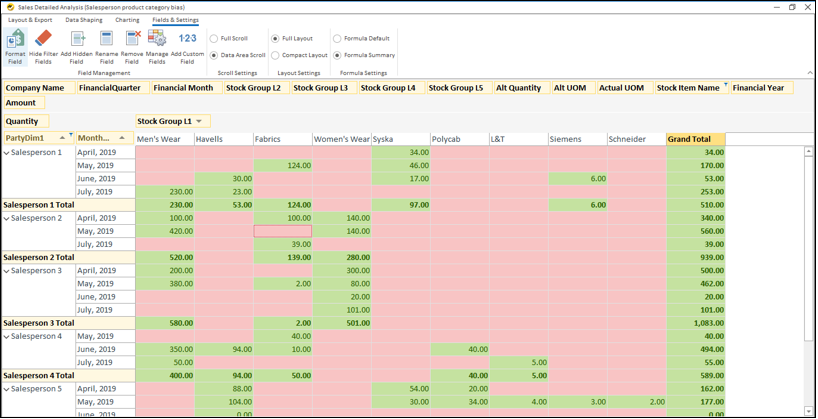
- Analyze salesperson-wise sales trends
Which Outstanding reports are available on EasyReports?
EasyReports provides multiple customer outstanding reports such as:
- Customer Outstanding: party-wise pending amount
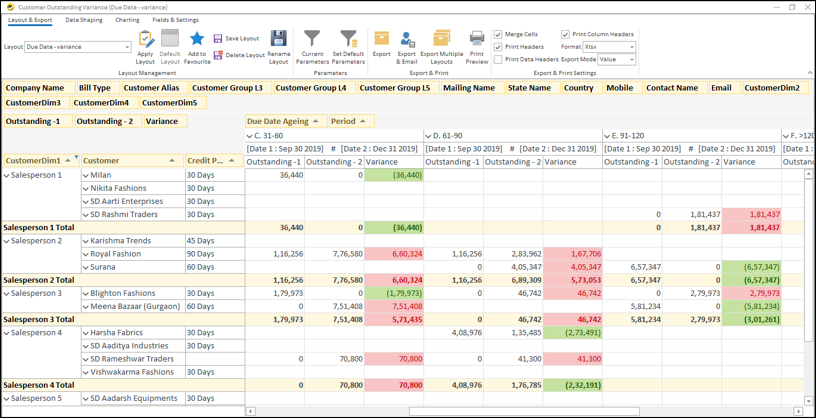
- Customer Outstanding Variation: increasing or decreasing credit days
- Customer Credit Utilization: customers exceeding credit limits
- Bill-wise Receipt Days: invoice-level payment behavior
- Customer Sales Collection Outstanding: sales vs collection comparison
Start making faster decisions with EasyReports. Get the demo now or book your free trial.
Disclaimer: This blog article is for educational purposes only. Tally is a product of Tally Solutions Pvt. Ltd. and we do not claim any affiliation.
Frequently Asked Questions (FAQs)
1. Can we automate sales reports from Tally Prime 7.0?
Yes. EasyReports helps automate sales reports from Tally Prime 7.0 by generating, scheduling and sharing reports automatically.
2. What sales reports can be generated from Tally Prime?
You can generate sales analysis, customer-wise, product-wise, salesperson-wise, dashboard and sales margin reports from Tally Prime.
3. Can I schedule daily sales reports from Tally Prime?
Yes. EasyReports lets you schedule daily reports from Tally Prime for automatic generation and delivery.
4. Can Tally Prime sales reports be sent automatically by email?
Yes. Reports can be automatically emailed to management, team members or external recipients.
5. Can I analyze salesperson-wise sales performance from Tally Prime?
Yes. EasyReports helps analyze salesperson-wise sales trends using data from Tally Prime.
6. Can I generate outstanding reports along with Tally sales reports?
Yes. EasyReports can generate customer outstanding reports along with Tally Prime sales reports.
7. Is EasyReports suitable for businesses using Tally Prime?
Yes. EasyReports helps businesses generate and automate reports from Tally Prime and improve reporting visibility.