


August 19, 2026
Standardized MIS reporting helps businesses maintain consistent report structures, KPI definitions, calculations, formats, and reporting schedules across reporting cycles. A standardized MIS reporting tool can connect ERP and business data, create reusable report templates, build dashboards, manage KPIs, automate report generation, and distribute reports to the right stakeholders.
What Is Standardized MIS Reporting?
Standardized MIS reporting means using consistent report structures, KPI definitions, calculations, formats, and delivery schedules across reporting cycles.
A standardized MIS process should answer five important questions:
- Which data sources should feed the report?
- Which KPIs and financial measures should the report use?
- Which format should management receive?
- How often should the system refresh and generate the report?
For example, a business may use the same Profit & Loss structure, KPI definitions, reporting periods, and presentation format every month across departments, branches, or companies. Instead of preparing each MIS report differently, standardized MIS reporting creates a repeatable reporting process where the same rules and report structures are applied consistently to updated business data.
Why Is Standardized MIS Reporting Important?
A standardized MIS process can help businesses:
- Maintain consistent report formats and KPI definitions
- Reduce manual effort involved in preparing management reports
- Apply the same reporting structure across departments and entities
- Consolidate financial and operational information from multiple companies
- Give management a consistent view of business performance
- Automate report generation, scheduling, and distribution
- Make recurring MIS reporting easier to maintain as business requirements change
What are the Popular Reporting Tools for Creating Standardized MIS?
There is no single reporting platform that fits every organization. The best option depends on the type of MIS you need, where your data resides, how much customization you require, and how much reporting automation you want.
Common reporting tools and platforms include:
| Sl. No. | Category | Tools | Best For | Website |
| 1 | ERP-Based MIS & Business Reporting | EasyReports | ERP-integrated reporting and MIS platform for finance and operations, providing dashboards, custom financial/operational reports, and automated report scheduling. | https://www.easyreports.in/ |
| 2 | Enterprise BI & Data Visualization | Microsoft Power BI | Business intelligence and analytics platform by Microsoft, connecting to diverse data sources and enabling users to build and share interactive reports and dashboards. | https://www.microsoft.com/en-in/power-platform/products/power-bi |
| Tableau | Visual analytics platform for connecting to various data sources and exploring data with an intuitive drag-and-drop interface to build interactive visualizations. | https://www.tableau.com/products/desktop | ||
| 3 | AI-Powered Analytics | Zoho Analytics | AI-powered BI and analytics platform that connects to 500+ data sources, enabling data blending and transformation via visual pipelines, and delivering dashboards, reporting, and AI-driven insights. | https://www.zoho.com/analytics/ |
| Databox | BI and analytics platform that connects 130+ data sources into a unified view, standardizes metrics, and offers interactive dashboards, automated reporting, scorecards/alerts, and AI-driven performance insights. | https://databox.com/ | ||
| 4 | Formatted / Pixel-Perfect Reporting | SAP Crystal Reports | Legacy enterprise reporting solution for designing and delivering highly formatted, pixel-perfect business reports and invoices, from virtually any data source. | https://www.sap.com/india/products/data-cloud/crystal-reports.html |
| 5 | Marketing Intelligence | Whatagraph | Marketing intelligence and reporting platform for agencies and marketers, connecting cross-channel data sources into dashboards and automated client reports, with white-label branding and template features. | https://whatagraph.com/ |
| Agency Analytics | Marketing analytics and client reporting platform for agencies, connecting 85+ data sources (SEO, PPC, social, eCommerce, etc.) to automate dashboards, reports, and client-branded reporting. | https://agencyanalytics.com/ |
What Should You Look for in a Standardized MIS Reporting Tool?
A practical standardized MIS workflow looks like this:
Connect → Configure → Standardize → Report → Analyse → Schedule → Share
A suitable MIS reporting platform should provide the capabilities your finance and management teams use repeatedly.
1. ERP and Data-Source Connectivity: The platform should connect directly with your ERP, accounting system, database, or spreadsheets.
2. Standard Report Templates: The platform should allow your team to create reusable report structures. Standard templates help different departments and entities.
3. Financial Statement Reporting: For finance teams, the platform should support reports such as Profit & Loss, Balance Sheet, Cash Flow, Budget vs Actual, and profitability analysis.
4. Dashboards and KPIs: Management should be able to monitor important metrics through dashboards instead of reviewing large volumes of raw transactions.
5. Multi-Company Reporting: If your organization operates several companies, branches the reporting platform should support consolidated reporting.
6. Report Scheduling: Scheduling allows recurring reports to reach stakeholders automatically.
7. Export and Distribution: The platform should support appropriate export and distribution options.
8. Custom Reporting: Every organization has different KPIs, dimensions, reporting structures, and management requirements. A useful reporting tool should allow customization.
9. Security and User Access: The platform should allow organizations to control who can view, analyze, export, or manage reports.
Which Reporting Tool Should I Use to Create Standardized MIS Reports?
The zero-code reporting tool EasyReports focuses on reporting and business intelligence across ERP and other business data sources.
Its supports Tally Prime and Tally ERP9, SAP Business One/HANA, Microsoft Dynamics 365, Microsoft NAV/Business Central, SQL Server, MySQL, Oracle, PostgreSQL and Excel data. It also provides ready reports, customized reports, dashboards, report scheduling, and Excel integration.
How EasyReports Can Support Standardized MIS Reporting?
EasyReports can help businesses standardize MIS through:
- Multiple Report Formats: Create Pivot, Grid, Spreadsheet, and PDF reports based on requirements.
- Interactive Dashboards: Build dashboards that combine information from multiple sources, provide filters and drill-downs.
- Custom Report and Dashboard Design: Use the Report Designer to create customized reporting interfaces and dashboards.
- KPI Management: Create configurable KPIs and connect them directly to detailed reports or dashboards for deeper analysis.
- Automated Report Scheduling: Schedule reports and dashboards for automatic export or email delivery without manual intervention.
- Multi-Company Reporting: Support consolidated reporting across multiple companies.
- Role and Field-Level Security: Control access to reports, functions, fields, branches, divisions, customers, and other data according to user roles and security rules.
- Excel and Google Sheets Integration: Bring in additional information such as targets, budgets, and other reporting dimensions from Excel uploads or Google Sheets.
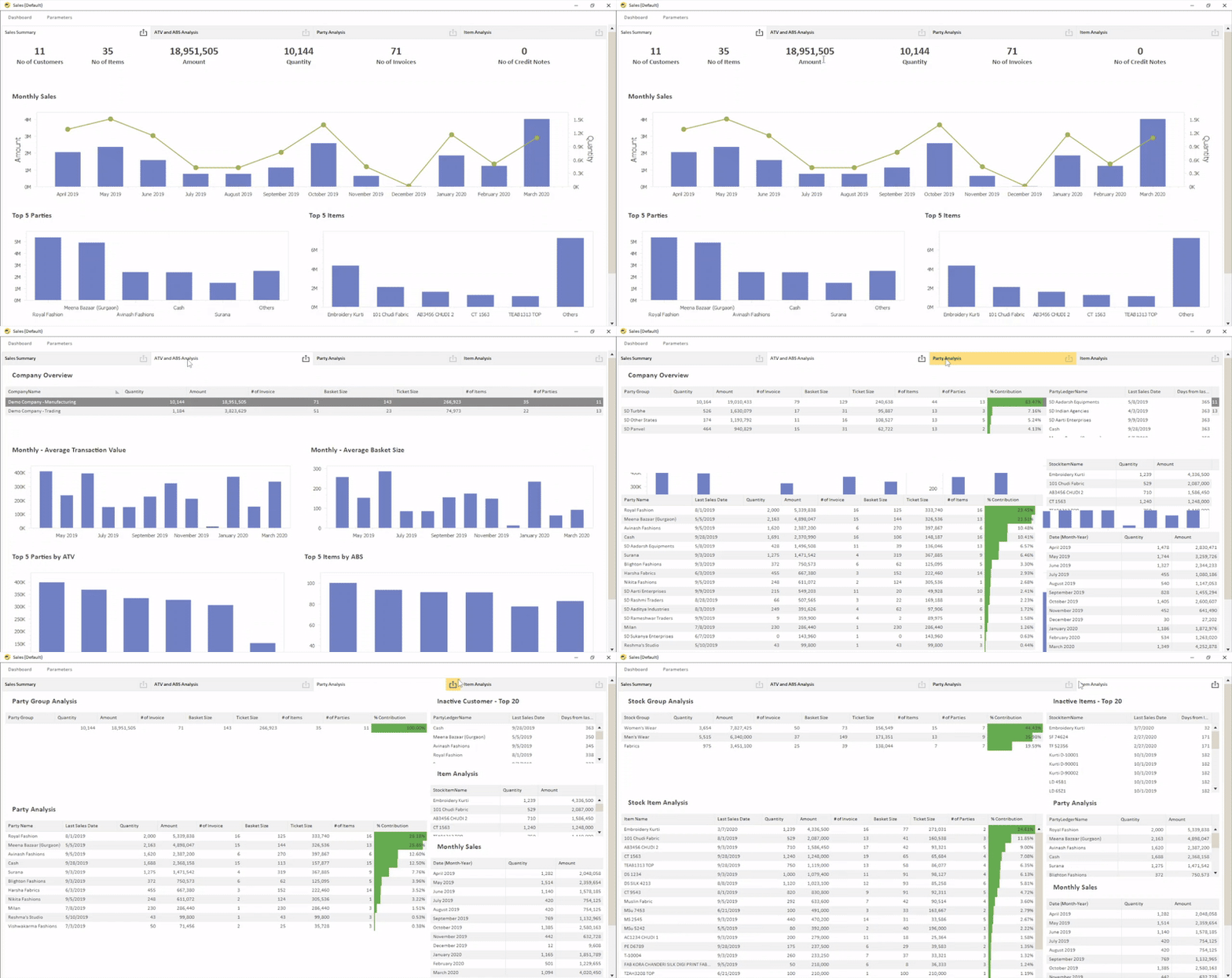
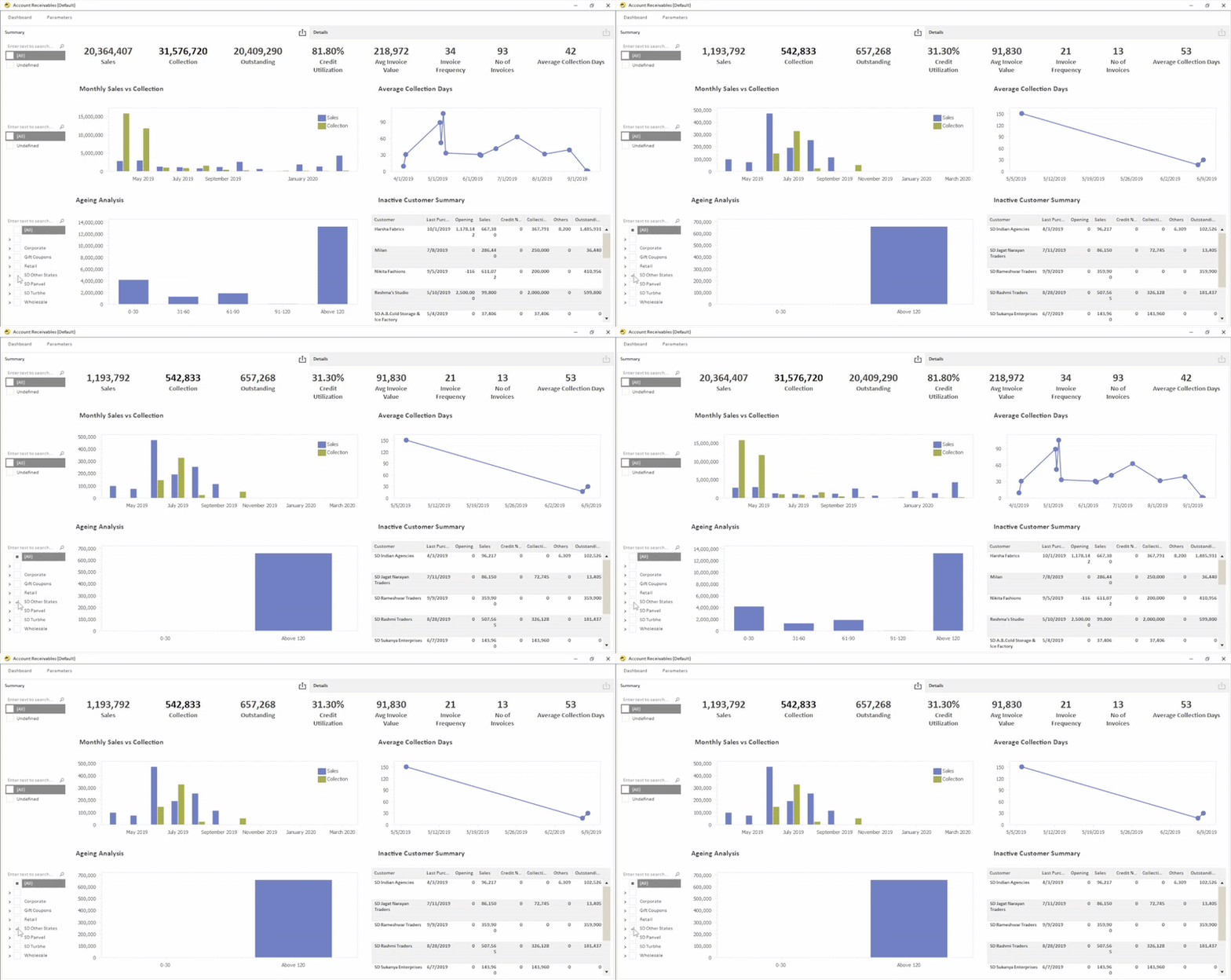
Ready to Explore How Standardize MIS Reporting can Help Your Business?
See how EasyReports can help you connect your ERP and business data, create standardized reports and dashboards, configure KPIs, automate recurring report delivery, and manage user access from one reporting platform. Book a free demo of EasyReports and explore how it can simplify your organization’s MIS reporting process.
Frequently Asked Questions (FAQs)
1. What is standardized MIS reporting?
Standardized MIS reporting uses consistent report formats, KPI definitions, calculations, and reporting schedules across business reporting cycles.
2. Which reporting tool is best for standardized MIS?
The right tool depends on your ERP, data sources, reporting requirements, customization needs, and automation goals.
3. Can MIS reporting tools connect with ERP systems?
Yes, many MIS tools connect with ERP systems, accounting software, databases, spreadsheets, and other business data sources.
4. Can I create financial reports from ERP data?
Yes, MIS reporting tools can generate reports such as Profit & Loss, Balance Sheet, Cash Flow, and Budget vs Actual.
5. What features should I look for in an MIS reporting tool?
Look for ERP connectivity, report templates, dashboards, KPIs, customization, scheduling, multi-company reporting, and security.
6. Can MIS reporting be automated?
Yes, reporting platforms can automate report generation, scheduling, exports, and email distribution.
7. Can I create dashboards and KPIs for management?
Yes, reporting and BI platforms allow businesses to create interactive dashboards and configurable KPIs for management analysis.
8. Can EasyReports create standardized MIS from Tally?
Yes, EasyReports supports Tally Prime and Tally ERP9 for creating standardized reports, dashboards, KPIs, and MIS outputs.
9. Does EasyReports support multi-company reporting?
Yes, EasyReports supports consolidated reporting across multiple companies and entities.
10. Can EasyReports automate MIS report delivery?
Yes, EasyReports can schedule recurring reports and dashboards for automated export or email delivery.
Disclaimer
The information in this article is provided for general informational and educational purposes only. The reporting tools and platforms mentioned are included for comparison based on their stated capabilities and intended use cases. Product features, pricing, integrations, availability, and functionality may change over time. EasyReports is not affiliated with, endorsed by, or sponsored by Microsoft, Tableau, Zoho, SAP, Whatagraph, AgencyAnalytics, Databox, or any other third-party brand mentioned in this article unless explicitly stated. Readers should verify current product information directly with the respective providers before making a software or purchasing decision.