


August 5, 2026
Imagine asking ChatGPT questions about your Tally Prime data. Imagine typing: “Create a monthly sales report in Excel”. Instead of manually opening multiple Tally reports, exporting data to Excel and performing calculations, ChatGPT can analyse your business data and generate clear answers, Excel reports, pivot-style summaries within seconds.In this guide, you’ll learn how to connect ChatGPT with Tally Prime data in 2026.
How to Connect ChatGPT with Tally Prime
The overall process is simple:
- Connect Tally Prime with EasyReports Tally Connector.
- Tally Connector automatically extracts Tally data into a SQL database.
- Connect ChatGPT to EasyReports Tally SQL DB.
- Ask questions to ChatGPT in natural language & generate business insights.
What Does ChatGPT Integration with Tally Prime Mean?
Many people believe ChatGPT can directly open and read Tally Prime data. That is not how enterprise deployments work.
Instead, organizations create a reporting layer that prepares business data for AI. EasyReports performs this role by extracting information from Tally Prime and storing it in a structured SQL database.
ChatGPT Integration Architecture with Tally Prime
The workflow looks like this:
Tally Prime → EasyReports Tally Connector → SQL Database → Chat GPT
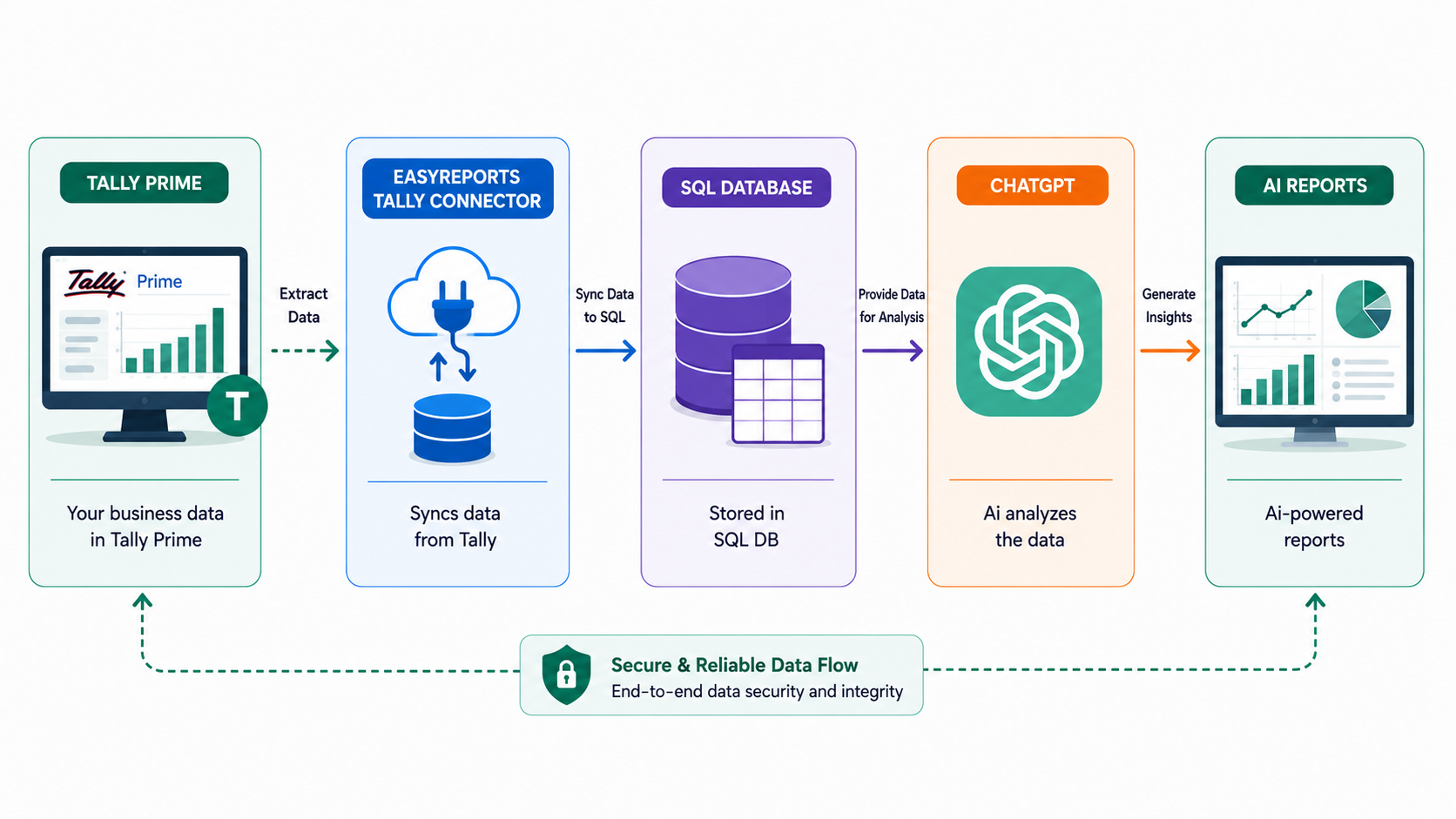
This architecture allows ChatGPT to answer business questions without modifying any accounting data inside Tally Prime.
Why Use EasyReports Before Connecting ChatGPT?
EasyReports prepares business data for AI.
I. Complete Business Data Available for Chat GPT
EasyReports extracts and organizes Tally Prime data into a structured SQL database. This allows ChatGPT to analyse business information accurately and provide meaningful insights.
II. Support for Custom Fields
EasyReports Tally Connector supports Tally Prime User Defined Fields (UDFs). This enables ChatGPT to work with both standard and customized business data.
III. Enterprise-Grade Support
EasyReports provides enterprise-grade support for Tally integration, SQL Server connectivity, custom reporting.
How Does ChatGPT Integration Work with the Tally Prime?
Step 1: Connect Tally Prime with EasyReports Tally Connector
EasyReports uses its inhouse Tally Connector to extract data from Tally Prime. The connector automatically collects information such as:
- Masters (ledger Items, Groups)
- Transactions
- Stocks & Ratio
- Trial balances
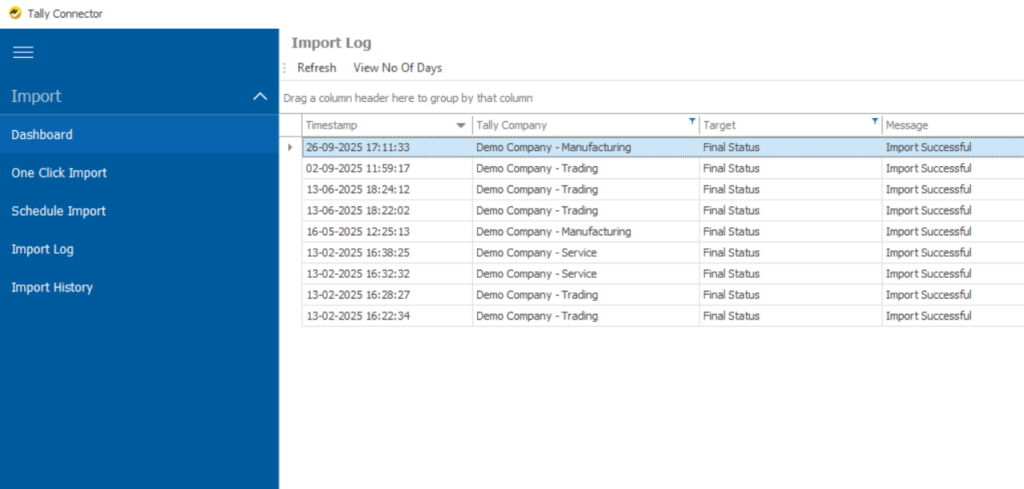
Step 2: Store Data in SQL Server
EasyReports stores the extracted data in a structured SQL database. Instead of searching thousands of vouchers, the database organizes information into optimized tables for reporting and AI analysis.
Examples include: Customer balances, Sales history, Product performance, Outstanding invoices etc.
Step 3: Connect SQL Server with ChatGPT
SQL Server acts as the secure bridge between your Tally Prime data and ChatGPT.
When a user asks a question, the required business data is retrieved from SQL Server and supplied to ChatGPT for analysis. For example:
“What is the outstanding amount from “Demo Company- Trading” ?
ChatGPT can analyse the retrieved information and present: Outstanding balance, Pending invoices, Due dates, Payment ageing.
Step 4: Ask Questions to ChatGPT and Generate Business Insights
One of ChatGPT’s biggest strengths is transforming business data into understandable reports. Users can ask questions in natural language. Prompt Example:
Generate a Monthly Sales Pivot Report in Microsoft Excel for “Demo Company – Trading” for the year 2019-20.
Create a pivot report grouped by Month showing:
- Total Sales Amount
- Number of Sales Invoices
- Average Sales per Invoice
Include Grand Totals, format the report professionally and export it as an .xlsx Excel file.
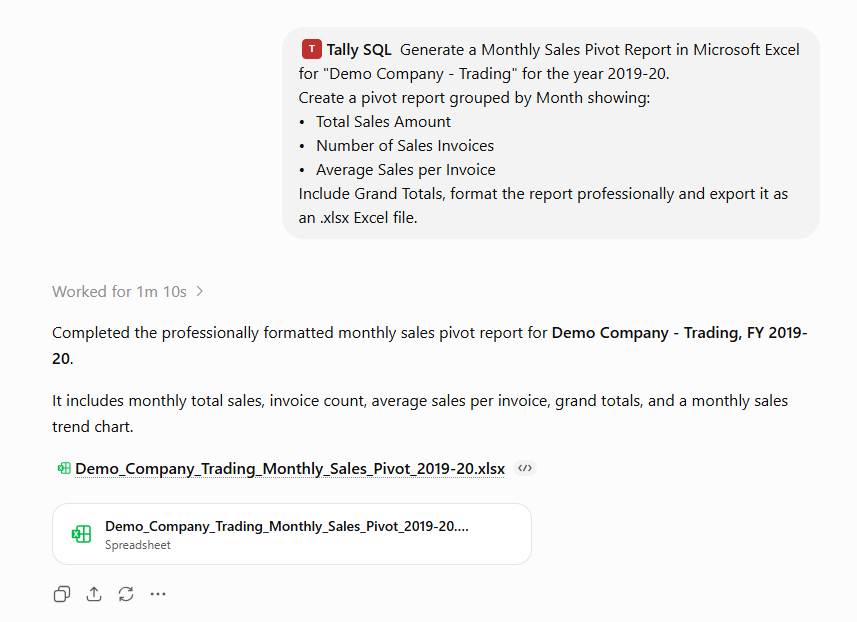
ChatGPT can help produce:
- Excel workbooks
- Pivot-style reports
- Summary tables
- Trend analysis
- Executive summaries
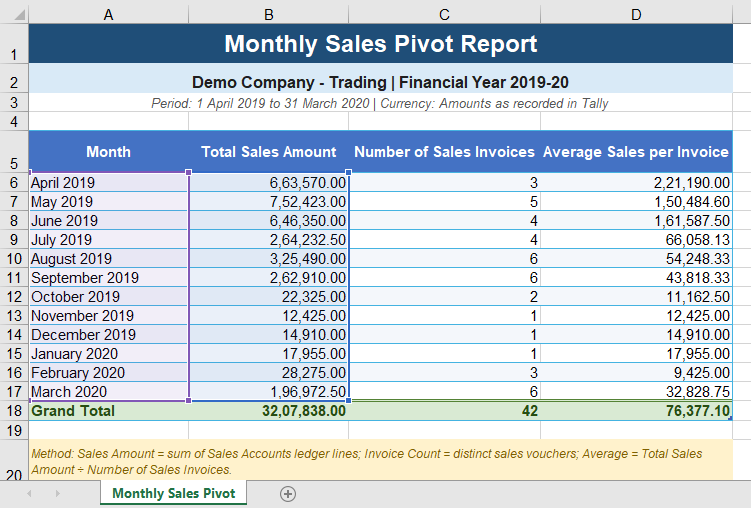
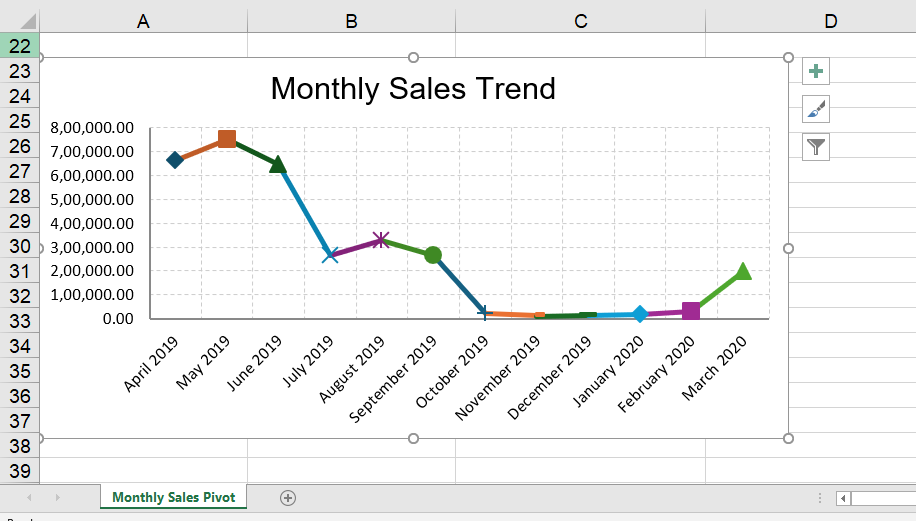
For example, if you ask: “Create a pivot report showing sales by state.”
ChatGPT can organize sales data into a pivot-style summary, helping management compare regional performance quickly.
Instead of reviewing multiple reports manually, users receive a business-friendly explanation.
Note: For more accurate and business-specific responses, the EasyReports team can train ChatGPT using your custom reporting logic. This helps ChatGPT to understand your organization’s unique data model and generate more relevant reports for your reporting requirements.
Want to see how EasyReports Tally Connector prepares your Tally Prime data for ChatGPT?
Book a free EasyReports demo today!
Disclaimer: ChatGPT is a product of OpenAI. Tally Prime is a product of Tally Solutions Pvt. Ltd. EasyReports is an independent reporting and business intelligence solution and is not affiliated with, endorsed by, or sponsored by OpenAI or Tally Solutions Pvt. Ltd. The information provided in this article is for educational and informational purposes only. ChatGPT analyses data made available through the integration environment and does not directly connect to or modify data within Tally Prime.
FAQs
1. How do I connect ChatGPT with Tally Prime data?
You can connect ChatGPT with Tally Prime by using EasyReports Tally Connector to extract Tally data into SQL Server. ChatGPT then accesses the structured data to generate reports, summaries and business insights.
2. Why should I use EasyReports before connecting ChatGPT?
EasyReports prepares and organizes Tally Prime data into a structured SQL database, supports Tally UDF fields, and enables ChatGPT to generate more accurate business reports and analyses.
3. Can ChatGPT generate Excel reports from Tally Prime data?
Yes. Once ChatGPT has access to structured Tally Prime data, it can generate Excel workbooks, pivot-style reports, summary tables, trend analyses, and business insights.
4. Can ChatGPT create pivot reports from Tally Prime data?
Yes. ChatGPT can organize structured Tally Prime data into pivot-style reports, helping users analyze sales, purchases, inventory, customers, and financial information more efficiently.
5. Does EasyReports support Tally Prime User Defined Fields (UDFs)?
Yes. EasyReports Tally Connector supports Tally Prime User Defined Fields (UDFs), custom masters, and business-specific reporting logic, enabling ChatGPT to analyze customized business data.
6. Is my Tally Prime data modified during the integration?
No. EasyReports extracts business data for reporting and AI analysis without modifying or overwriting any data inside Tally Prime.
7. What business questions can ChatGPT answer using Tally Prime data?
ChatGPT can answer questions such as:
- Who are my top customers?
- What is my outstanding receivables amount?
- Generate a monthly sales pivot report.
- Which products are slow moving?
- Compare monthly sales trends.
- Show inventory and financial summaries.
8. Can EasyReports train ChatGPT with custom business reporting logic?
Yes. The EasyReports team can configure ChatGPT using your database structure, reporting terminology, custom reporting logic, and business-specific requirements to generate more relevant and accurate responses.
9. What are the benefits of connecting ChatGPT with Tally Prime data?
Connecting ChatGPT with Tally Prime data helps businesses automate reporting, generate Excel and pivot reports, gain AI-powered business insights, and reduce manual reporting efforts.