


July 31, 2026
A Claude AI sales dashboard for Tally helps businesses analyse sales data, customer performance and revenue trends using natural language prompts. By integrating Claude AI, Tally Prime and the EasyReports Tally Connector, companies can generate AI-powered sales dashboards without manual reporting.
What is a Claude AI Sales Dashboard for Tally?
Generating a sales dashboard with Claude AI means using artificial intelligence to analyse structured sales data and automatically present business insights in an interactive dashboard.
Instead of creating separate reports for revenue, customers, products and sales performance, users can generate a complete dashboard with one prompt.
Traditional Sales Reporting vs. Claude AI Sales Dashboard for Tally
Many businesses still rely on exporting Tally data to Excel and creating reports manually, which takes time and delays decision-making. A Claude AI sales dashboard makes the process much easier.
| Traditional Sales Reporting | Claude AI Sales Dashboard for Tally |
| Manual Excel exports from Tally | Generate dashboards using natural language prompts |
| Multiple reports for different metrics | Unified interactive sales dashboard |
| Limited business insights | Revenue, customer, product, and sales analysis |
| Requires manual consolidation | Automated reporting through the EasyReports Tally Connector |
| Manual data analysis | AI-powered insights and recommendations |
What Sales Data Can Claude AI Analyse from Tally Prime?
Claude AI can analyse a wide range of sales information after the EasyReports Tally Connector synchronizes Tally Prime data into SQL Server.
Depending on your business configuration, Claude AI can analyse:
- Sales Data: Monthly Sales, Daily Sales, Yearly Sales etc.
- Customer Analytics: Top Customers, Customer Outstanding, Repeat Customers etc.
- Product Analytics: Best Selling Products, Slow Moving Products etc.
- Sales Team Analytics: Salesperson Performance, Territory-wise Sales
How Does the Architecture Work for a Claude AI Sales Dashboard for Tally?
The integration follows a secure enterprise reporting architecture.
Tally Prime ➤ EasyReports Tally Connector / SQL Database ➤ Claude AI Connector ➤ Interactive Sales Dashboard
This architecture protects the original accounting data while enabling AI-powered analytics.
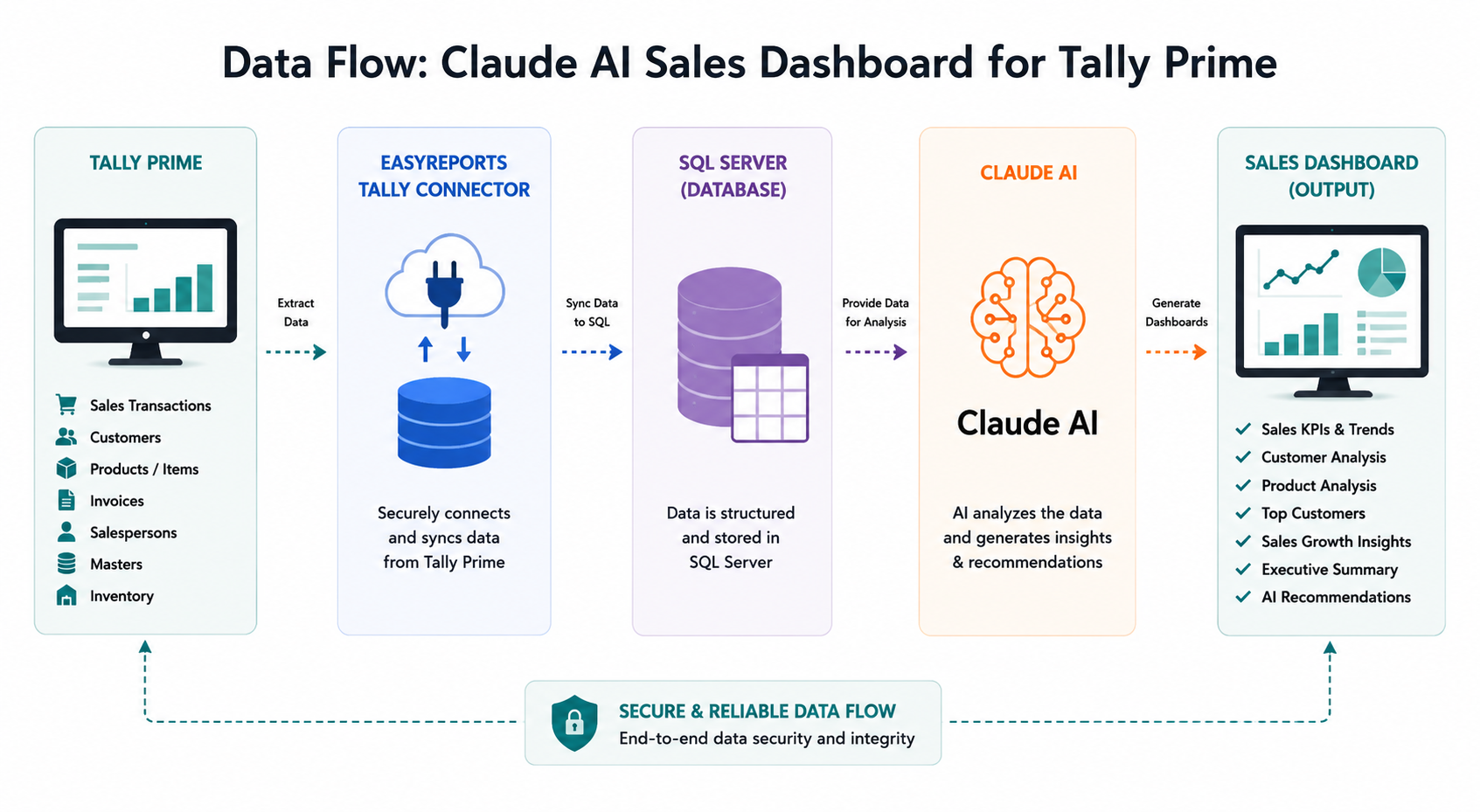
How Does Claude AI Generate a Sales Dashboard from Tally Prime?
Generating a sales dashboard requires structured business data rather than direct access to accounting vouchers.
Step 1: Connect Tally Prime with EasyReports Tally Connector
The first step is connecting Tally Prime with the EasyReports Tally Connector. The connector automatically extracts business data from Tally Prime and synchronizes it with a structured SQL database.
Typical data includes: Masters, Accounting Records, Inventory Records etc.
Step 2: Store Sales Data in SQL Server
After synchronization, EasyReports stores the data in SQL Server.
Instead of reading thousands of accounting vouchers directly, Claude AI accesses organized reporting tables designed specifically for analytics.
Step 3: Connect SQL Server to Claude AI Using a Connector
The connector creates a secure communication layer between Claude AI and SQL Server.
Rather than granting Claude AI unrestricted database access, the connector retrieves only the information required for each request.
For example, when a someone asks:
“Generate my monthly sales dashboard.”
Claude AI sends the request to the connector.
The connector retrieves the required sales data from SQL Server.
Claude AI then analyses the information and generates:
- KPI Cards
- Revenue Charts
- Product Analysis
- Customer Analysis
- Executive Summary
- AI Recommendations
This architecture enables secure AI-powered reporting without changing the original Tally Prime data.
Step 4: Ask Claude AI to Generate a Sales Dashboard
Once the integration is complete, users can generate dashboards using simple natural language prompts.
Instead of opening multiple reports, they simply ask Claude AI what they need.
For example:
- Generate my monthly sales dashboard.
- Compare this month’s sales with last month.
- Display product-wise sales.
- Show customer-wise revenue.
- Generate a sales growth dashboard.
- Compare quarterly sales performance.
- Show my top-selling products.
- Analyse sales by region.
- Generate an executive sales dashboard.
Example Claude AI Prompts for Generating Sales Dashboards
Note: The following prompts are sample examples. EasyReports can customize Claude AI skills based on your organization’s reporting requirements, industry, and sales KPIs.
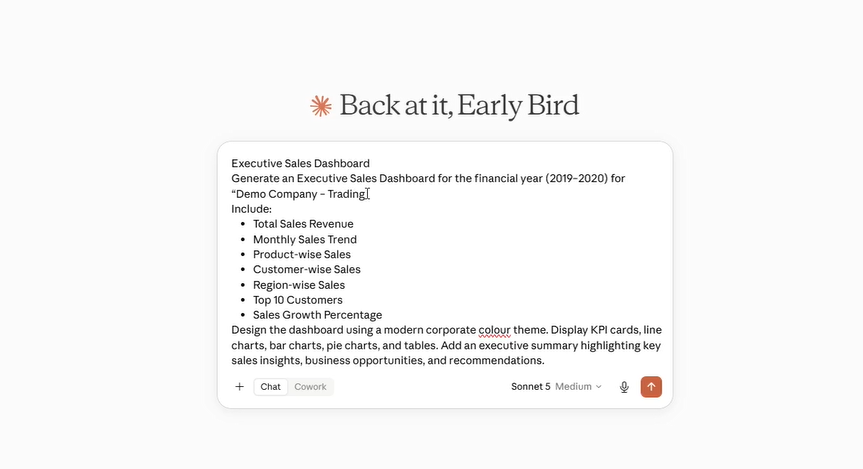
Example Prompt 1: Executive Sales Dashboard
Generate an Executive Sales Dashboard for the financial year (2019–2020) for “Demo Company – Manufacturing.”
Include:
- Total Sales Revenue
- Monthly Sales Trend
- Product-wise Sales
- Customer-wise Sales
- Region-wise Sales
- Top 10 Customers
- Sales Growth Percentage
Design the dashboard using a modern corporate colour theme. Display KPI cards, line charts, bar charts, pie charts, and tables. Add an executive summary highlighting key sales insights, business opportunities, and recommendations.
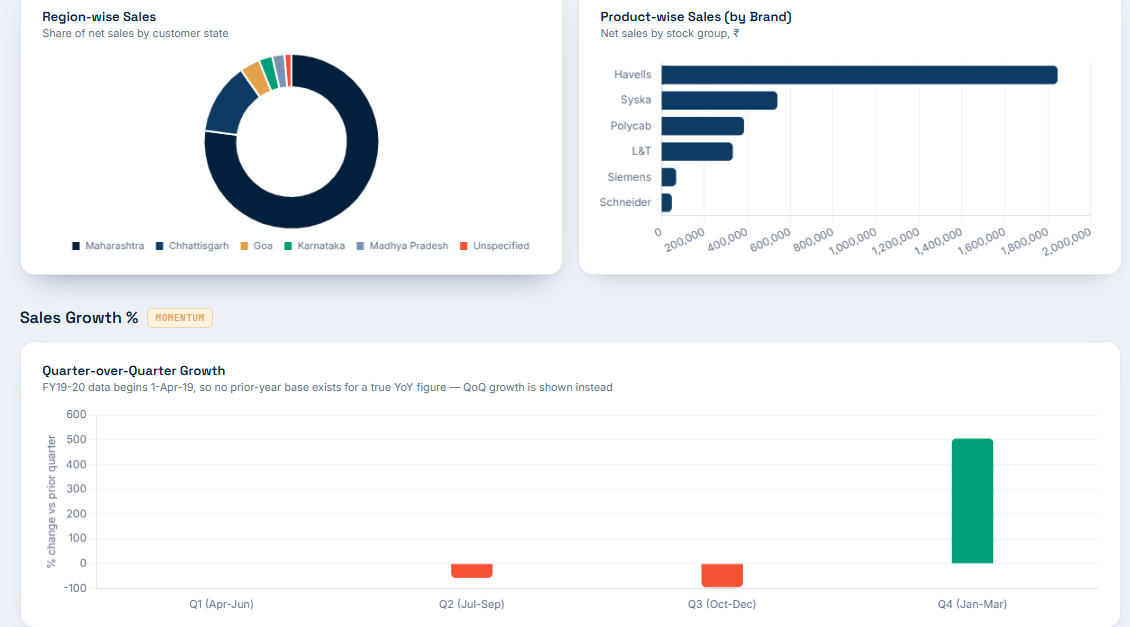
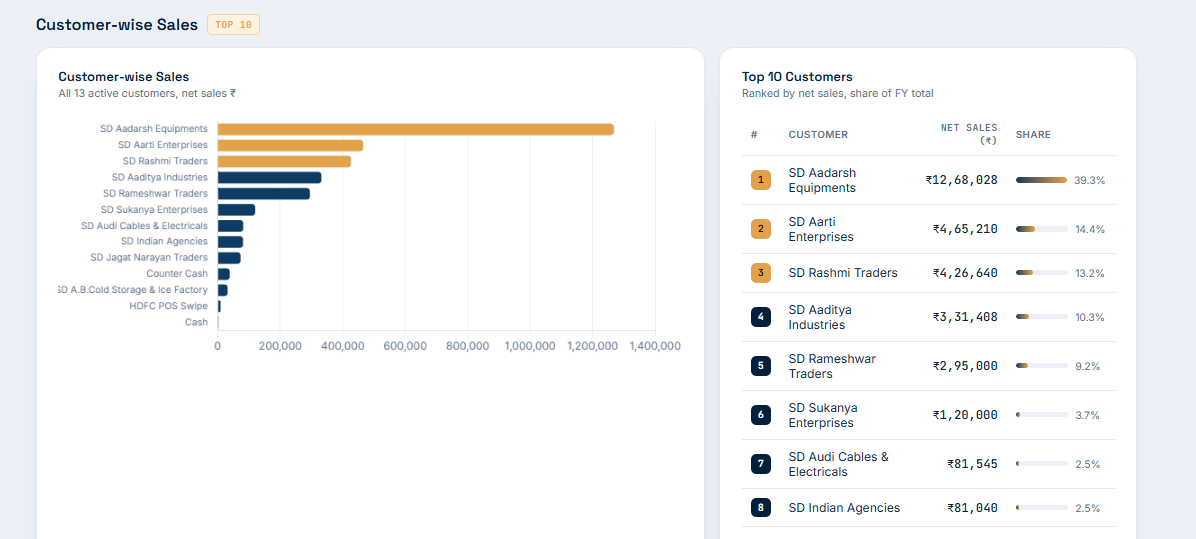
Why Use EasyReports Tally Connector Before Connecting Claude AI?
Claude AI performs best when it works with structured, organized business data.
The EasyReports Tally Connector automatically extracts information from Tally Prime and synchronizes it with SQL Server, where the data is optimized for reporting and analytics.
Key benefits include:
- Automatic synchronization from Tally Prime
- No manual Excel exports
- Structured SQL reporting database
- Secure AI access through a connector
- Faster dashboard generation
- Custom sales KPIs
- Industry-specific dashboard customization
- No changes to the original Tally Prime data
Most importantly, your accounting records remain secure and unchanged while Claude AI accesses only the reporting database.
Discover how Claude AI can transform your sales reporting process with interactive dashboards and actionable business insights. Book a Free EasyReports Demo!
Disclaimer: Claude is a product of Anthropic. Tally Prime is a product of Tally Solutions Pvt. Ltd. EasyReports is an independent reporting and business intelligence solution and is not affiliated with, endorsed by, or sponsored by Anthropic or Tally Solutions Pvt. Ltd. The information provided in this article is for educational and informational purposes only.
Frequently Asked Questions (FAQs)
1. What is a Claude AI sales dashboard for Tally?
A Claude AI sales dashboard for Tally is an AI-powered dashboard that analyses Tally Prime sales data and presents business insights such as sales revenue, customer performance, product analysis, and sales trends using natural language prompts.
2. Can Claude AI connect directly to Tally Prime?
Claude AI does not connect directly to Tally Prime. The EasyReports Tally Connector synchronizes Tally Prime data with SQL Server, allowing Claude AI to securely access structured reporting data for analysis and dashboard generation.
3. Why is SQL Server used between Tally Prime and Claude AI?
SQL Server stores synchronized Tally Prime data in a structured format for faster reporting and analytics. Claude AI retrieves only the required reporting data through a secure connector while keeping the original accounting data protected.
4. What sales reports can Claude AI generate from Tally Prime?
- Monthly Sales Dashboard
- Daily Sales Analysis
- Customer-wise Sales Report
- Product-wise Sales Report
- Top Customers Analysis
- Best-Selling Products
- Sales Growth Dashboard
- Territory-wise Sales Analysis
- Executive Sales Dashboard
5. Is my Tally Prime data secure when using Claude AI?
Yes. The EasyReports Tally Connector retrieves only the reporting data required for each request. Your original Tally Prime accounting data remains secure and unchanged while Claude AI analyses structured reporting data.
6. Can I generate sales dashboards using natural language prompts?
Yes. Once the integration is complete, you can generate dashboards using prompts such as:
- “Generate my monthly sales dashboard.”
- “Compare this month’s sales with last month.”
- “Show customer-wise revenue.”
- “Display product-wise sales.”
- “Generate an executive sales dashboard.”
7. What are the benefits of using the EasyReports Tally Connector with Claude AI?
- Automatic synchronization from Tally Prime
- No manual Excel exports
- Structured SQL reporting database
- Secure AI access
- Faster dashboard generation
- Custom sales KPIs
- Industry-specific dashboard customization
- No changes to the original Tally Prime data
8. Which businesses can benefit from a Claude AI sales dashboard for Tally?
Businesses using Tally Prime in manufacturing, trading, retail, distribution, wholesale, and service industries can use Claude AI sales dashboards to monitor KPIs, analyse customer behaviour, track sales performance, and make faster, data-driven decisions.