


June 12, 2026
Imagine asking: “What are my top 10 customers by outstanding balance?” or “Why did my profit drop this month?” and getting an answer in seconds. Instead of searching through multiple reports, exporting data to Excel, or performing manual calculations, users can simply ask Claude AI questions. You can achieve this by combining Tally Prime, EasyReports Tally Connector, SQL Server and Claude AI. In this guide, we explain how to connect Claude AI with Tally Prime Data in 2026.
How to Connect Claude AI with Tally Prime?
- Connect Tally Prime with EasyReports Tally Connector.
- Store Tally data in a SQL database.
- Ask Claude AI business questions.
- Generate AI-powered insights from ERP data.
What Does Claude AI Integration with Tally Prime Mean?
Many people think Claude AI connects directly to Tally Prime. In reality, businesses often use a reporting layer between Tally Prime and Claude AI.
With EasyReports, the process becomes much simpler and more structured.
The flow looks like this: Tally Prime → EasyReports Tally Connector / SQL Database → Claude AI
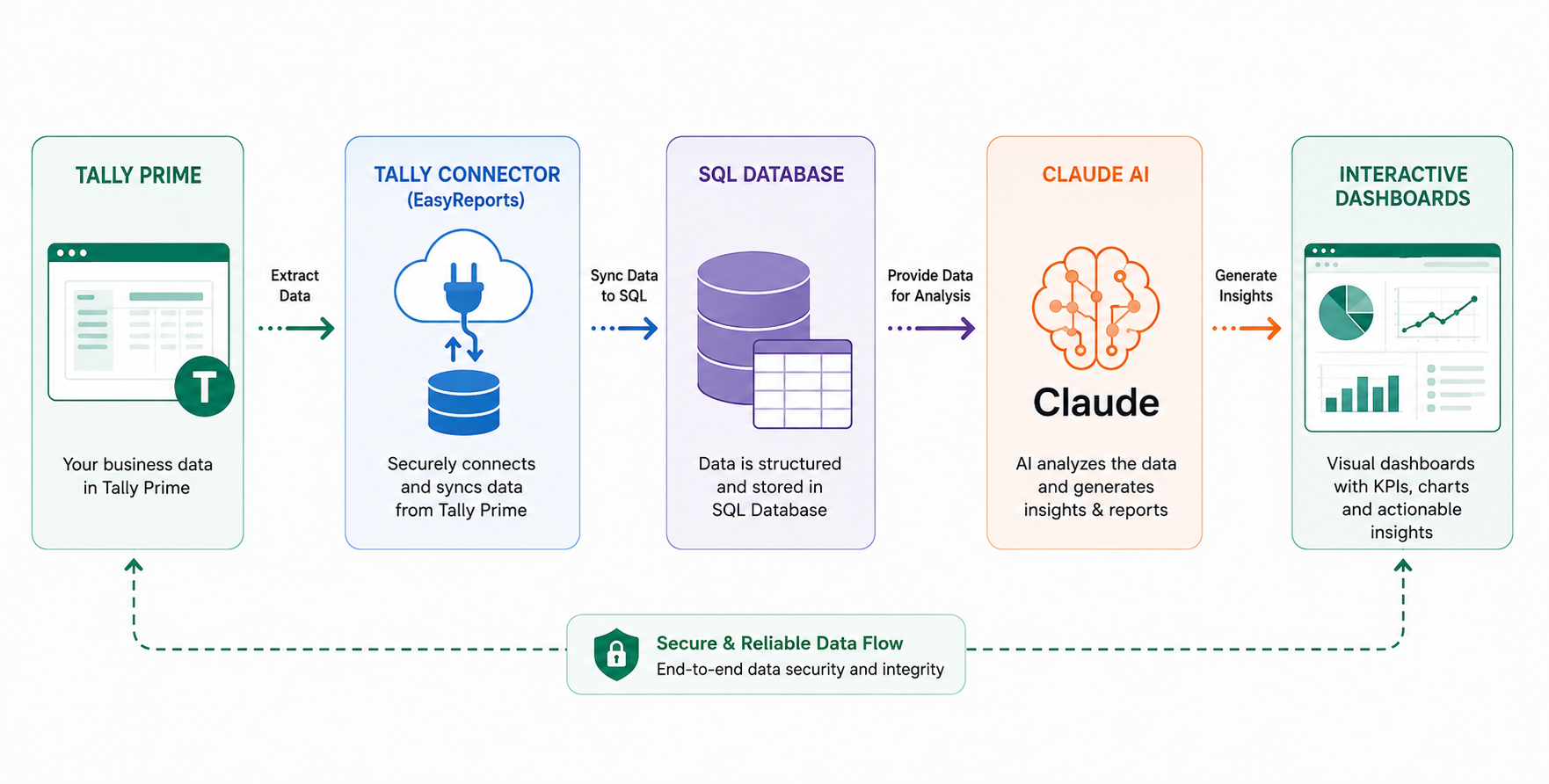
Advantages by connecting Claude AI with Tally Prime
I) Complete masters, transactions with reporting dimensions available to Claude to query
EasyReports extracts and organizes data from Tally Prime into a structured SQL database. This includes masters, transactions, inventory records, financial data, reporting dimensions, cost centres, branches, business units, and other reporting structures. As a result, Claude AI can access a much broader business context when answering questions.
II) Specific skill training to Claude to answer specific queries
Claude AI can be trained with business-specific reporting logic and query patterns commonly used by management teams, finance departments, sales managers, and business owners.
III) Support for custom fields and data models for business specific deployments
Every business has unique reporting requirements. Many organizations create custom fields, additional masters, industry-specific classifications, or specialized reporting structures within their ERP environment.EasyReports supports custom data models and business-specific configurations.
IV) Access to enterprise grade support for any issues and development requirement
EasyReports provides enterprise-grade assistance for implementation, reporting enhancements, SQL integrations and more.
How Does the Integration Work with Claude AI?
Connect Claude AI with Tally Prime Step 1: Tally Prime with EasyReports Tally Connector
EasyReports uses its inhouse Tally Connector to extract data from Tally Prime. The connector automatically collects information such as:
- Masters (ledger Items, Groups)
- Transactions
- Stocks & Ratio
- Trial balances
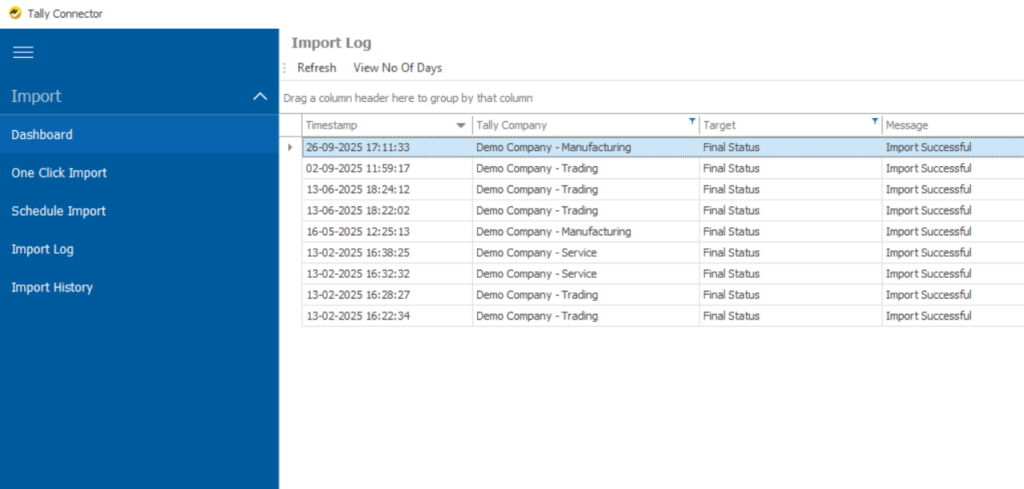
Connect Claude AI with Tally Prime Step 2: Store the Data in SQL
After collecting data from Tally Prime, EasyReports Tally Connector stores it in a structured SQL database.
Example: Instead of searching through thousands of Tally entries, the SQL database organizes customer balances, sales figures, inventory records, and financial data in a structured format.
Connect Claude AI with Tally Prime Step 3: Connect SQL Server
The SQL Server acts as a secure bridge between the SQL database and Claude AI. It allows Claude AI to access only the required business information when users ask questions.
Example: When someone asks: “What is the outstanding amount from XYZ Traders?”
Claude sends the request to the SQL Server. The SQL Server retrieves the information from the SQL database and returns the answer.
Connect Claude AI with Tally Prime Step 4: Ask Claude AI Questions
Once connected, users can ask questions.
Examples:
- What are my top 10 overdue customers?
- What is my GST liability this month?
- Which products have not moved in the last 90 days?
Claude retrieves the information and presents it in an easy-to-understand format.
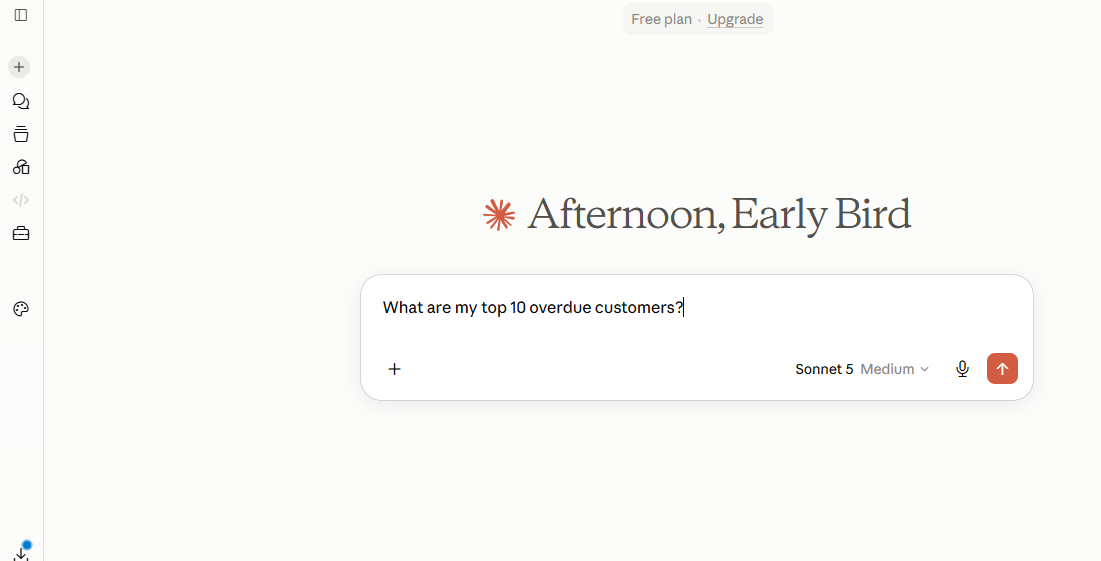
Connect Claude AI with Tally Prime Step 5: Use AI-Powered Insights
Claude AI can do more than retrieve numbers. It can help users understand what those numbers mean.
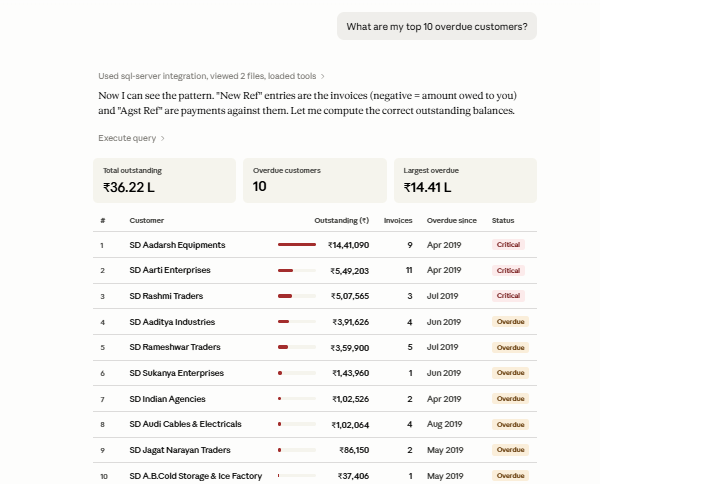
Example: You ask “What are my top 10 overdue customers?”
Claude AI can automatically:
- Calculate outstanding balances from invoices and payments
- Identify customers with the highest overdue amounts
- Show the number of pending invoices
- Highlight how long payments have been overdue
- Categorize customers by risk level (Critical, Overdue, etc.)
Instead of manually reviewing multiple reports, Claude AI presents the information in a clear, business-friendly format, helping management prioritize collections and improve cash flow.
Why Use EasyReports Tally Connector Before Connecting AI?
EasyReports Tally Connector extracts data from Tally Prime and stores it in a structured SQL database. The SQL Server then allows Claude AI to safely access that data and answer business questions.
Most importantly, no one needs to modify or overwrite any data inside Tally Prime. Your accounting data remains secure and unchanged.
So, What’s Next?
As AI becomes part of everyday business operations, companies need a reliable way to connect their business data with AI tools.
By combining Tally Prime, EasyReports Tally Connector, SQL Server and Claude AI, businesses can move beyond static reports and start getting answers from their data instantly.
Want to see how EasyReports Tally Connector helps you on this? Book a free EasyReports demo today.
Disclaimer: Claude is a product of Anthropic. Tally Prime is a product of Tally Solutions Pvt. Ltd. EasyReports is an independent reporting and business intelligence solution and is not affiliated with, endorsed by, or sponsored by Anthropic or Tally Solutions Pvt. Ltd. The information provided in this article is for educational and informational purposes only.
FAQs
1. Can Claude AI connect directly with Tally Prime?
Claude AI can access Tally Prime data through integration layers such as EasyReports, SQL databases depending on the deployment environment.
2. Why use EasyReports Tally Connector before connecting Claude AI?
EasyReports Tally Connector prepares Tally Prime data for AI-powered reporting by storing it in a structured SQL database. This enables secure access to business information without modifying any data in Tally Prime.
3. What is the role of EasyReports Tally Connector?
EasyReports Tally Connector extracts data from Tally Prime and stores it in a structured SQL database, making the information ready for reporting, analytics, and AI-based querying.
4. What business questions can Claude AI answer using Tally Prime data?
Claude AI can answer questions such as top overdue customers, GST liability, non-moving inventory, profit analysis, revenue trends, and customer performance.
5. Can EasyReports BI work with custom fields and business-specific data models?
Yes. EasyReports supports custom fields, reporting dimensions, and business-specific data models, allowing Claude AI to answer questions based on unique business requirements.
6. What are the benefits of connecting Claude AI with Tally Prime?
Benefits include faster access to business insights, reduced manual reporting, natural language querying, automated analysis, improved decision-making, and secure access to ERP data.