

September 30, 2026
What are the key benefits of MIS reporting for business performance?
MIS reporting helps businesses monitor sales, profitability, receivables, inventory, expenses, and targets versus actual performance. It turns business data into structured insights that help management identify changes, investigate variances, and focus on areas that need attention.
Businesses generate large amounts of data every day. Sales teams create transactions, finance teams record payments and expenses, inventory teams track stock, and management sets targets and budgets. The challenge is not simply collecting this information. The challenge is turning it into a clear view of business performance.
MIS reporting helps turn this data into clear insights on business performance, trends, targets, and key indicators. But an effective MIS report should do more than display numbers. It should help management answer a simple question:
“What is happening in the business, and where do we need to pay attention?”
What Is MIS Reporting?
MIS (Management Information System) reporting is the process of collecting business data, organizing it into meaningful information, and presenting it through reports that management can use to monitor performance.
For example, a sales report may show that revenue increased. A more useful MIS report can help management see whether the increase came from a particular region, product, customer group, or salesperson and whether the growth also improved profitability.
Key Benefits of MIS Reporting for Business Performance
MIS reporting gives management a structured way to review different parts of the business.
1. Monitor Sales Performance with MIS Reporting
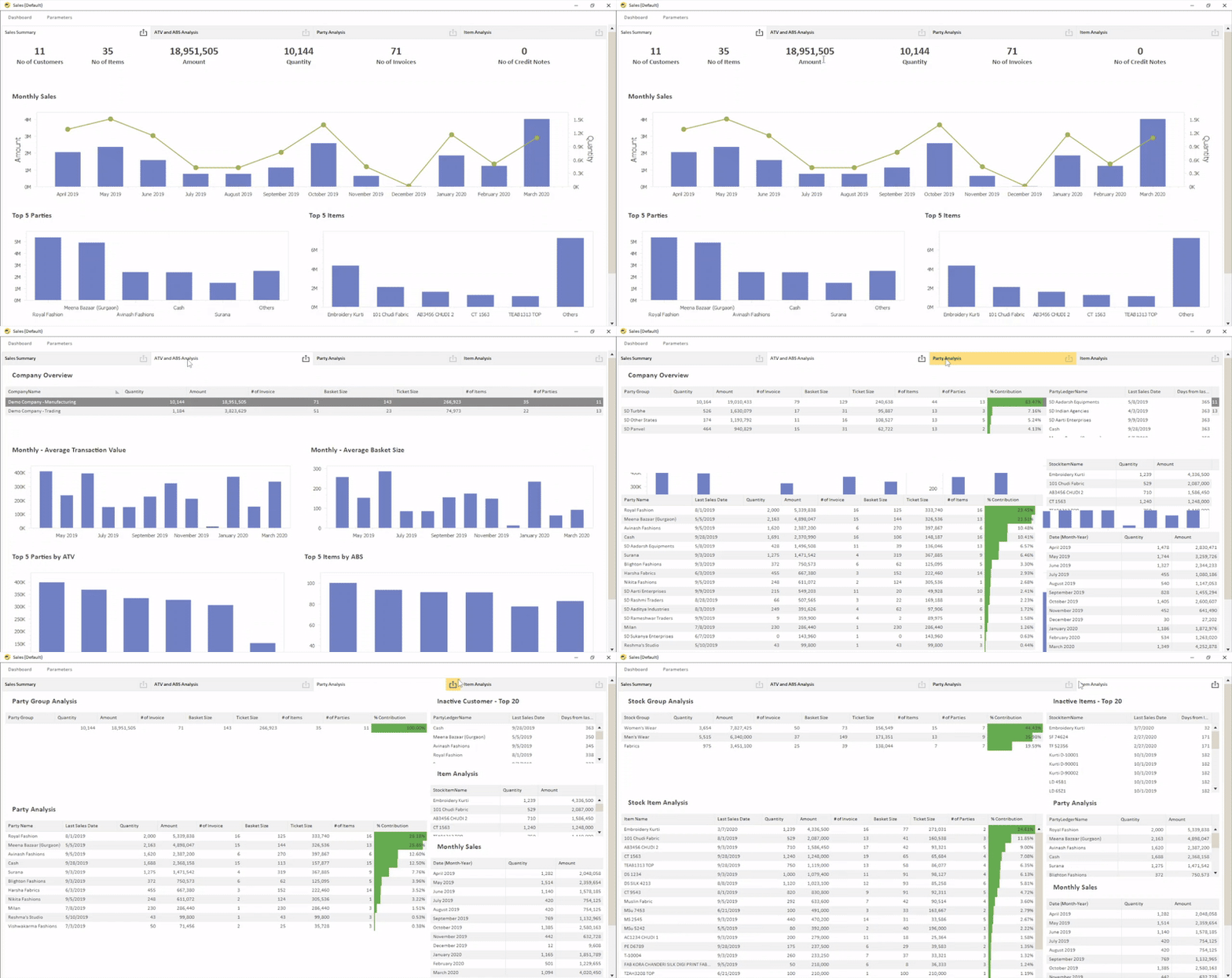
Sales MIS reports help managers understand where revenue comes from and how sales change over time.
This allows managers to move beyond the question, “How much did we sell?” . They can ask:
- Which products are growing?
- Which regions are falling behind?
- Which salespeople are meeting their targets?
- Which customers contribute significant revenue?
- Where has sales performance changed?
EasyReports, for example, supports sales and debtor reporting across dimensions such as salesperson, area, channel, segment, location.
2. Track Profitability
Revenue alone does not show whether the business is performing well.
A company can increase sales while margins decline because of higher costs, discounts, product mix changes, or other factors. MIS reporting can help management compare:
Revenue → Costs → Margin → Profitability
Managers can analyze profitability by:
- Customer
- Product
- Location
- Business segment
- Cost centre
- Salesperson
3. Monitor Receivables and Cash Position
Strong sales do not automatically mean strong cash flow.
A business can generate significant revenue while customers delay payments. That can create pressure on working capital. Receivables MIS reports can help managers monitor:
- Outstanding customer balances
- Ageing of receivables
- Overdue invoices
- Customer payment patterns
- Collection performance
Management can then identify accounts that require attention instead of waiting until overdue balances become a larger problem.
4. Monitor Inventory Performance with MIS Reporting
MIS reporting helps businesses examine:
- Current stock levels
- Fast-moving items
- Slow-moving items
- Non-moving stock
- Inventory ageing
- Stock by location or warehouse
- Sales versus inventory movement
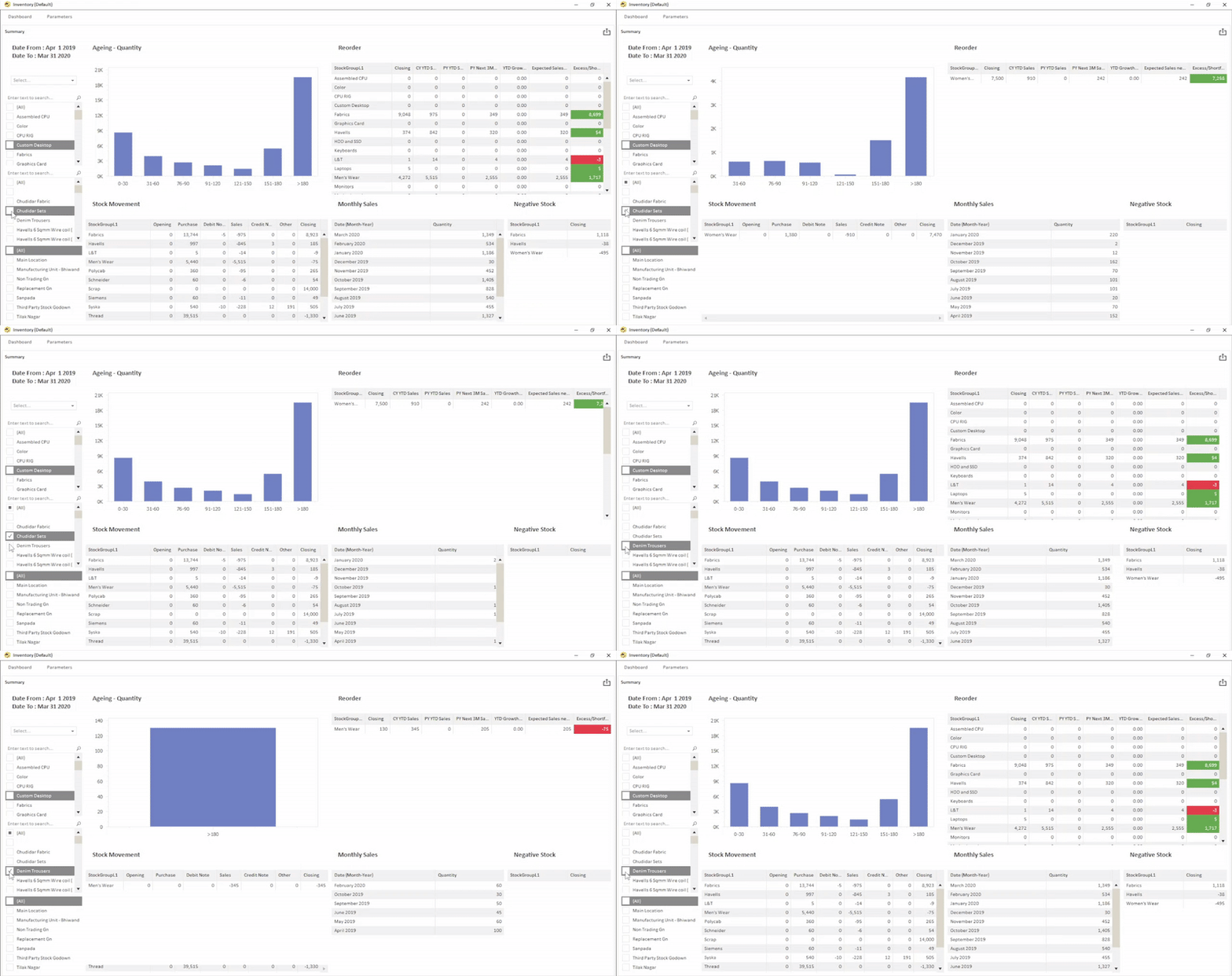
For example, if a report identifies products that have remained in stock for a long period, management can investigate whether the business should change purchasing levels, pricing, promotions, or sales priorities.
EasyReports provides inventory analysis including ageing and slow/non-moving stock reporting.
5. Compare Targets with Actual Performance Using MIS Reporting
A target has limited value if management does not regularly compare it with actual performance. MIS reporting can bring the two together:
| Metric | Target | Actual | Variance |
| Sales | ₹50 lakh | ₹46 lakh | -₹4 lakh |
| Gross Margin | 25% | 23% | -2 pts |
| Collections | ₹30 lakh | ₹32 lakh | +₹2 lakh |
The purpose is not simply to highlight a negative variance. Management should use the variance as a starting point:
Target → Actual → Variance → Reason → Action
For example, if sales fall below target, management can investigate whether the problem comes from a particular product, region, customer group, or sales team.
EasyReports supports targets and budgets versus actual reporting across areas such as sales, items, salespersons, revenue, and expenses.
6. Monitor Expenses and Cost Centres
Managers also need to understand where the business spends money. MIS reports can organize expenses by:
- Department
- Location
- Cost centre
- Project
- Business unit
- Expense category
This makes it easier to identify unusual increases or areas where costs are moving differently from expectations. Instead of reviewing one large expense figure, management can investigate the specific area responsible for the change.
How EasyReports Supports MIS Reporting for Business Performance?
EasyReports is designed as a reporting and BI platform for this purpose.
EasyReports can connect reporting with ERP and other data sources and provide reports, dashboards, and MIS views for different business functions. Its platform supports Tally, SAP Business One/HANA, Microsoft Dynamics and database sources, depending on the implementation.
Build reports around your business requirements
EasyReports provides different reporting formats, including:
- Pivot reports
- Grid reports
- Spreadsheet reports
- PDF reports
- Dashboards
Its Report Designer also allows businesses to create customized reporting interfaces and dashboards without requiring traditional report-development work for every change.
Automate recurring reporting
Businesses can use the Report Scheduler to automate report exports and email delivery. EasyReports also supports multi-company consolidated reporting and Excel/Google Sheets integration for information such as targets, budgets, and additional reporting dimensions.
This creates a practical workflow:
Business data → MIS reports → dashboards → scheduled distribution → management review
If your team still spends significant time exporting ERP data, preparing Excel files and distributing recurring MIS reports, EasyReports can help you move toward a more structured reporting process. Explore EasyReports or request a demo to see how it can fit your reporting requirements.
Frequently Asked Questions
1. What is MIS reporting?
MIS reporting is the process of collecting business data, organizing it into meaningful information, and presenting it through reports that management can use to monitor business performance.
2. How does MIS reporting help businesses monitor performance?
MIS reporting gives management a structured way to monitor areas such as sales, profitability, receivables, inventory, expenses, and performance against targets.
3. What can businesses track with MIS reports?
Businesses can use MIS reports to track sales performance, profitability, customer receivables, inventory levels, inventory ageing, expenses, targets, budgets, and variances.
4. How does MIS reporting help monitor sales performance?
Sales MIS reports can help managers understand revenue trends and analyze sales by dimensions such as product, region, customer, salesperson, channel, or location.
5. Can MIS reporting help businesses monitor profitability?
Yes. MIS reporting can help management compare revenue, costs, margins, and profitability across customers, products, locations, business segments, cost centres, and salespeople.
6. How does MIS reporting help with inventory management?
MIS reporting can help businesses monitor stock levels, fast-moving items, slow-moving items, non-moving stock, inventory ageing, stock by location, and sales versus inventory movement.
7. How can MIS reports compare targets with actual performance?
MIS reports can bring targets, actual results, and variances together. Management can then investigate the reason for the variance and determine the appropriate action.
8. Can MIS reporting be automated?
Yes. Reporting platforms such as EasyReports can automate report exports and email delivery, helping businesses reduce manual work involved in preparing and distributing recurring MIS reports.