


August 2, 2023
Cost Centre in Tally helps businesses track income and expenses for specific departments, projects, employees or other business units. Cost Centre Reporting in Tally helps businesses analyze costs, compare performance and improve financial control.
What is a Cost Centre in Tally?
A Cost Centre in Tally is a specific department, project, employee, location or business unit used to track allocated income and expenses. It helps businesses understand where costs are incurred and analyze performance across different areas of the business.
If you enable the option “Allocate Non-Revenue Items” and set it to “Yes,” Tally will allow you to track even balance sheet items with cost centres.
Common examples include:
- Production departments
- Marketing and Sales
- Administration
This helps businesses properly categorize and analyze expenses for each department.
How to Create a Cost Centre in TallyPrime?
To create a Cost Centre in TallyPrime, Enable Cost Centers, Press Ctrl + A to save the settings.
Open your company in Tally. Press F11 (Features) from the Gateway of Tally. Set Enable cost centres to Yes.
Next step, Gateway of Tally → Create Master → Cost Centre. Enter the Cost Centre name, Select Primary or an existing parent group under the Under field. and save the master. Once created, you can allocate income and expenses to the relevant Cost Centre while recording transactions.
What is a Cost Category in Tally?
A cost category in Tally allows you to group cost centres based on specific reporting needs. By default, Tally provides a Primary Cost Category, but you can create multiple categories for advanced tracking.
Example:
If your business needs to track by both location and department, you can create:
- Cost Category 1: Location (e.g., Kolkata, Delhi, Mumbai)
- Cost Category 2: Department (e.g., Marketing, HR, Accounts)
When entering vouchers, you can tag both categories to achieve multi-dimensional reporting.

When you enable the “Allocate Non-revenue items” option to “Yes” then you can even track balance sheet items with cost centres.
Examples of cost centres include production departments, marketing departments, and administrative departments. Cost centres help businesses track expenses related to specific areas, enabling them to monitor and manage costs more effectively.
How can you use multiple cost categories?
Suppose you are running a business which needs tracking by location and department both. In such cases you can define two cost categories – “Location” and “Department”. Under “Location” cost category you can create location cost centres and under “Department” cost category you can create department cost centres.
Thereafter you can make entries by tagging both location and department.

Other Use Cases for Cost Centres
In addition, you can use cost centres for tracking projects, budget code-wise tracking and reporting, such as project sub-activities, machine- or vehicle-wise costs, and employee- or salesperson-wise costs.
For software, IT, project, infrastructure, construction and other service companies, cost centre reporting is key to tracking performance of the business.
Cost Centre Reports in Tally
Tally provides Cost Centre reports that help businesses track income and expenses by Cost Centre. Businesses can use these reports to analyze individual departments, projects, employees, and other business units and compare their financial performance.
How Can You Get Advanced Cost Centre Reporting from Tally to Reporting Tool?
While Tally provides basic reporting using cost centres, EasyReports is a reporting automation tool that provides various types of reports and report automation functions. In addition, you can use drag-and-drop reporting to generate reports of your choice in seconds and combine data from ledgers and cost centres to create your specific MIS formats. Furthermore, EasyReports can provide budget vs. actual comparisons, financial statements and summaries based on cost centres.
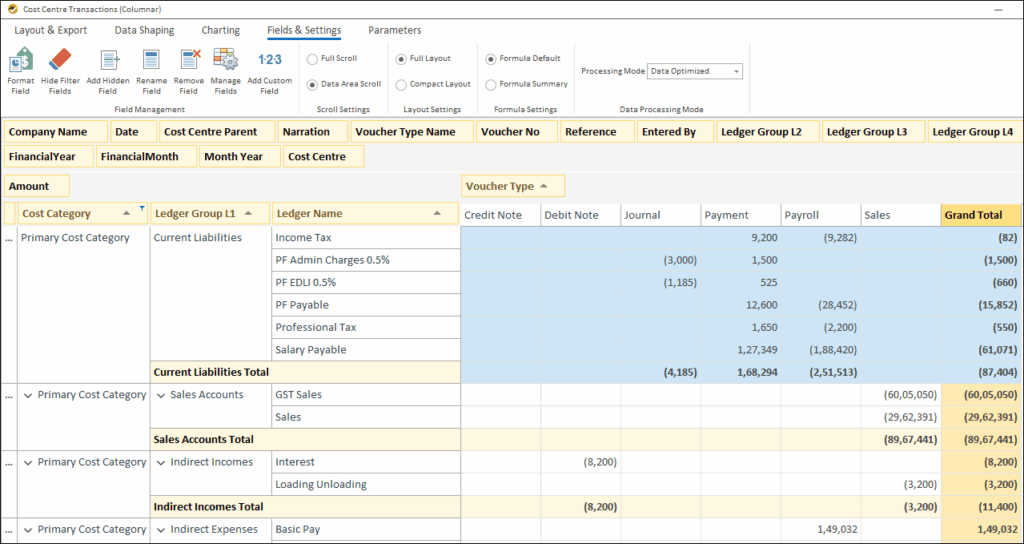
The example below shows how you can use drag-and-drop to create your own cost centre report with filters, sorting and sub-totalling:
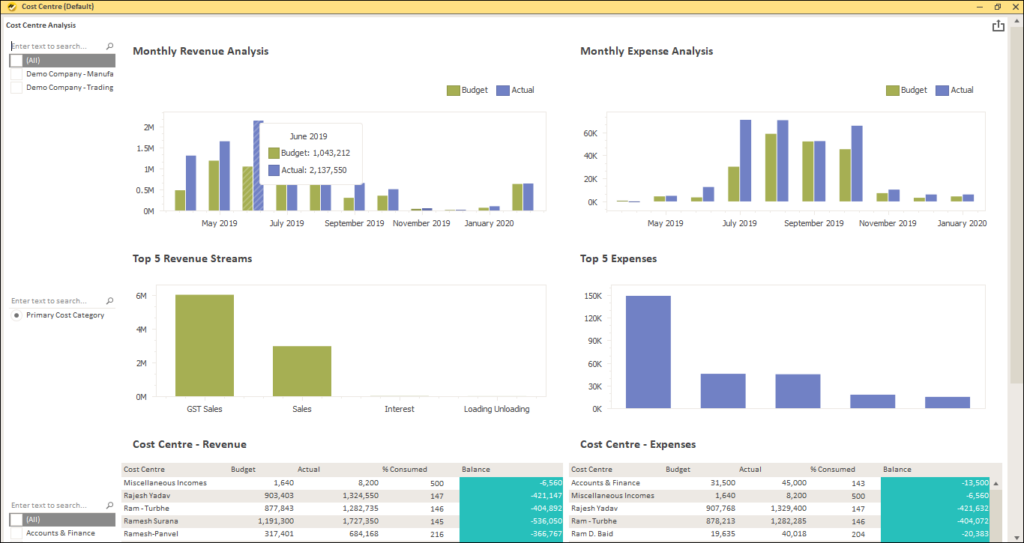
The following image is an example of a dashboard with cost centre data.
Cost Centre in Tally helps businesses organize and analyze income and expenses across departments, projects, employees and other business units. By combining Cost Centre data with advanced reporting and dashboards, businesses can gain deeper financial visibility and make better decisions. Get your free demo now!
Disclaimer: This blog article is for educational purposes only. Tally is a product of Tally Solutions Pvt. Ltd. and we do not claim any affiliation.
Frequently Asked Questions (FAQs)
1. What is a Cost Centre in Tally?
A Cost Centre in Tally helps businesses track income and expenses for specific departments, projects, employees or business units.
2. How do I create a Cost Centre in TallyPrime?
Enable Cost Centres in TallyPrime, then go to Gateway of Tally → Create Master → Cost Centre and enter the required details.
3. What is a Cost Category in Tally?
A Cost Category in Tally groups Cost Centres based on reporting requirements, such as location, department or other business dimensions.
4. How can Cost Centres help businesses?
Cost Centres help businesses track costs by department, project, employee or other business unit and improve cost control.
5. Can I create advanced Cost Centre reports from Tally?
Yes. EasyReports can create customized Cost Centre reports, dashboards, budget vs. actual analysis and automated reports from Tally data.