

October 30, 2026
How to Identify Slow-Moving Stock Using Tally Data? To identify slow-moving stock using Tally data, review stock quantities, stock ageing, inventory movement and sales history. TallyPrime reports such as Stock Summary, Stock Ageing Analysis and Movement Analysis help identify items that need attention. EasyReports’ Non-Moving Items Report identifies inactive items, while its Stock Clearance Report helps businesses explore potential customers for selected products.
Slow-moving stock can tie up working capital, occupy warehouse space and make inventory planning more difficult. Businesses can identify these items by comparing available stock with sales activity, purchase history and the time since the last stock movement.
What Is Slow-Moving Stock?
Slow-moving stock refers to inventory that sells or moves less frequently than a business expects during a particular period. These items may remain in storage for weeks or months while the business continues to hold quantities that customers are not buying regularly.
For example, a distributor might have 500 units of an electrical component in stock but sell only a few units over several months. If demand remains low, the business may need to review its purchasing decisions, pricing or sales strategy.
Slow-moving stock differs from non-moving stock:
- Slow-moving stock: The business sells or uses the item occasionally, but movement remains low compared with expectations.
- Non-moving stock: The item has recorded no movement during a defined period.
- Dead stock: The business has little or no realistic prospect of selling or using the item under normal conditions.
Why Should Businesses Identify Slow-Moving Inventory?
Businesses need to monitor slow-moving inventory because unsold stock can affect cash flow, storage capacity and purchasing decisions.
I. Identify capital tied up in inventory
When a business purchases goods, it commits funds to inventory. If those goods remain unsold for an extended period, the business cannot readily use the money for other operational needs.
Reviewing stock quantities alongside sales history helps management identify products that may be tying up more capital than expected.
II. Reduce excess inventory
A business may continue ordering an item because it follows an old purchasing pattern or relies on incomplete sales information. Reviewing stock movement helps purchasing teams decide whether to reduce future orders or reassess reorder levels.
III. Make better stock clearance decisions
Older inventory may need a different sales approach. A business can review its last sale date, current quantity and selling rate before deciding whether to contact customers, offer a discount or bundle the item with other products.
IV. Improve inventory planning
Regular inventory reviews help teams distinguish products with consistent demand from items that need closer monitoring.
Which Tally Reports Help Identify Slow-Moving Stock?
TallyPrime provides several inventory reports that help businesses review stock levels, ageing and movement.
1. Stock Summary
The Stock Summary report shows available stock quantities and values, helping businesses identify items with high inventory levels.
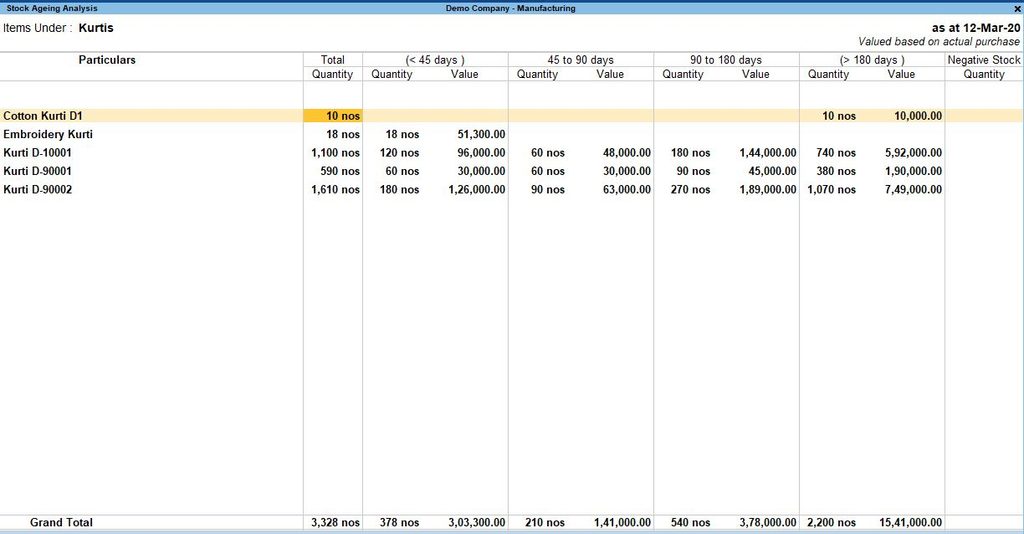
2. Stock Ageing Analysis
Stock Ageing Analysis shows how long inventory has been held and helps identify older stock. Tally Prime allows users to configure ageing periods, making it easier to review inventory that may need attention.
3. Movement Analysis
Movement Analysis helps businesses review inventory inflows and outflows, including purchases and sales. It supports analysis by stock item and group, but excludes inventory vouchers that record only quantitative changes without corresponding accounting transactions.
How Can You Turn These Reports into Action?
For businesses that need a focused list of slow moving (inactive) items, EasyReports offers a Non-Moving Items Report that identifies items that have not moved for a specified number of days.
Users can filter the results by company and stock category. Its Stock Clearance Report also helps businesses identify potential customers for selected items and review the last sale date and last sales rate when planning clearance offers.
These reports help businesses move from identifying inactive stock to investigating potential sales opportunities and making more informed inventory decisions.
How EasyReports Helps Identify Slow-Moving Stock Using Tally Data?
Tally data can help businesses review stock quantities, sales activity and inventory movement. However, teams also need a practical way to identify inactive items and decide which products require further action.
EasyReports offers two reports that support this process: the Non-Moving Items Report and the Stock Clearance Report. The first helps businesses identify items that have not moved for a specified period. The second helps them explore potential customers and plan stock clearance activity.
1. Identify inactive inventory with the Non-Moving Items Report
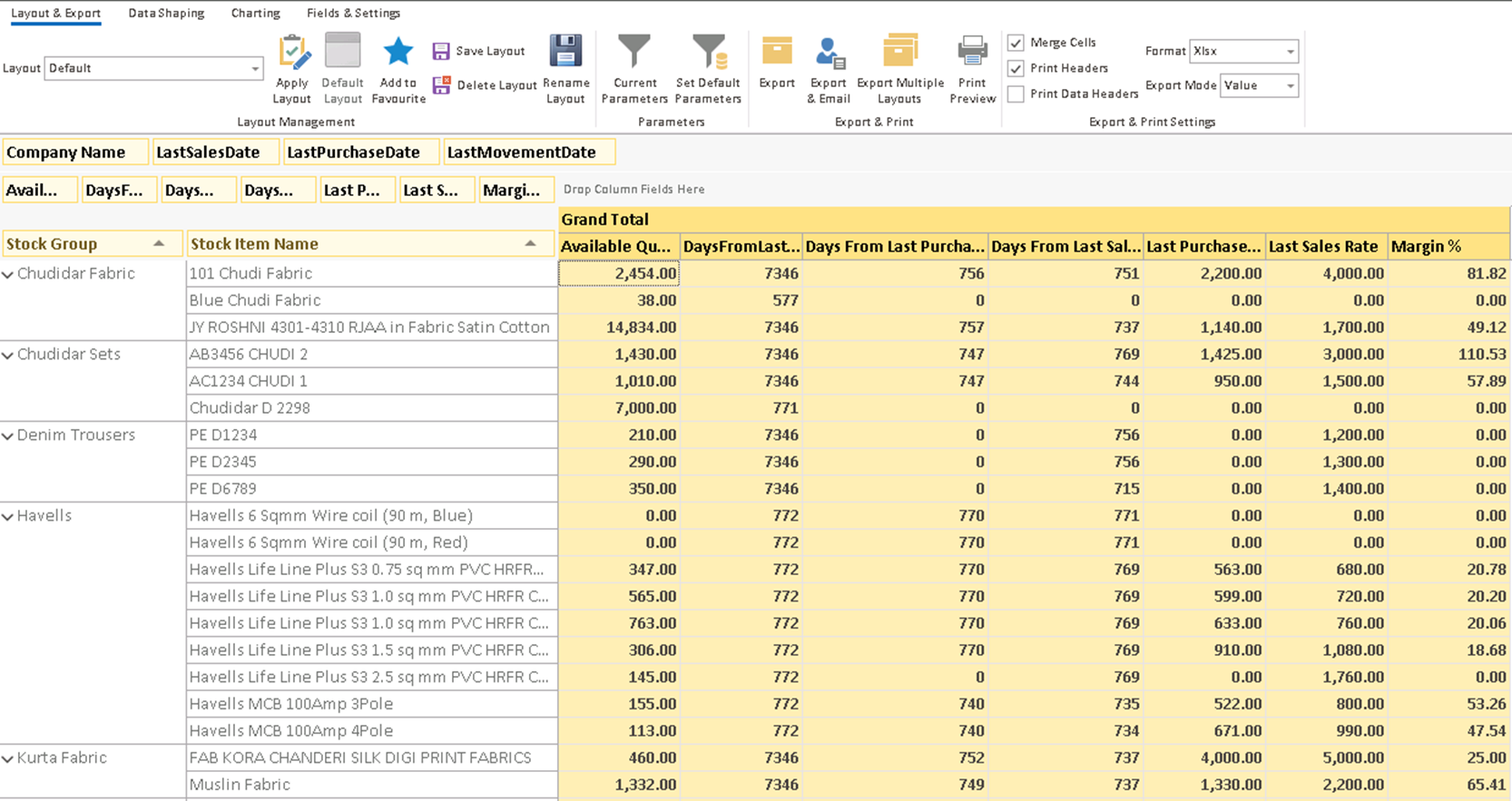
The EasyReports Non-Moving Items Report helps businesses identify stock items that have not moved for a specified number of days. Users can filter the results by the inactivity period, company and stock category.
For example, a trading company can review items that have remained inactive for 90, 180 or 360 days, depending on its inventory policy. These are example thresholds, not fixed classifications. The business should select a suitable period based on product demand, seasonality and its normal stock cycle.
This report helps inventory and purchasing teams focus on products that need further investigation. They can review the flagged items, compare available quantities with recent demand and decide whether to adjust future purchases or explore sales opportunities.
2. Use the Stock Clearance Report to explore sales opportunities
Identifying non-moving stock is only the first step. Businesses also need to consider whether they can sell the items they still hold.
The EasyReports Stock Clearance Report helps users identify customers to whom they may sell a particular item during a clearance campaign. It also helps them review the last sale date and last sales rate when considering what rate to offer. Users can filter items by stock-ageing bracket and stock category.
For example, a distributor may identify an item that has remained in stock for an extended period. The sales team can use the clearance report to explore potential buyers and review previous selling information before preparing an offer under the company’s pricing policy.
This gives the team a practical next step after identifying inactive stock: investigate possible demand and plan an appropriate clearance campaign.
Explore EasyReports for Tally to learn how its reporting capabilities can help your team analyse business data and support inventory decisions. Get your demo now!
Disclaimer: TallyPrime is a trademark of Tally Solutions Private Limited. EasyReports is an independent reporting solution. All third-party product names and trademarks belong to their respective owners. References to TallyPrime are for identification and compatibility purposes only. No affiliation, sponsorship or endorsement is implied.
Frequently Asked Questions
1. How do I identify slow-moving stock in TallyPrime?
Review Stock Summary, Stock Ageing Analysis and Movement Analysis in TallyPrime. Compare available quantities with sales activity and stock movement to identify items that are selling slowly.
2. What is the difference between slow-moving and non-moving stock?
Slow-moving stock sells or moves less frequently than expected, while non-moving stock has recorded no movement during a defined period.
3. Which Tally report helps identify slow-moving inventory?
Movement Analysis reviews stock inflows and outflows, Stock Ageing Analysis shows inventory age, and Stock Summary displays available quantities and values.
4. How many days should businesses use to identify non-moving stock?
Businesses can use 90, 180 or 360 days as starting points, depending on product demand, seasonality and normal stock cycles.
5. How does stock ageing analysis help inventory management?
It helps businesses identify older inventory, understand how long goods have been held and prioritise items that may need further investigation or clearance.
6. Can EasyReports identify non-moving stock from Tally data?
Yes. EasyReports’ Non-Moving Items Report identifies items that have not moved for a specified number of days. Users can filter results by company and stock category.
7. How can businesses clear slow-moving inventory?
Review last sale dates, previous selling rates and available quantities. Businesses can then explore discounts, customer outreach, product bundling or other clearance strategies.