

October 15, 2026
How to automate ageing reports from Tally Prime? You can automate ageing reports from Tally Prime by connecting Tally data to a reporting solution such as EasyReports, configuring customer, supplier and inventory ageing reports, and scheduling data imports and report distribution. This helps finance teams review outstanding balances, overdue invoices and older inventory more efficiently.
A customer who regularly pays 30–60 days late may not surprise your finance team. But when a customer who usually pays on time starts showing outstanding balances in the 0–30-day bucket, your team may need to investigate before the pattern continues.
The second situation deserves attention because it represents a possible change in payment behaviour. However, a balance in the 0–30-day bucket does not automatically mean a payment is overdue. The answer depends on the customer’s credit terms and whether the report calculates ageing from the bill date or the due date.
You can automate ageing reports from Tally Prime by connecting Tally data to a reporting solution such as EasyReports, configuring the required customer, supplier and inventory reports, and scheduling data imports and report distribution.
What Can Businesses Identify by Reviewing Ageing Reports?
Regular ageing reviews help businesses ask practical questions:
- Which customers have the highest outstanding balances?
- Which invoices have passed their due dates?
- Are customers changing their usual payment behaviour?
- Which supplier payments are approaching their due dates?
- Which inventory items have remained in stock for a long time?
What Are the Main Types of Ageing Reports in Tally Prime?
Tally Prime provides reports that help businesses monitor customer receivables, supplier payables and inventory. Sample Reports Available in Tally Prime:
- Bills Receivable: Reviews outstanding customer invoices and pending payments.
- Bills Payable: Tracks outstanding supplier bills and payment obligations.
- Ledger Outstandings: Shows outstanding transactions for a selected customer or supplier.
- Stock Ageing Analysis: Helps businesses review inventory according to its age.
How EasyReports Helps Automate Ageing Reports from Tally Prime?
EasyReports connects with Tally Prime and Tally.ERP 9 to support reporting across areas such as debtors, creditors and inventory. Businesses can configure report layouts, schedule data imports and distribute recurring reports according to their reporting requirements.
A typical workflow looks like this:
Tally Prime → EasyReports Tally integration → Data synchronization → Configured ageing reports → Scheduled distribution
Let’s examine how EasyReports supports this process.
1. Customer Outstanding: Bill Date Ageing
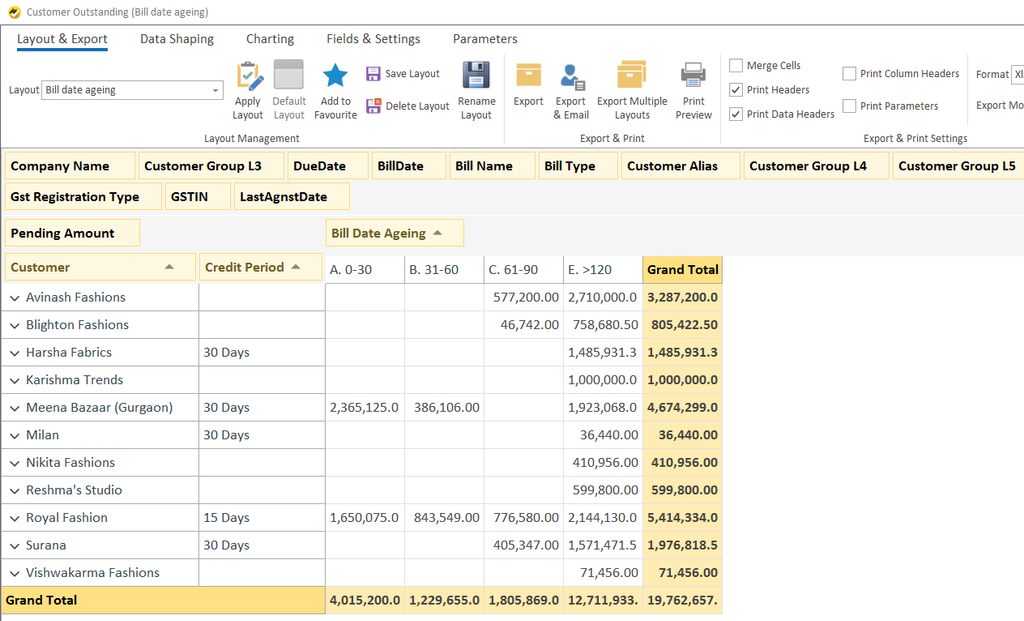
Customer Outstanding: Bill Date Ageing shows how long customer bills have remained unpaid from their invoice dates.
How EasyReports helps: EasyReports provides customizable ageing buckets, credit periods, customer details. It helps your finance team identify where outstanding amounts are concentrated, review older unpaid bills and prioritize customer follow-ups.
2. Customer Outstanding: Due Date Ageing
Customer Outstanding: Due Date Ageing helps businesses identify customer invoices based on their payment due dates.
How EasyReports helps: EasyReports shows customer outstanding balances by due-date ageing, separating amounts that are not yet due from those overdue by 0–30, 31–60 and over 120 days. It helping finance teams identify long-overdue receivables and prioritize collection follow-ups.
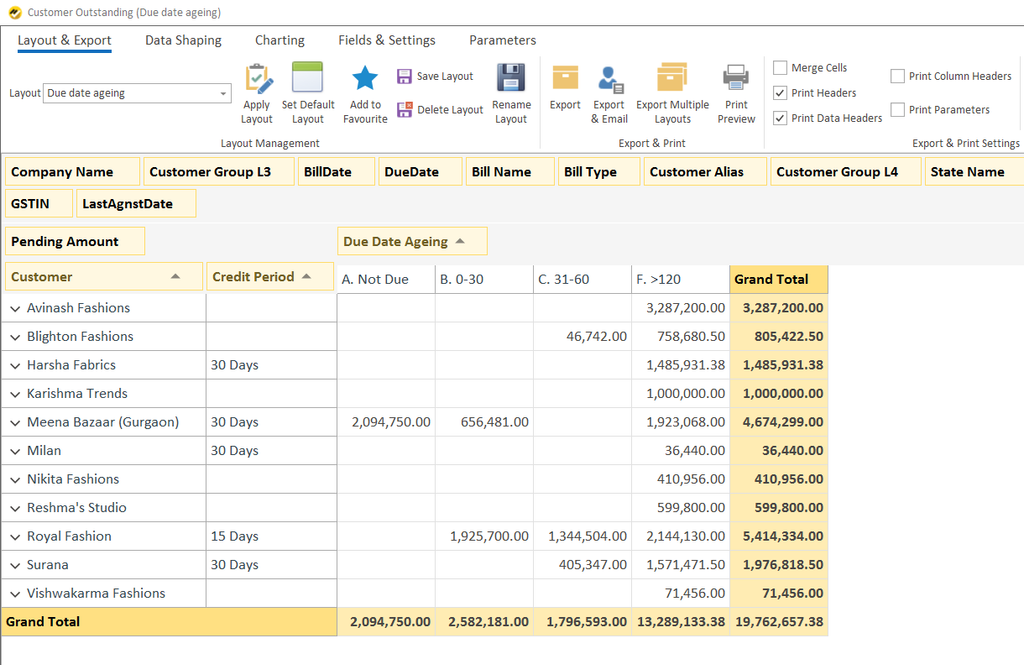
In this example, the total outstanding amount is 19,762,657.38, including 13,289,133.38 in the over-120-day bucket. This helps finance teams identify long-overdue receivables, prioritize collection follow-ups and distinguish upcoming payments from older outstanding balances.
3. Supplier Payable: Bill Date Ageing
Supplier Payable: Bill Date Ageing shows how long supplier bills have remained unpaid from their invoice dates.
How EasyReports helps: It supports better visibility into supplier liabilities, helps finance teams prioritize payment reviews and enables more informed cash-flow and working-capital planning. Teams can also use supplier-level reporting to investigate older outstanding amounts and coordinate payment decisions with business priorities.
4. Supplier Payable: Due Date Ageing
Supplier Payable: Due Date Ageing helps businesses review supplier obligations in relation to their payment due dates.
How EasyReports helps: EasyReports helps finance teams assess supplier payment obligations and make informed payment decisions. It improves visibility into upcoming and overdue liabilities, supports payment prioritization and helps businesses coordinate supplier commitments with available cash flow and working-capital requirements.
5. Inventory Ageing
Inventory Ageing shows how long stock items have remained in inventory, helping businesses identify older stock that may need further review.
How EasyReports helps: EasyReports helps businesses understand stock movement, identify slow-moving inventory and review where stock remains tied up for extended periods. This supports better purchasing decisions, inventory control and working-capital management while helping teams focus on items that may require further attention.
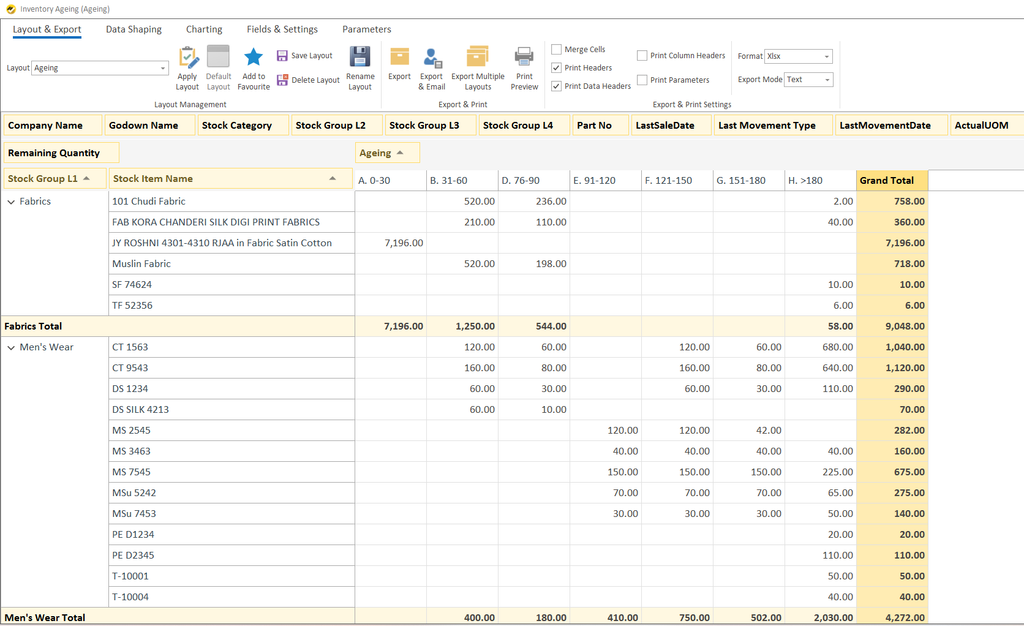
What the report shows: The report organizes remaining stock quantities by item, stock group and ageing period. It also includes godown details, stock categories, last sale dates, last movement information and total quantities.
What Are the Benefits of Automating Ageing Reports from Tally?
It helps them establish a more repeatable process for preparing and reviewing the information.
I. Reduce Repetitive Report Preparation
When teams prepare the same reports repeatedly, they spend time retrieving data, formatting spreadsheets and distributing files. Configured reports and scheduled distribution can reduce these repeated steps.
II. Review Customer and Supplier Balances Consistently
A regular reporting schedule helps teams review receivables and payables using the same reporting format.
III. Identify Changes That Need Investigation
A customer’s new outstanding balance or a growing overdue amount can signal a need for further review.
IV. Improve Inventory Visibility
Inventory ageing reports help businesses identify stock that has remained in inventory for a long time.
How EasyReports Supports Tally Prime Reporting?
EasyReports extends Tally reporting with configured reports, MIS layouts and scheduled distribution. It supports Tally Prime and Tally.ERP 9 integration and offers reporting across areas such as debtors, creditors, inventory and other business functions.
If your team spends considerable time preparing ageing reports manually, explore EasyReports for Tally to understand its reporting and automation capabilities.
Want to see how EasyReports can support your reporting process? Book a demo to discuss your Tally reporting requirements.
Frequently Asked Questions
1. Can you automate ageing reports in Tally Prime?
Yes, you can use a reporting solution such as EasyReports to configure ageing reports, synchronize Tally data and schedule report distribution.
2. What is the difference between bill date and due date ageing?
Bill date ageing measures time since the invoice date, while due date ageing shows how long a bill is overdue or how much time remains until it is due.
3. How do I check overdue customer invoices in Tally Prime?
Review the Receivables or Ledger Outstandings reports to check pending invoices, due dates and overdue amounts.
4. Can Tally Prime show supplier payment ageing?
Yes, Payables and Ledger Outstandings reports help you review outstanding supplier bills and payment due dates.
5. What is an inventory ageing report?
An inventory ageing report groups stock by age, helping businesses identify older inventory and investigate slow-moving items.
6. How do ageing reports help with cash-flow planning?
They help finance teams monitor overdue customer payments and upcoming supplier obligations to plan cash flow more effectively.
7. Can EasyReports schedule Tally Prime reports?
EasyReports supports configured reporting, scheduled data imports and report distribution based on business requirements.