

September 15, 2026
Why is decision-making slower without MIS reporting software? Businesses may spend more time collecting, consolidating and checking data manually. MIS reporting software helps provide timely reports and dashboards, allowing managers to access information faster and make informed decisions.
Decision-making becomes slower when management cannot access accurate, relevant, and timely business information. Without MIS reporting software, teams often spend time collecting data from ERP systems, Excel files, accounting software, and other sources before they can prepare a report. By the time management receives the information, the situation may have already changed.
MIS reporting software helps reduce this delay by organizing business data, generating reports, creating dashboards, and delivering management information on a defined schedule. The goal is not simply to create reports faster. It is to help managers spend less time waiting for information and more time acting on it.
The Institute of Chartered Accountants of India (ICAI) also emphasizes the importance of accurate and timely MIS reports that help management make important decisions.
Why Does the Lack of MIS Reporting Slow Down Business Decisions?
A typical manual reporting process may look like this:
Business transactions → ERP/accounting data → data exports → Excel preparation → data checking → report creation → management review → questions → additional analysis → decision
Every additional step can introduce a delay. With automated MIS reporting, the process can become much shorter:
Business data → automated reporting → management report/dashboard → analysis → decision
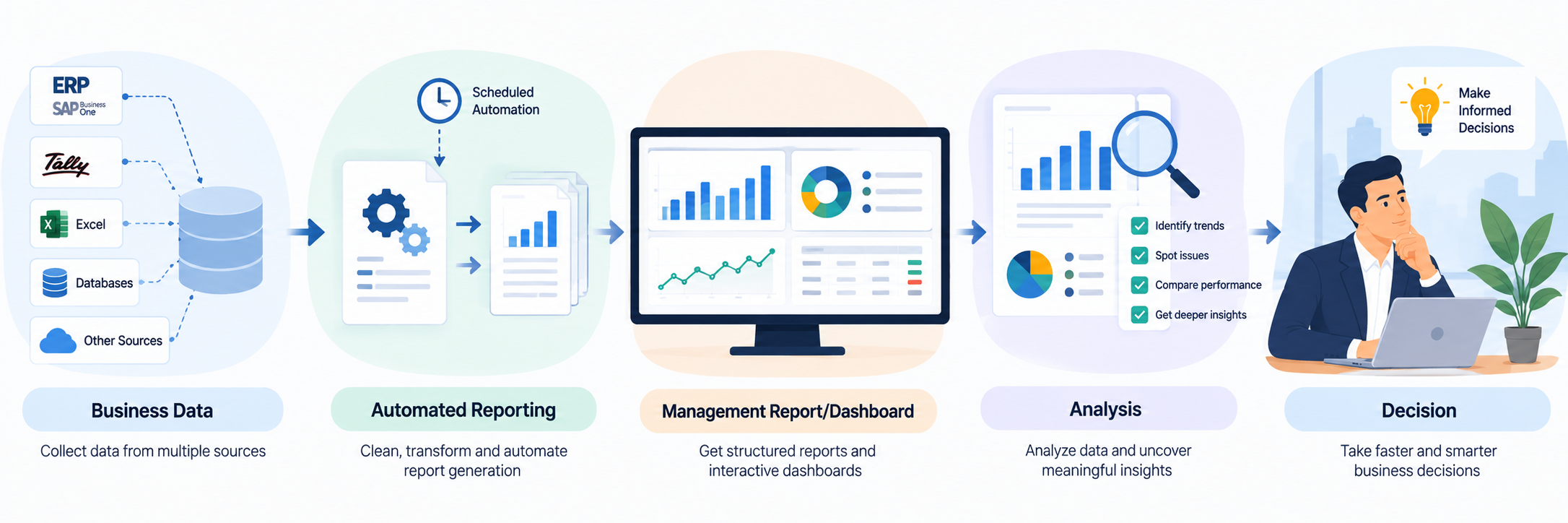
Here are the main reasons decision-making slows down without MIS reporting software.
1. Management Has to Wait for the Data
Managers cannot make informed decisions if they do not have the information they need. Consider a business owner who wants to know:
- Which products are selling below expectations?
- Which customers have overdue payments?
- Which branches are underperforming?
- Where are inventory levels increasing?
- Are actual expenses exceeding the budget?
- Which salespeople are meeting their targets?
That creates a gap between the business event and the management decision.
2. Business Data Often Sits Across Multiple Sources
Indian businesses may use ERP systems, accounting software, Excel files, databases, CRM systems, payroll systems, production systems, or eCommerce platforms.
When these sources remain disconnected, managers may not have one clear view of business performance.
For example, a finance manager may have financial information in an ERP, sales targets in Excel, and operational information in another system. Before management can compare these numbers, someone may need to collect and combine them.
That adds another reporting cycle before the actual decision-making process begins.
3. Management May Receive Historical Information Too Late
Timing matters.
A report that arrives after a problem has already affected sales, cash flow, inventory, or profitability may have limited value for immediate action.
For example, suppose a product’s sales begin declining during the month. If management sees the trend only after the monthly reporting process finishes, the business may lose valuable time before investigating the reason.
This does not mean every business needs second-by-second reporting. Instead, management needs information at a frequency that matches the decision it needs to make.
4. Important Trends and Exceptions Can Be Missed
A large spreadsheet can contain useful information without making the important information easy to find.
Managers may need to identify:
- unusual changes in sales
- increasing receivables
- slow-moving inventory
- unexpected expenses
- declining margins
- overdue orders
- branch-level performance differences
- budget variances
If employees must manually search through spreadsheets every time management asks a question, analysis takes longer.
5. Different Departments May Work with Different Numbers
Another problem appears when different teams maintain separate reporting files.The sales team may have one version of sales information. Finance may have another.
Operations may maintain a separate inventory report. Management then has to determine which numbers are current and how the reports differ.
What Does Faster MIS Reporting Look Like?
A practical reporting workflow can look like this:
Connect → Collect → Standardize → Generate → Analyze → Share
The system collects information from defined sources, applies the required reporting structure, generates the report or dashboard, and delivers it to the appropriate users.
How EasyReports Supports Automated MIS Reporting?
EasyReports focuses on reporting and MIS automation across ERP systems, databases, Excel, and other business data sources.
For businesses using systems such as Tally, SAP Business One/HANA, Microsoft Dynamics, SQL databases, and Excel, EasyReports can connect business data and use it to create reports, dashboards, KPIs, and scheduled reporting workflows.
The platform supports different reporting formats, including Pivot, Grid, Spreadsheet, and PDF reports. It also supports interactive dashboards, customized report and dashboard design, configurable KPIs, automated report scheduling, multi-company reporting, and Excel/Google Sheets integration.
This can be particularly useful when a business already has its transactional data in an ERP but still relies heavily on manual Excel work to prepare management information.
“`html
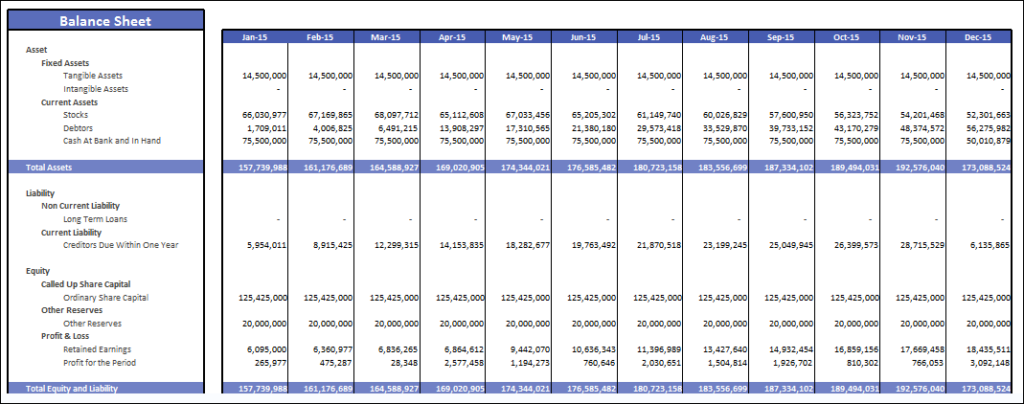
For example, a business can use ERP data to create standardized sales, financial, inventory, customer, purchasing, or management reports rather than rebuilding the same reporting process manually each cycle.
Explore EasyReports for automated MIS reporting and see how your business can connect its data, standardize reports, and automate management reporting. Get your free demo now!
Frequently Asked Questions
1. Why is decision-making slower without MIS reporting software?
Without MIS reporting software, teams may spend more time collecting, consolidating and checking data before making decisions.
2. How does MIS reporting software improve decision-making?
MIS reporting software provides structured reports and dashboards, helping managers access business information faster.
3. What problems can manual MIS reporting cause?
Manual reporting can involve repetitive data collection, Excel consolidation and verification, which can increase reporting time and errors.
4. How can automated MIS reports help management?
Automated MIS reports reduce repetitive reporting work and provide management with consistent information for analysis.
5. Can MIS reporting software reduce reporting delays?
Yes. Automating report preparation can reduce the time required to generate management reports and deliver information faster.
6. What is the role of dashboards in faster decision-making?
Dashboards make important business information easier to review, helping managers identify trends and performance changes quickly.