

May 28, 2026
How to Automate Financial Reports from Tally Prime? In 2026, A Reporting tool connects directly to your Tally Prime data and automates your financial reporting insights with formatted statements in PDF or Excel, Auto ledger mapping, Budget variance tracking, Cash flow visibility and Working capital management, all without any manual effort.
At first let us look,
What Financial Reports Can You Generate in Tally Prime?
Before we get into automation, let us quickly cover the reports that Tally Prime already gives you out of the box:
I) Balance Sheet
A snapshot of your assets, liabilities, and equity on a given date.
Navigation Path: Gateway of Tally → Under Reports Section→ Balance Sheet
II) Profit & Loss Statement
Shows your income, expenses, and net profit or loss over a period.
Navigation Path Gateway of Tally → Under Reports Section→ Profit & Loss A/c
III) Trial Balance
Lists all ledger balances to check that debits equal credits.
Navigation Path: Gateway of Tally → Display More Reports → Trial Balance
IV) Cash Flow & Fund Flow Statement
Tracks how cash moves in and out of your business and shows changes in working capital over different periods.
Navigation Path: Gateway of Tally → Display More Reports → Cash / Funds Flow
V) Receivables & Payables Ageing
Shows how long customer dues and vendor payments have been outstanding.
Navigation Path: Gateway of Tally → Display More Reports → Statements of Accounts → Outstanding → Receivables / Payables
These reports exist in Tally and organising your financial data.
But as businesses grow, the reporting needs grow with them. Management wants formatted statements. Auditors want structured outputs. Leadership wants trend analysis and budget comparisons etc. This is where a dedicated reporting tool becomes the natural next step for to automate the financial reports from Tally Prime.
Now, let us move to the problems that users are facing,
What Are the Reporting Questions Every Growing Business Asks?
Here are the questions that growing businesses and their finance teams for to take their reporting to the next level. Let us check some of the examples:
- How do I get a properly formatted financial statement?
- I manage accounts for 5 to 8 different companies. Is there a way to map ledgers to reporting heads automatically instead of doing it company by company?
- Can I set up ledger-to-reporting-head mapping once and reuse it across multiple entities or do I have to redo it every time?
- Some of my clients operate in foreign currencies. How do I convert those balances to INR or vice versa using the right exchange rates before generating reports?
- Can I maintain budgets at the ledger level or even at the cost centre level?
- How do I track cash-based inflows and outflows separately for better fund management?
These are not small problems. They eat up hours of a finance team’s time every single week. And this is exactly where the need to automate financial reports from Tally becomes crucial.
Here Is How Reporting Tool Like EasyReports Automate Financial Reports From Tally Prime
EasyReports is a reporting tool built specifically to automate financial reporting insights from Tally Prime & other ERPs. It connects directly to your Tally data and gives your finance team a smarter, faster way to generate reports. EasyReports solves these problems to generate useful financial reports directly from Tally.
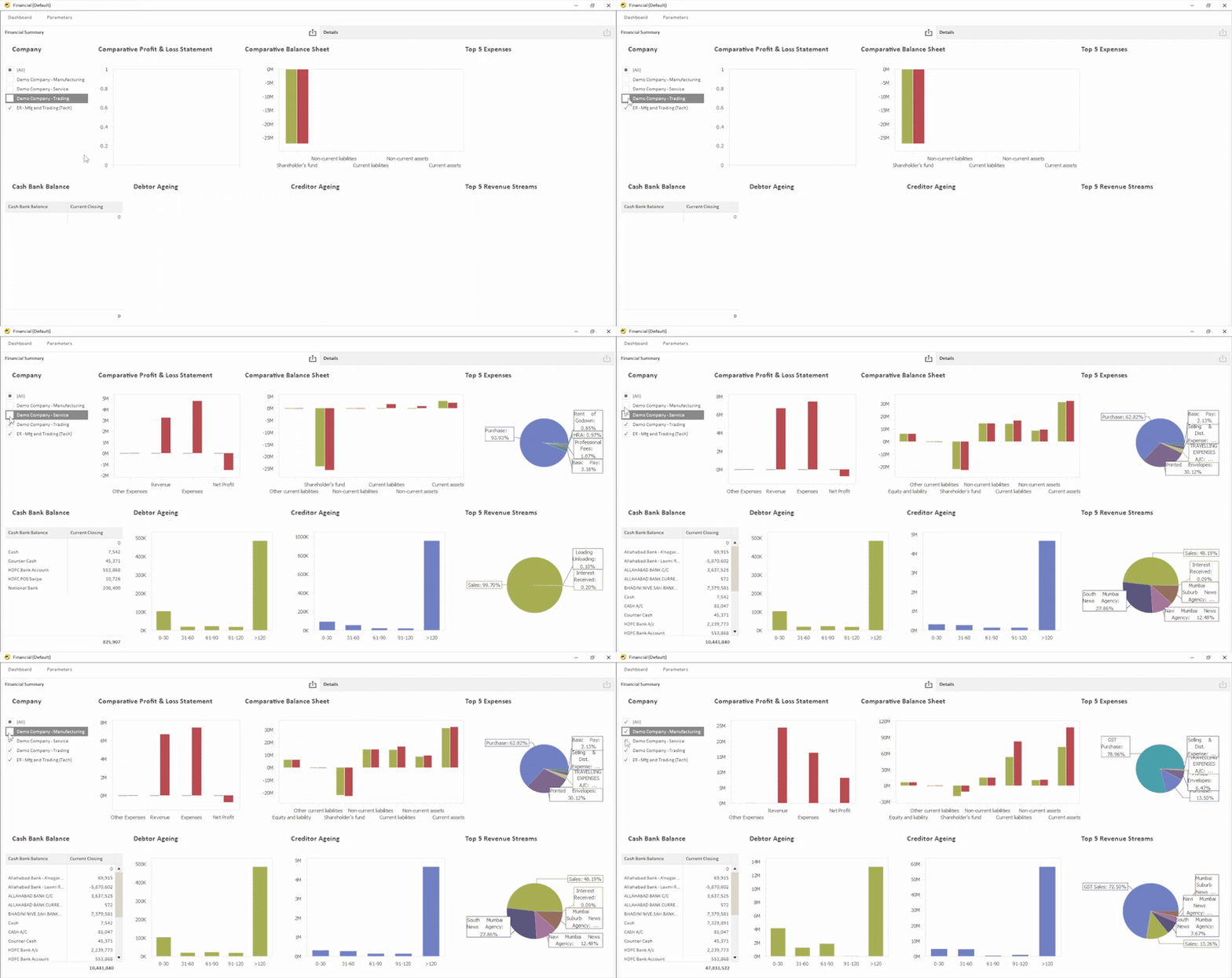
Accurate Financial Statements, Always Ready
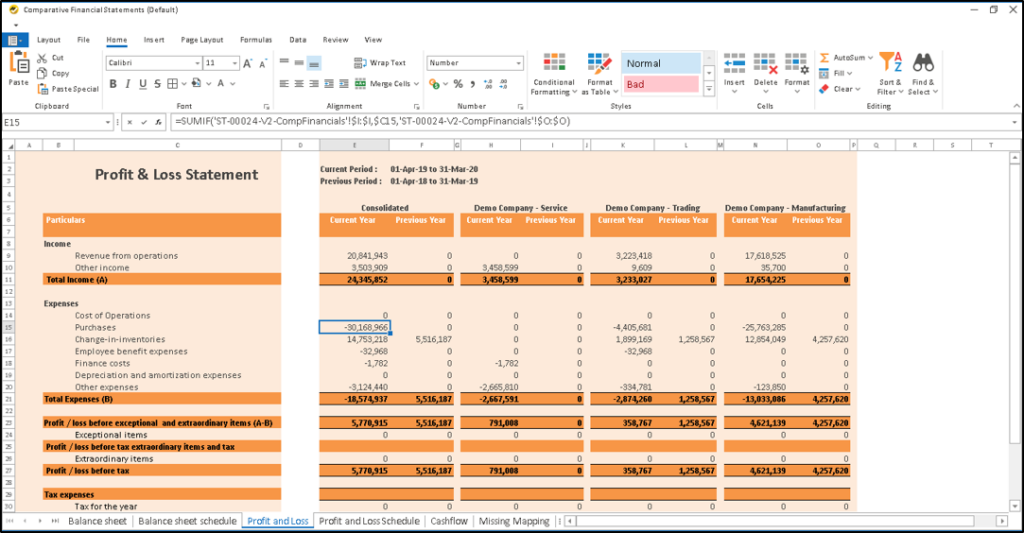
- Generate formatted financial statements in both PDF and Excel formats.
- With predefined rules, nearly 80–90% of ledgers can be mapped automatically to reporting heads.
- Flexible reporting structures support both ledger-level and group-level mapping.
- Businesses can easily maintain entity-wise or entity group-wise mapping configurations.
- Foreign currency accounts are converted into domestic currency using updated exchange rates and vice versa.
- Better financial analysis becomes possible through trend tracking of important financial ratios.
Budget Planning and Variance Tracking
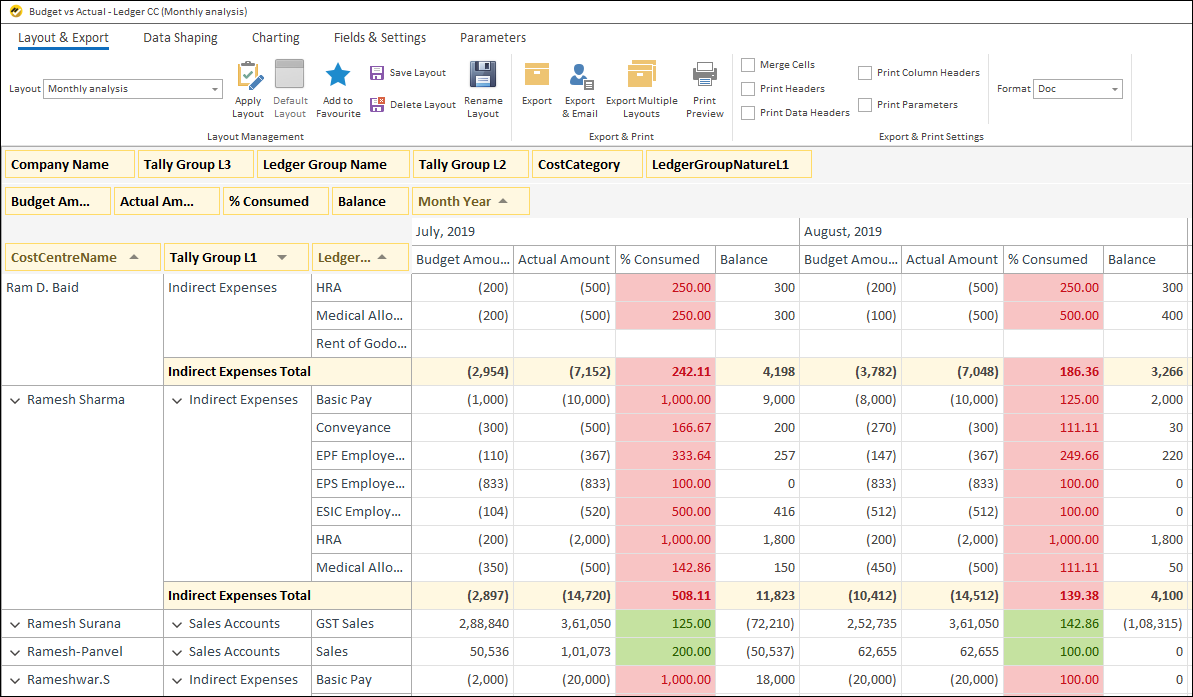
- Easy to use utility to maintain budget data. Option to upload monthly or quarterly or yearly
- Variation analysis with actuals
- Maintenance of budget at Ledger level or Ledger Cost Centre level
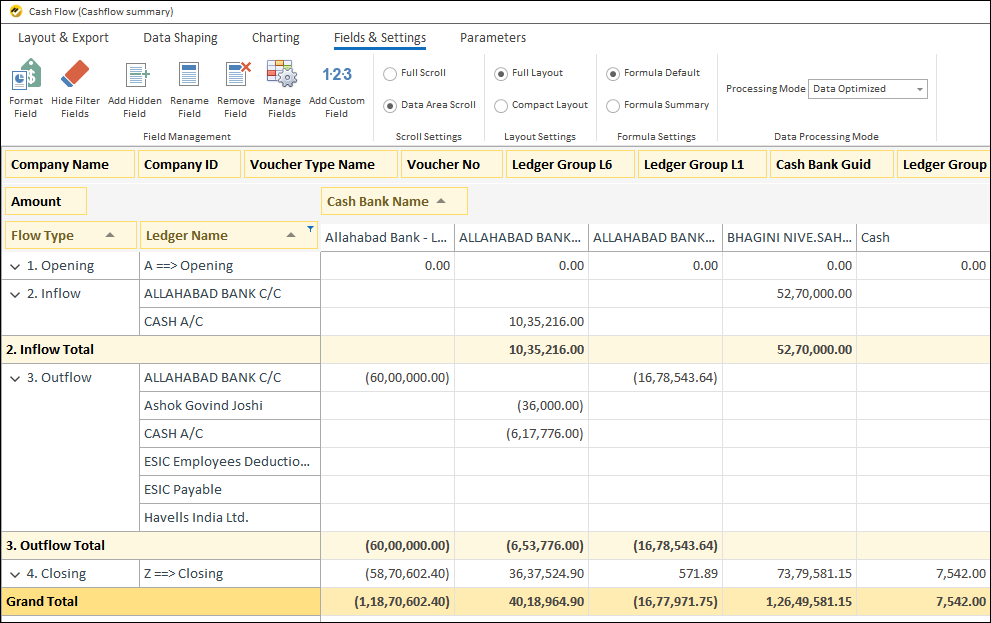
Know Your Cash Flow & Fund Flow Management
- Get better fund management visibility by tracking upcoming vendor payments and customer receipts
- A more realistic fund flow can be achieved through recurring payment and receipt configuration.
- Cash payments and receipts can also be monitored efficiently in a centralized view.
Working Capital Management
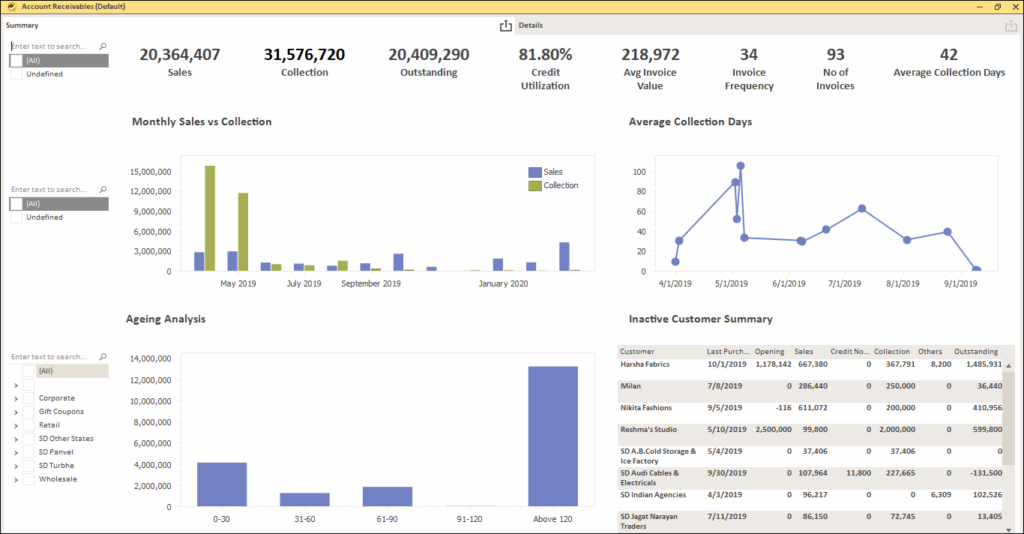
- Track Customer Receivables and Supplier Payables to better manage working capital. Easy identification of overdue payments and receipts
- Track non-moving inventory to free funds for profitable and top selling items. Get list of customers whom you can sell the stock based on past sales history
- Customer with increasing payment days
- Customers with over utilized credit limits
Why Automating Financial Report Matters for Your Business?
When you automate financial reports from Tally with EasyReports, your team shifts from doing the formatting to actually analysing the numbers. Reports go out faster. Errors go down. And your management gets the information they need in a format they can actually read and act on.
Quick Summary: What EasyReports Reporting Tool Helps You Do
| Problem | EasyReports Solution |
| Poorly formatted financial statements | PDF and Excel formatted output |
| Manual ledger-to-reporting-head mapping | Auto-mapping with pre-defined rules |
| Mapping across multiple companies | Entity-wise and entity group-wise mapping |
| Foreign currency balances | Auto-conversion with exchange rates |
| No visibility on financial ratio trends | Trend view across periods |
| Manual budget vs actuals comparison | Auto variance analysis from Tally actuals |
| Rigid budget structure | Budget at ledger or cost centre level |
| No forward view on cash position | Upcoming payment and receipt tracking |
| Unrealistic cash flow forecasts | Recurring transaction configuration |
| Mixed cash and bank tracking | Separate cash inflow and outflow tracking |
Ready to Automate Financial Reports from Tally Prime in 2026?
If you are about finding a better way to automate financial reports from Tally Prime, EasyReports is worth a look.
EasyReports connects directly to your existing Tally Prime setup, pulls the required data automatically, and formats the reports into a structured and business-ready format. And it gives your team the tools to do actual financial analysis with your data staying completely secure at every step. Get your demo now!
The numbers are already in Tally. EasyReports makes sure they tell the right story.
FAQ
Q1. How can I automate financial reports from Tally Prime?
You can automate financial reports from Tally Prime using a reporting tool like EasyReports that connects directly with your Tally data and generates formatted reports automatically.
Q2. What financial reports can be automated from Tally Prime?
Businesses can automate Balance Sheets, Profit & Loss Statements, Trial Balance reports, Cash Flow reports, Fund Flow reports, Receivables & Payables Ageing reports, and budget variance reports.
Q3. Can EasyReports generate formatted financial statements from Tally Prime?
Yes, EasyReports generates professionally formatted financial statements in PDF and Excel formats directly from Tally Prime data.
Q4. Does EasyReports support automatic ledger mapping from Tally Prime?
Yes, EasyReports supports predefined auto ledger mapping rules that help businesses map reporting heads automatically across multiple companies.
Q5. Can I manage budget vs actual analysis from Tally Prime?
Yes, EasyReports helps businesses maintain budgets at ledger and cost centre levels and automatically compare them with actual data from Tally Prime.
Q6. How does EasyReports help in cash flow management?
EasyReports provides visibility into upcoming payments, customer receipts, recurring transactions, and cash inflows and outflows for better fund flow management.
Q7. Can EasyReports handle multi-company financial reporting?
Yes, EasyReports supports entity-wise and entity group-wise reporting, making it easier to manage financial reports for multiple companies.
Q8. Is foreign currency conversion possible while generating reports from Tally Prime?
Yes, EasyReports supports foreign currency conversion using exchange rates while generating financial reports from Tally Prime.
Q9. Why should businesses automate financial reports from Tally Prime?
Automating financial reports reduces manual effort, improves report accuracy, saves reporting time, and provides faster business insights for management decision-making.
Q10. Is EasyReports suitable for working capital management?
Yes, EasyReports helps track receivables, payables, overdue payments, credit limits, and non-moving inventory for better working capital management.