


December 2, 2025
What is Tally Integration Using a Reporting Tool?
Tally integration using a reporting tool means connecting your Tally.ERP 9 or Tally Prime with a smart reporting solution that can automatically extract, analyze, and display your accounting data.
A tool like EasyReports makes this process smooth by converting your raw Tally data into clear business insights through automated MIS reports, dashboards, and advanced analytics.
Why Integrate Tally with a Reporting Tool?
Tally is excellent for recording transactions and generating basic reports.
But when you need:
- Customized MIS reports
- Multi-company consolidation
- Real-time dashboards
- Deeper business analysis
A reporting tool like EasyReports becomes essential.
EasyReports directly integrates with Tally.ERP 9 and Tally Prime and provides:
- 99+ ready-made reports
- Custom report builder
- Multi-company consolidation
- Automated reports & Interactive dashboards
- Automated daily/weekly/monthly reports
Step-by-Step Guide: How to Integrate Tally with EasyReports
Below are the simple steps to integrate Tally with EasyReports and start using automated reporting:
Step 1: Install EasyReports
Download and install the EasyReports application on your system.
This step sets up the reporting tool for use.
Step 2: Connect EasyReports with Tally
Integrate EasyReports Tally Connector with Tally.ERP 9 or Tally Prime.
Once connected, the tool will sync all your accounting, inventory, finance data & other data automatically.
Step 3: Run Initial Reports
Once the sync process has been completed, the next step is to run a few basic reports. These reports help you confirm that your data is flowing correctly and give you an early view of your business performance.
Here are the types of reports you can start with:
I) Financial Reports
These reports give you a clear picture of your business’s overall financial health.
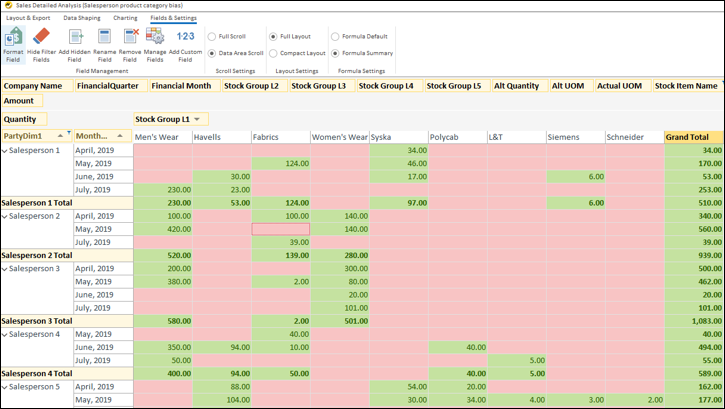
II) Sales & Purchase Reports
Sales reports show how your products or services are performing. They help you track customer purchases, revenue growth, and which items are selling the most.
Purchase reports show what you are buying from suppliers.
They help you keep track of purchase expenses, supplier activity, and cost patterns.
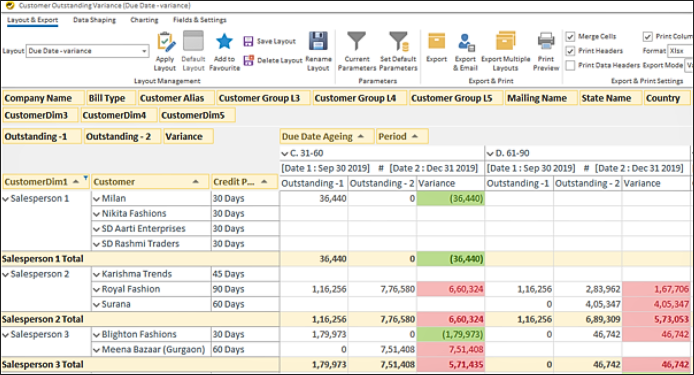
III) Customer & Supplier Reports
These reports show outstanding payments, credit limits, and overall customer or supplier performance.
They help you manage dues, follow up on payments, and maintain healthy business relationships.
IV) Dashboard Overviews
Dashboards give you a quick visual summary of your data.
They help you view key metrics like sales, expenses, cash flow and stock, all in one place.

Step 4: Set Up Report Schedules
Automate daily/weekly/monthly report generation.
Once scheduled, EasyReports will automatically deliver reports without manual work.
Benefits of Tally Integration with EasyReports
I) Remove Manual Reporting Work
| Before | After |
| 15–20 hours weekly exporting data | Zero manual export |
| Manual Excel formatting | All reports auto-generated |
| Copy-paste errors & Formula mistakes | 80–90% time savings |
II) Get Real-Time Business Intelligence
| Before | After |
| Delayed understanding of performance | Real-time automated reports & dashboards |
| Missed opportunities due to delays | Faster and accurate decision-making |
III) View Multi-Company Data in One Place
| Before | After |
| Manual consolidation of companies | Automatic multi-company consolidation |
| No group-level visibility | One-click consolidated MIS |
Integrating Tally with a reporting tool like EasyReports helps you move from manual reporting to smart, automated insights.
Whether it is real-time, consolidated reports, or automated MIS, EasyReports makes Tally reporting faster, easier and more powerful. Book your slot for the demo now!
Disclaimer: This blog article is for educational purposes only. Tally is a product of Tally Solutions Pvt. Ltd. and we do not claim any affiliation.
FAQs
1. What is Tally integration using a reporting tool?
Tally integration using a reporting tool means connecting Tally.ERP 9 or Tally Prime with software like EasyReports to automatically extract, analyze, and display your business data through dashboards, MIS reports, and advanced analytics.
2. Why should I integrate Tally with a reporting tool?
Integrating Tally with a reporting tool helps you overcome manual reporting challenges. It provides real-time dashboards, customized MIS, multi-company consolidation, and automated reports that save time and reduce errors.
3. Does EasyReports work with both Tally.ERP 9 and Tally Prime?
Yes. EasyReports integrates seamlessly with both Tally.ERP 9 and Tally Prime, allowing users to sync financial, inventory, and sales data without manual exports.
4. How long does it take to integrate Tally with EasyReports?
Integration usually takes just a few minutes. Once EasyReports is installed and the Tally Connector is linked, your data begins syncing automatically.
5. What type of reports can I generate after integration?
You can generate financial reports, sales & purchase reports, customer & supplier outstanding reports, multi-company MIS, and interactive dashboards through EasyReports.
6. Can I automate daily, weekly, or monthly reports?
Yes. EasyReports allows you to schedule recurring reports. Once scheduled, the system automatically delivers them without manual work.
7. Will integrating Tally improve decision-making?
Absolutely. Real-time dashboards, consolidated insights, and automated MIS help you make faster, more accurate financial and operational decisions.