

October 10, 2025
Features to look for when selecting a reporting tool? Focus on features like automation, multi-source data integration, zero-code report creation, customizable dashboards, and scalability. The right platform should connect seamlessly with your ERP systems, reduce manual effort, and deliver real-time insights without requiring technical expertise. EasyReports combines all these capabilities, offering pre-built reports, multi-company consolidation and user-friendly reports & dashboards to help businesses automate reporting and make faster, data-driven decisions.
Why Do Businesses Need a Robust Reporting Platform?
Modern businesses generate massive amounts of data across multiple systems. You need a reporting platform that transforms this raw data into actionable insights without forcing your team to spend hours downloading, cleaning, and formatting information in spreadsheets. The right platform automates repetitive tasks, accelerates decision-making and gives you real-time visibility into your business performance.
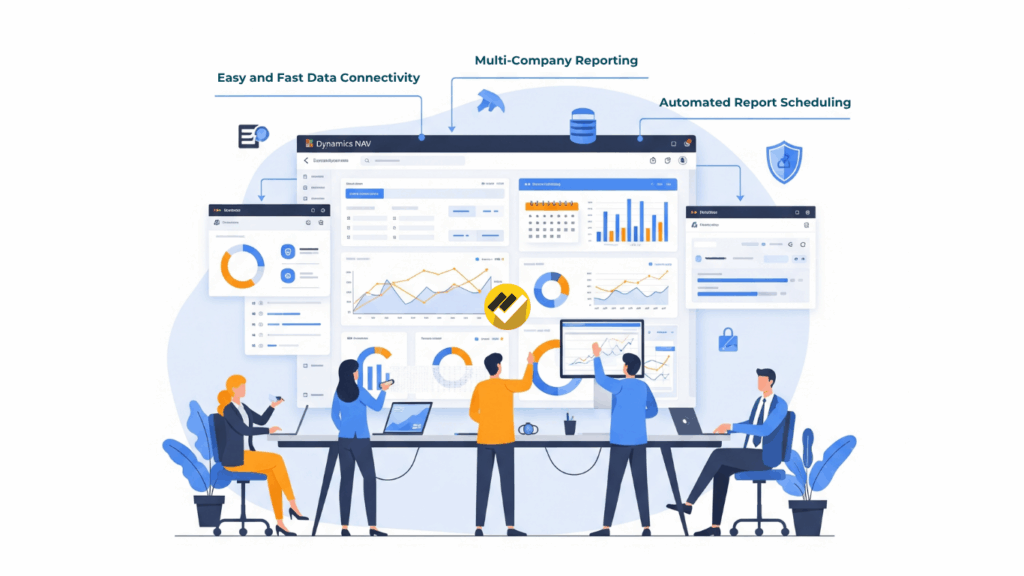
What Features Should You Prioritize When Selecting a Reporting Platform?
I) Multi-Source Data Integration
Look for solutions that integrate with ERPs like Tally, SAP Business One, Microsoft Dynamics NAV, and Business Central. EasyReports excels in this area by providing seamless connectivity to multiple data sources including MySQL, Oracle, and various ERP systems.
II) Zero-Code Report Development
Select a reporting platform that offers drag-and-drop functionality without requiring coding skills or special scripting knowledge. EasyReports delivers a zero-code approach that empowers business users to create custom reports independently, reducing dependency on IT teams.
III) Pre-Built Report Libraries
EasyReports provides an extensive repository of built-in reports that cover all major business functions, allowing you to deploy professional reports immediately without development effort.
IV) Consolidated Multi-Company Reporting
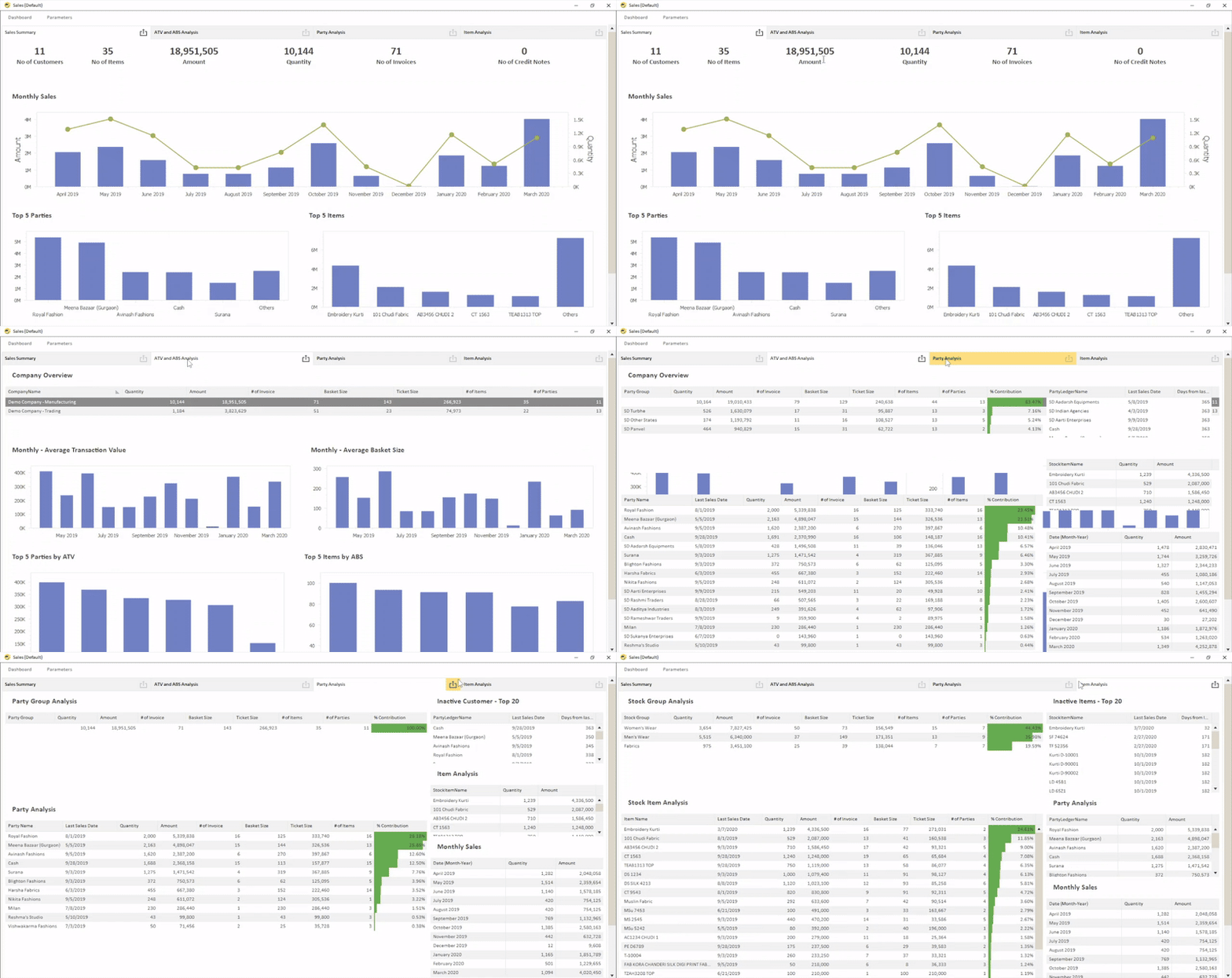
Managing multiple business entities, need consolidated reporting capabilities. Selecting a reporting platform with multi-company functionality allows to analyze performance across your entire organization from a single interface. EasyReports enables consolidated reporting across companies for all areas including sales, purchase and inventory, providing enterprise-wide visibility.
V) Advanced MIS and Reporting Capabilities
EasyReports transforms vanilla ERP reporting into compiled Management Information Systems (MIS) with reporting & interactive dashboards that support real-time analysis.
VI) Custom Fields Support
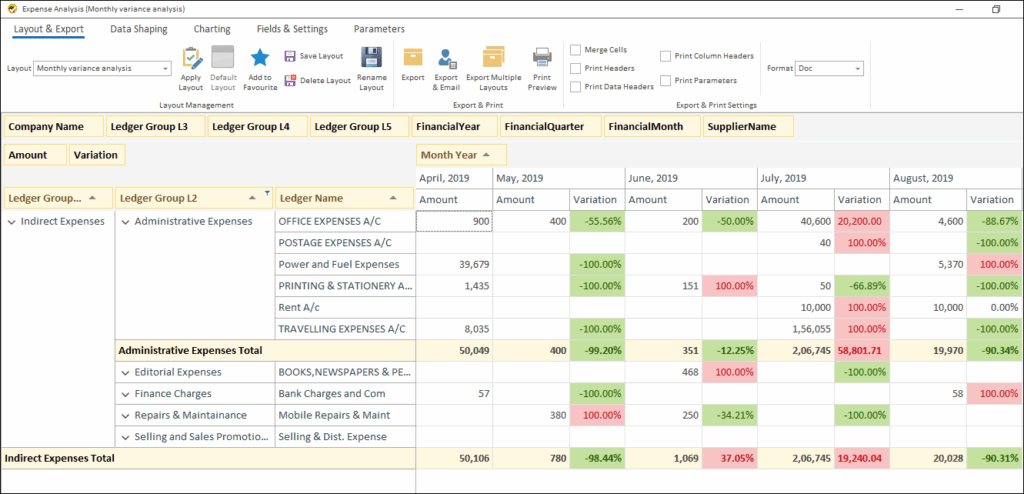
Every business has unique requirements. Reporting platform should accommodate custom fields that capture specific data points. EasyReports provides options to use additional fields and UDFs.
VII) Security and Data Control
When evaluating a reporting platform, data security should be a top priority. EasyReports provides robust security features ensuring that all data stays within your infrastructure.
The platform includes Role-Based Security, allowing to configure user roles, manage access to specific reports and restrict actions such as exporting or modifying layouts. Also, define data-level access filters to ensure users only view information relevant to them while keeping critical fields hidden when needed.
How Can You Evaluate a Reporting Platform Before Committing?
Most vendors offer trial periods or demonstrations. EasyReports encourages potential customers to try the solution, allowing you to verify that it meets your specific requirements.
Create a shortlist of reports and attempt to build them during the evaluation. Involve actual end users in the evaluation to ensure the platform meets their needs and expectations.
What Support and Implementation Considerations Matter?
You should evaluate the vendor’s responsiveness, expertise and commitment to customer success. EasyReports has served customers since 2011, demonstrating stability and sustained commitment to the reporting automation space.
What Are the Long-Term Benefits of Selecting the Right Reporting Platform?
The right platform transforms your reporting function from a time-consuming burden into a strategic advantage. EasyReports users report significant reductions in manual effort, faster report cycles and improved access to timely information for decision-making. These benefits compound over time, so it can build a comprehensive reporting framework that supports all areas of your business. These are the above-mentioned features to look for when selecting a reporting tool. Visit www.easyreports.in for more.
FAQ Section:
1. What are the key features to look for in a reporting tool?
You should look for features like automation, multi-source data integration, zero-code report creation, customizable dashboards, and scalability. These help reduce manual effort and deliver real-time business insights.
2. Why do businesses need a robust reporting platform?
Modern businesses generate data from multiple sources. A strong reporting platform automates data processing, eliminates manual tasks, and provides real-time visibility into business performance.
3. How does EasyReports simplify reporting for businesses?
EasyReports connects with ERPs like Tally, SAP B1, and Microsoft Dynamics NAV, offering pre-built reports, consolidated dashboards, and zero-code report creation to make reporting fast and effortless.
4. Can EasyReports handle data from multiple companies or systems?
Yes. EasyReports supports multi-source data integration and consolidated multi-company reporting, allowing you to analyze sales, purchases, and inventory across your organization from a single dashboard.
5. Is EasyReports suitable for non-technical users?
Absolutely. EasyReports provides a zero-code environment with drag-and-drop functionality so that business users can create custom reports without depending on IT teams.
6. How does EasyReports ensure data security?
EasyReports offers role-based access control and data-level filters, ensuring users only see relevant information while protecting sensitive business data.
7. How can I evaluate if EasyReports is right for my business?
You can request a demo or trial to test EasyReports’ features using your own data and reports. Involving your team during evaluation ensures it meets your real-world requirements.