

February 6, 2026
How to choose the right financial statement automation tool for 2026? Choose a financial statement automation tool by evaluating these critical factors like ERP integration, automated ledger mapping. formatted outputs, multi-entity support and many more. The right tool integrates seamlessly, saves hours and reduces month-end closing time.
What is Financial Statement Automation and Why Does It Matter?
A modern financial statement automation tool for 2026 uses of software technology to generate your balance sheets, profit and loss statements and cash flow reports with minimal manual work. By using automated tools which pull data directly from ERP systems like SAP S/4HANA, Oracle, SAP B1, Microsoft Navision, Microsoft Business Central, Tally, Zoho Books, Quickbooks, etc.
What Should You Look for When Choosing Financial Statement Automation Software?
The right tool must:
- Integrate seamlessly with your existing ERP system
- Automatically map your ledgers to reporting heads
- Generate formatted financial statements in both PDF and Excel formats
- Provide real-time dashboards
- Provide budget vs actual analysis
- Support multi-entity consolidation if you manage multiple companies
- Ensure data security with encryption and role-based access controls
How to Evaluate Financial Statement Automation Tools?
Check out the complete framework below:
1. Automated Ledger Mapping Features
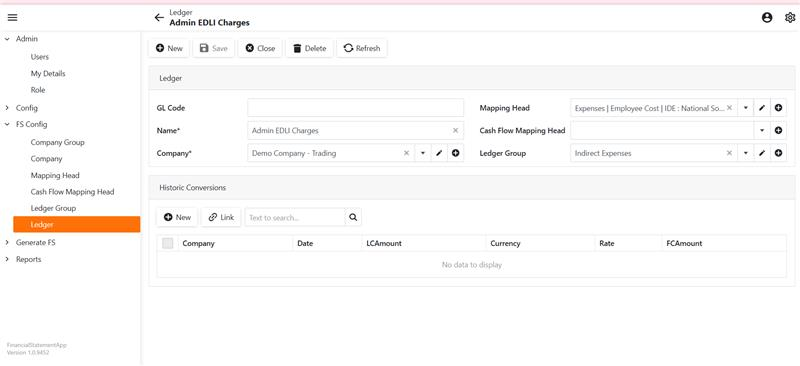
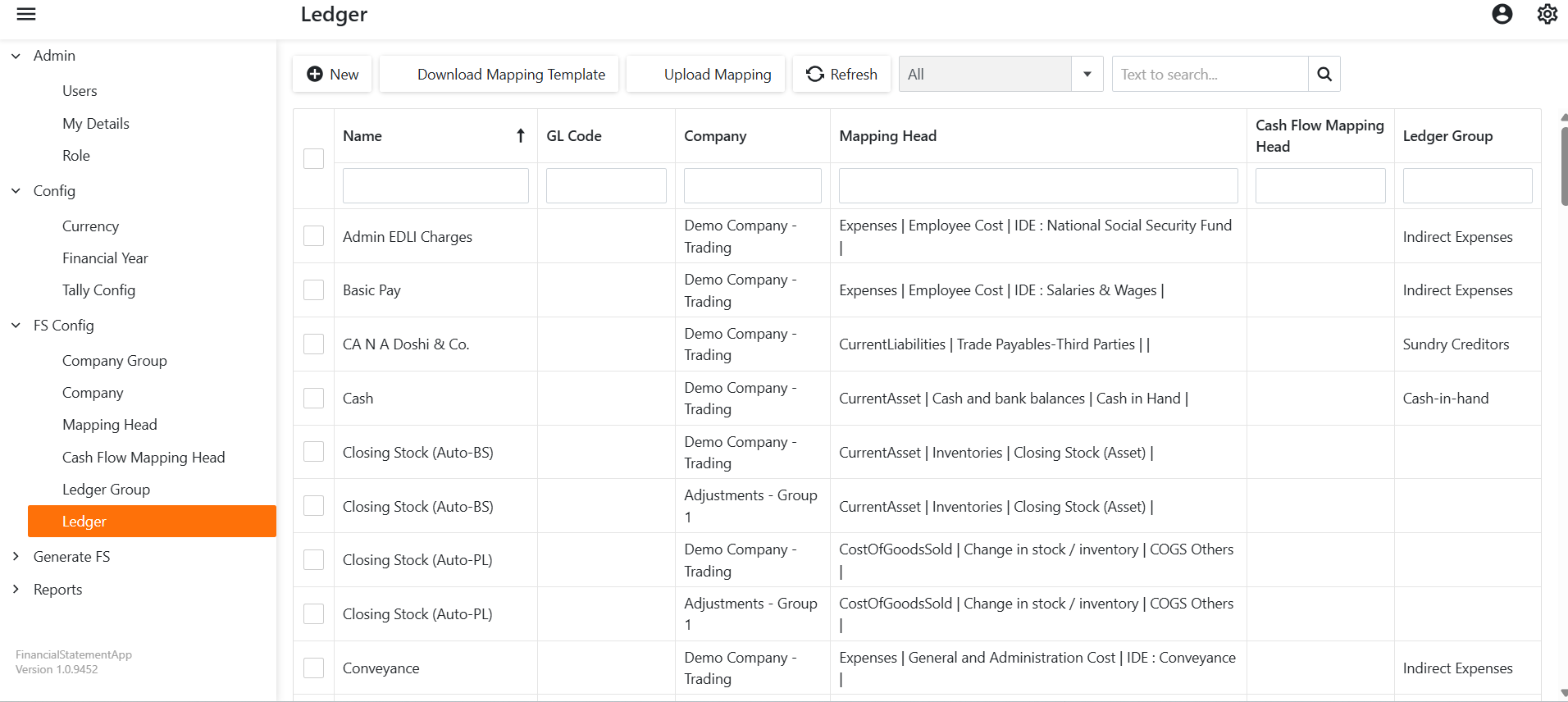
Your chart of accounts has hundreds or thousands of ledgers. You need software that automatically categorizes these into financial statement line items.
You can map your ledgers based on rules or excel upload. The system then intelligently categorizes your chart of accounts into Balance Sheet (BS) and Profit & Loss (PL) statements with proper classification levels.
2. Report Formatting and Customization
Your financial statements represent your business to investors, banks and board members. They need to look professional.
The EasyReports advantage: Generate formatted financial statements with top sheets all in one click.
Essential formatting features:
- Comparative financial statements with current year vs previous year columns
- Multi-company view & drill-down capability from summary to ledger level
- Structured classification of equity, non-current liabilities, current liabilities and assets

3. Budget vs Actual Analysis Capabilities
Smart finance teams don’t just look at actuals, they compare performance against budgets.
Key features:
- Easy budget data upload monthly or quarterly or yearly
- Budget maintenance at ledger level or ledger-cost centre level
- Drill-down to understand why variances occurred
Best practice: Use your financial statement automation tool like EasyReports to upload annual budgets at the start of the year, then generate automatic variance reports every month.
4. Real-Time Dashboard Analytics
Modern tools like EasyReports don’t just create PDF reports. They provide interactive dashboards that answer questions instantly.
Let’s discuss a few dashboard capabilities:
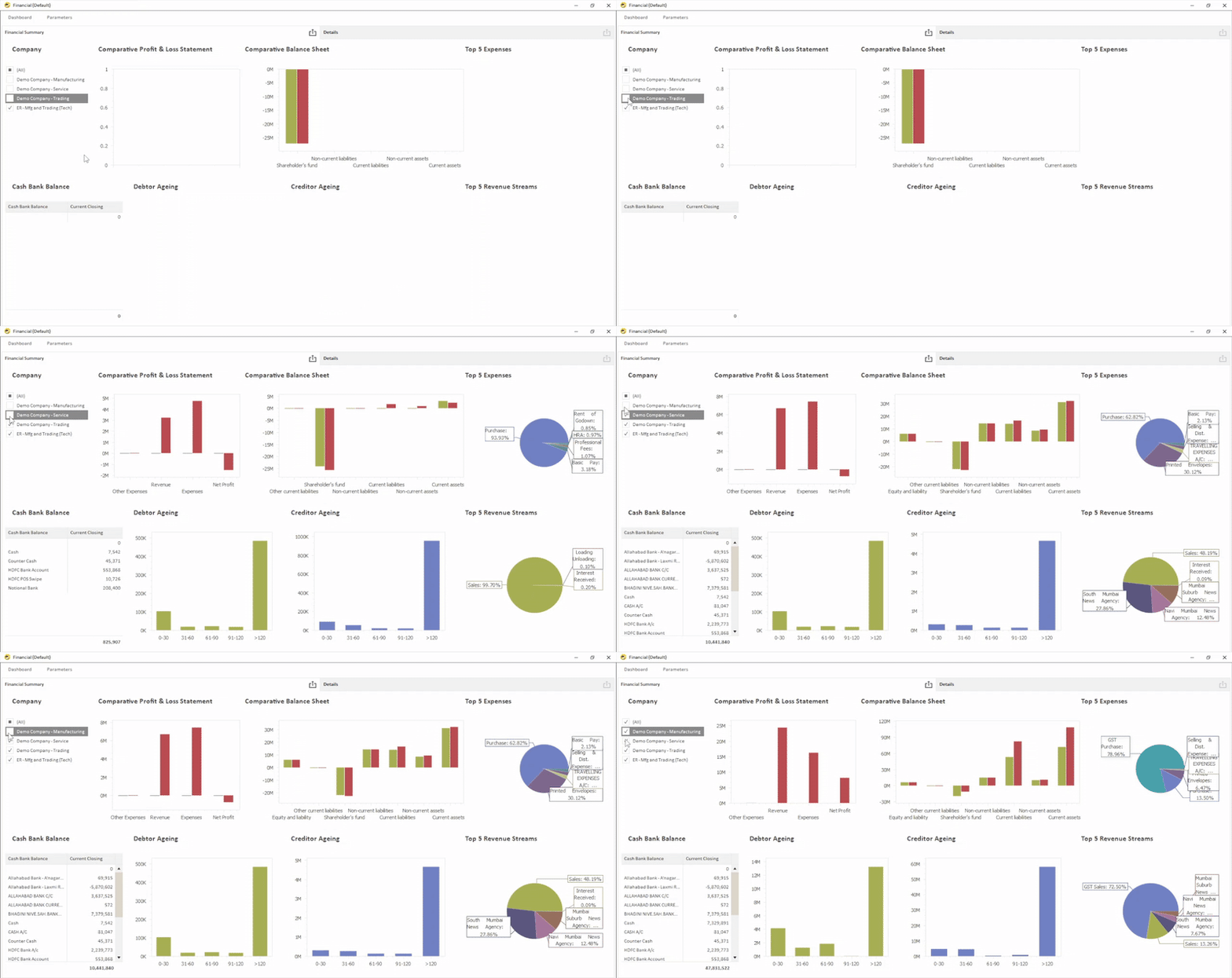
Financial Dashboard Performance Overview
- Comparative Profit & Loss statement
- Comparative Balance Sheet view
- Top 5 Revenue Streams analysis
- Top 5 Expense categories breakdown & many more
Cash Flow Dashboard Visibility
- Opening, Inflow, Outflow, and Closing balance summary
- Monthly inflow vs outflow comparison
- Monthly closing balance tracking
- Top payment and receipt groups analysis & many more
Working Capital Dashboard Overview
- Real-time Debtor Ageing and Creditor Ageing
- Monthly Current Assets vs Current Liabilities comparison
- Working Capital movement tracking
- Stock-in-hand trend monitoring
These are the fundamental financial reporting capabilities every business should evaluate before investing in a financial statement automation solution.
Want to experience faster closing and smarter financial decisions? Book a free demo of EasyReports Today.
Make 2026 the year your finance team moves from manual reporting to automated intelligence.
FAQs
1. What is a financial statement automation tool?
A financial statement automation tool is software that automatically generates balance sheets, profit and loss statements, and cash flow reports by pulling data directly from ERP systems, reducing manual work and errors.
2. Why is financial statement automation important in 2026?
In 2026, businesses need faster month-end closing, real-time dashboards, and multi-entity consolidation. Automation reduces manual errors, improves accuracy, and helps finance teams make data-driven decisions.
3. What features should I look for in financial statement automation software?
You should look for ERP integration, automated ledger mapping, formatted PDF and Excel outputs, budget vs actual analysis, real-time dashboards, and multi-company consolidation.
4. How does automated ledger mapping work?
Automated ledger mapping categorizes your chart of accounts into Balance Sheet and Profit & Loss line items using predefined rules or Excel uploads, ensuring accurate financial classification.
5. Can financial statement automation tools integrate with ERP systems?
Yes, modern tools integrate with ERP systems like SAP S/4 HANA, SAP B1, Oracle, Microsoft Business Central, Tally, Zoho Books, and QuickBooks to pull live financial data.
6. How does financial automation reduce month-end closing time?
By eliminating manual Excel work, auto-generating reports, and providing real-time dashboards, automation significantly reduces month-end closing time.