


December 31, 2025
How to Consolidate Tally Data from Multiple Companies into Single Report? To consolidate Tally data from multiple companies, use a reporting tool like EasyReports to import data from all your Tally companies through data import process. Once imported, open any report and select the companies you want to consolidate by & generate a consolidated report showing company-wise breakdowns and combined totals across all selected entities.
Why Do Businesses Need Multi-Company Consolidation?
If you’re opening each Tally company separately and manually noting down figures, you’re wasting 10-15 hours every month. Plus, there’s a high chance of errors when you’re copying numbers manually.
By the time you are done, it’s Friday evening and you’ve missed your weekend plans! This is why businesses actively search for how to consolidate Tally data from multiple companies using an automated and reliable method.
What Makes EasyReports Different?
Here’s what makes it special:
1. One-Time Setup, Lifetime Benefits
You set up the connection once & EasyReports Tally Connector automatically syncs data from all your Tally companies. No daily exports, no manual downloads.
2. Select Companies as Easily as Checking a List
Seriously! When you open a report, you just check boxes next to the companies you want to include. Want to see all 4 companies? Check all 4 boxes.
3. Real Consolidated Reports
You get 99+ ready to use reports, including financial statements like – P&L, Balance Sheet, Cash Flow & other valuable reports as well.
Q: Does EasyReports cover all areas of business for multi-company consolidation?
Yes. EasyReports covers all critical areas of business, enabling seamless multi-company consolidation across departments, across Audit and Reconciliation, Banking, Cost Centre, Customer, Dashboards, Data Register, Employee, Financials, General Ledger, Inventory, Marketing Analytics, Order Processing, Production, Purchase, Sales, Supplier, System Reports, Target / Budget.
Step-by-Step: How to Consolidate Multiple Tally Companies
Step 1: Connect Your Tally Companies to EasyReports
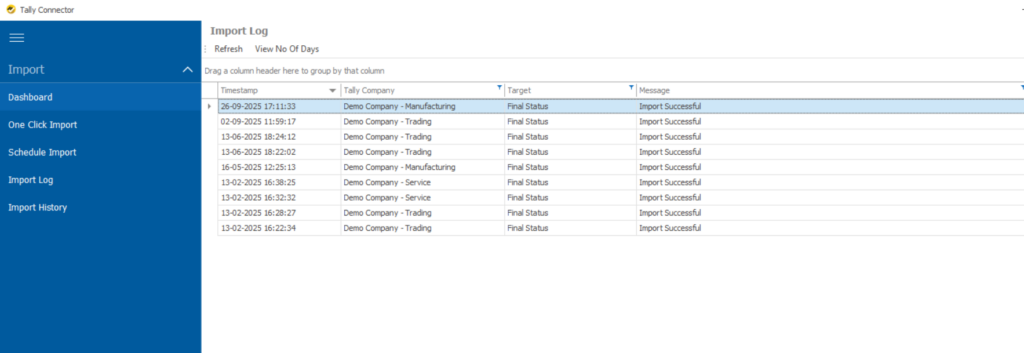
First, you need to import data from your Tally companies into EasyReports using the Tally Connector.
How it works:
- Open EasyReports Tally Connector
- Go to the Data Import section
- The Tally Connector will detect all Tally companies for that particular Tally ERP
- Select which companies you want to connect, for ex. (Demo Company – Manufacturing, Demo Company – Service, Demo Company – Trading, etc.)
- Click “One Click Import”
Q: Does this affect my Tally data?
Not at all! EasyReports only reads data from Tally – it never modifies or deletes anything. Your Tally data remains 100% safe.
Step 2: Open Your Consolidated Report
Once your data is imported, you’re ready to create consolidated reports.
Here’s how:
Go to the Reports section in EasyReports
Select the type of report you want (let’s say “Columnar Ledger Detailed”)
Click on the report to open it
Step 3: Select Multiple Companies Using Parameters
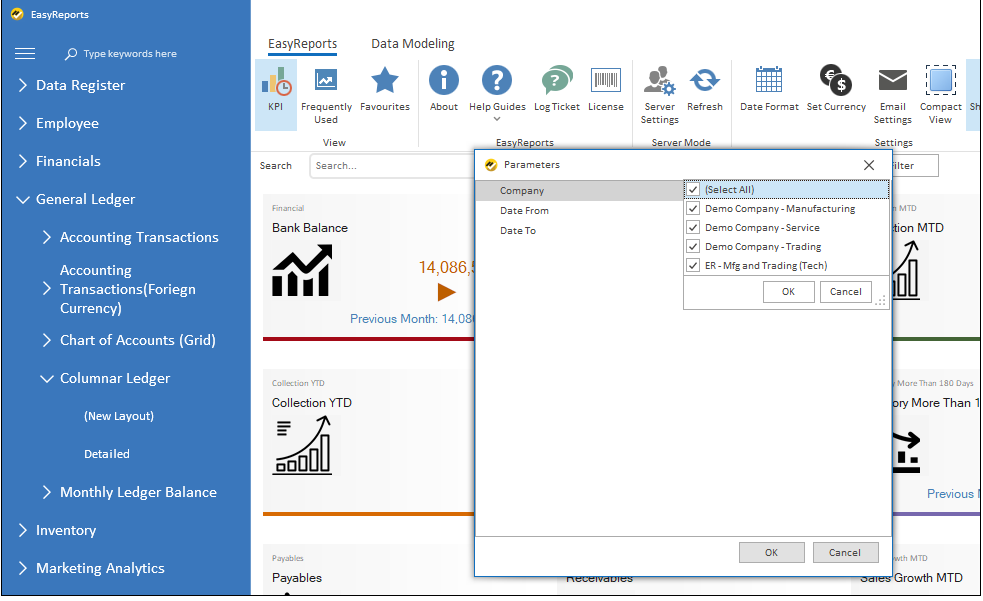
When you open any report, you’ll see a Parameters dialog box (like in the screenshot you’ve seen).
What you do:
- Simply check the boxes next to companies you want to consolidate
- Want all 4 companies? Click “Select All”
- Want only Manufacturing and Trading? Check just those two
- Set your date range (Date To parameter)
- Click OK
Q: Can I save these selections so I don’t have to choose every time?
Yes! EasyReports remembers your last selection, so if you’re always looking at the same set of companies, you won’t need to select them repeatedly.
Step 4: View Your Consolidated Report
Boom! Within seconds, you’ll see your consolidated report.
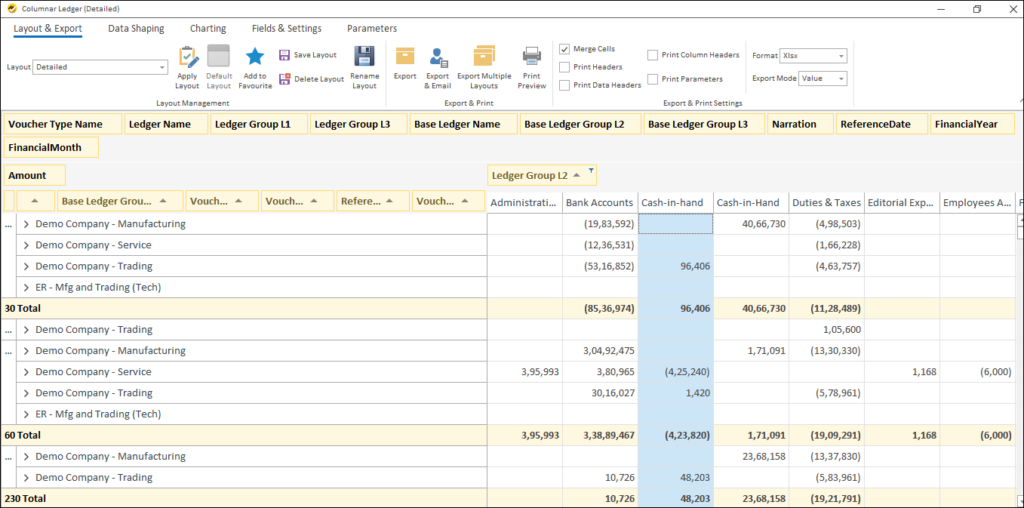
What you get: Looking at the consolidated report screenshot, you can see:
- Company-wise breakdown: Each company (Manufacturing, Service, Trading) is clearly separated
- Ledger-wise details: All your ledgers grouped by categories (Bank Accounts, Cash-in-Hand, Duties & Taxes, etc.)
- Consolidated totals: At the bottom, you see totals across all selected companies
- Hierarchical structure: Data is organized by Base Ledger Group L2, making it easy to navigate
Q: Can I drill down to see transaction-level details?
Absolutely! Click on any amount and you can drill down to see the actual vouchers and transactions behind that number. You can even see which company that transaction came from.
With the right reporting tool, understanding how to consolidate Tally data from multiple companies becomes simple and reliable. EasyReports brings data from all your Tally companies into one place, helps you generate accurate consolidated reports in seconds, and allows you to drill down into details whenever needed.
Book a free demo of EasyReports today!
Disclaimer: This blog article is for educational purposes only. Tally is a product of Tally Solutions Pvt. Ltd. and we do not claim any affiliation.
FAQs: How to Consolidate Tally Data from Multiple Companies
1. Does this affect my Tally data?
No. EasyReports only reads data from Tally. It never modifies, deletes, or writes back any data. Your Tally data remains 100% safe.
2. Can I save my company selections so I don’t have to choose them every time?
Yes. EasyReports remembers your last company selection, so if you frequently view the same consolidated reports, you won’t need to reselect companies each time.
3. Can I drill down to see transaction-level details in consolidated reports?
Absolutely. You can click on any value in the consolidated report to drill down into voucher-level and transaction-level details, including which company the transaction belongs to.
4. Do I need technical knowledge to consolidate Tally data from multiple companies?
No. The EasyReports Tally Connector is designed for non-technical users and works through a simple one-click data import process.
5. Does EasyReports cover all areas of business for multi-company consolidation?
Yes. EasyReports covers all critical areas of business, enabling seamless multi-company consolidation across Audit and Reconciliation, Banking, Cost Centre, Customer, Dashboards, Data Register, Employee, Financials, General Ledger, Inventory, Marketing Analytics, Order Processing, Production, Purchase, Sales, Supplier, System Reports, and Target / Budget.