


December 18, 2025
To reduce year-end financial close time in 2025, businesses should automate financial report consolidation, data reconciliation & MIS reporting across ERP systems like Tally, SAP B1 & Business Central. ERP reporting automation eliminates manual work, reduces errors, and enables finance teams to close books in days instead of weeks.
1) What is Year End Financial Close and Why Does It Take So Long?
Year-end financial close is the process of finalizing all your company’s financial records and transactions from January to December. It involves reconciling accounts, adjusting entries, consolidating reports across entities and preparing financial statements for tax filing and audit.
Here’s why it takes so long:
- Finance teams manually extract data from Tally, SAP B1 or Business Central/ MS NAV
- Reports need consolidation across multiple companies and branches
- Reconciliation happens in spreadsheets with high error risk
The average company takes 15-20 days or sometimes even months to complete year-end close. But it doesn’t have to be this way.
2) How Can ERP Automation reduce Year-End Close Time in Half?
Can you really close your books 50% faster? Yes, and here’s how.
ERP automation helps reduce year-end financial close time in 2025 by removing repetitive and manual steps from the process. A reporting tool like EasyReports enables:
- Eliminating manual data extraction – Connect directly with ERPs like Tally, SAP B1, Microsoft NAV/ Business Central
- Automating report consolidation – Combine financial data across companies, branches, and locations instantly
- Reporting Automation – Get summary and detailed reports for financial statements, e.g. Balance Sheet and its schedules
- Reducing reconciliation time – Ready to use reports ensure accuracy and consistency. Identify unmapped ledgers and prepare comparative reports comparing current and previous period

3) How Does EasyReports Automate Year-End Financial Reporting?
What exactly does automated year-end closing look like?
Step I: Connect Your ERP Systems
EasyReports connects directly to your ERP, whether you’re using Tally.ERP9, Tally Prime, SAP B1, Microsoft NAV, or Business Central, the setup takes minutes.
Step II: Build Consolidated Reports Once
Create your year-end report templates using EasyReports drag-and-drop interface. Need consolidated report for 10 companies? Build it once. Want segment-wise profitability? Set it up with simple parameters.
Step III: Automate Report Generation
Schedule your December year-end reports to run automatically. Set them to generate daily, weekly or on specific dates.
Step IV: Enable Self-Service Reporting
Give department heads access to their own reports & dashboards. Sales managers can pull their year-end numbers without bothering the finance team. Operations can view inventory reports whenever needed.
This reduces the burden on your finance team during the closing period.
4) What Reports Should You Automate for Year-End Close?
Which reports will give you the biggest time savings?
I) Financial Statements Package
Automate your complete financial statements with EasyReports:
- Balance Sheet (Fixed Format) and Balance Sheet (Pivot) for flexible presentation
- Comprehensive Financial Statements for complete reporting
- Profit & Loss (Pivot) with drill-down capabilities
- Cash Flow and Fund Movement (Monthly) for liquidity analysis

II) Management MIS Reports
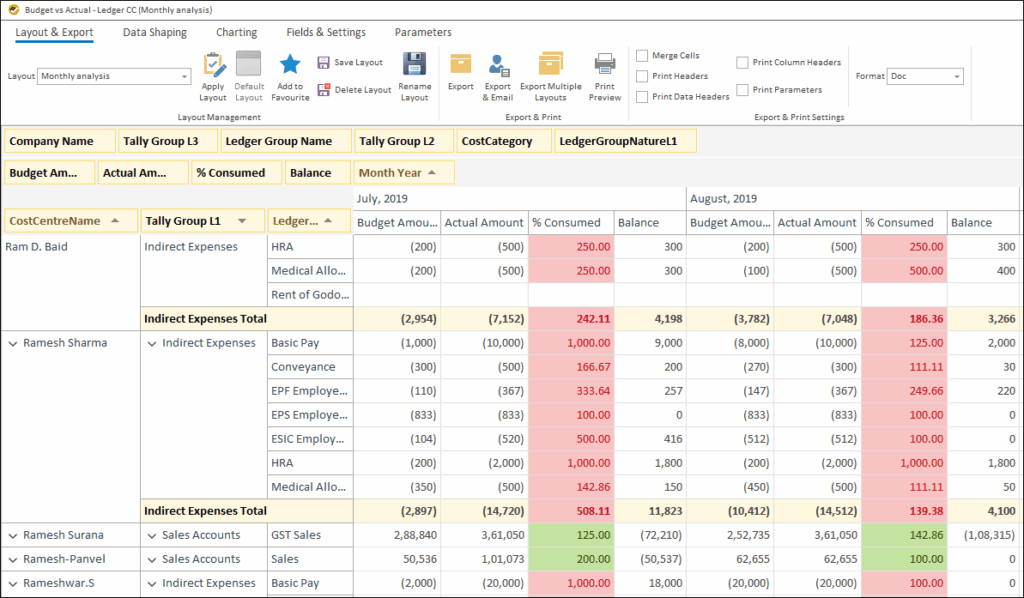
- Budget vs Actual (Ledger) and Budget vs Actual (Ledger CC) for performance tracking
- Monthly Trial Balance for comparative analysis
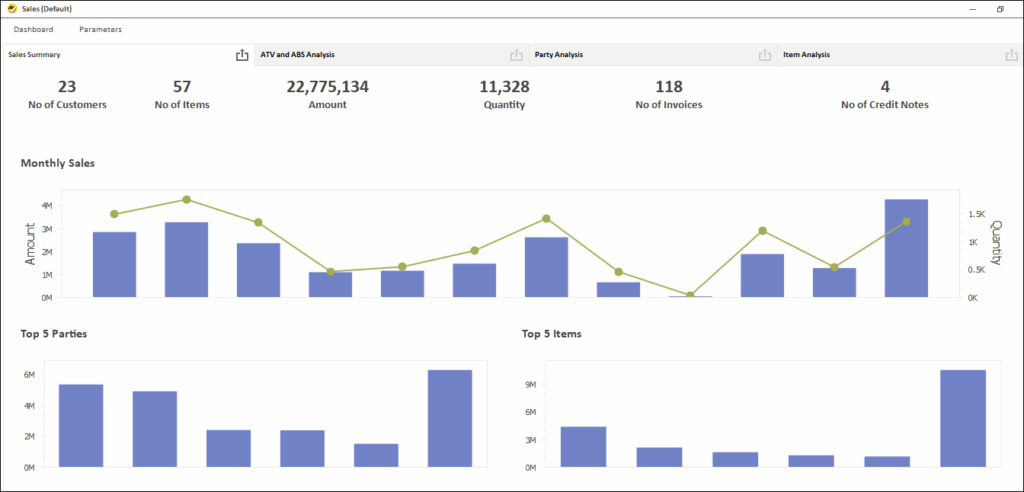
- Pre-built dashboards: AR Dashboard, AP Dashboard, Sales Dashboard, Purchase Dashboard, Cash Flow Dashboard & more
- Expense % of Sales and Sales Margin – Avg Cost for profitability insights
III) Reconciliation Reports
- Bank Reconciliation Statement
- Closing Stock and Inventory Ageing for stock verification
- Customer Outstanding and Supplier Payable statements for confirmation
5) What Makes EasyReports Different from Other Reporting Tools?
I) Purpose-Built for ERP Reporting
EasyReports is specifically designed for Tally, SAP B1, NAV, and Business Central. It understands your ERP data structure, user-defined fields (Tally) and reporting details. You don’t need expensive consultants to map your data.
II) Zero-Code Report Building
Can your finance team build reports without IT support? With EasyReports, they can. The drag-and-drop interface requires no coding or SQL knowledge. Your team builds new reports in minutes, not weeks.
III) Installed on Your Infrastructure
Worried about data security? EasyReports installs completely on your infrastructure. Your financial data never leaves your servers. You maintain complete control over data access and security.
IV) Multiple Report Types
EasyReports provides all types of reporting formats in one tool:
- Pivot reports for slice-and-dice analysis
- Grid reports for detailed transaction lists
- Spreadsheet reports for formatted financial statements
- Interactive dashboards with drill-down capabilities
If your finance team is still relying on spreadsheets and manual consolidation, it’s time to rethink the process. ERP reporting automation is the most effective way to reduce year-end financial close time in 2025, improve accuracy, and ensure timely financial reporting.
Ready to Close Your Books Faster in 2025?
Schedule a Free Demo: See automated ERP reporting now!
Start a Free Trial: Experience ready-to-use MIS reports and dashboards!
Connect with Us: Talk to our reporting experts!
FAQ’s (People Also Ask)
1: What is year-end financial close?
Year-end financial close is the process of finalizing all accounting transactions for a financial year. It includes reconciling accounts, posting adjustments, consolidating data across companies or branches, and preparing financial statements for audits and tax filing.
2: Why does year-end financial close take so much time?
Year-end financial close takes time because many finance teams still rely on manual data extraction from ERPs, spreadsheet-based reconciliation, and manual consolidation across multiple entities. These processes increase errors and cause repeated rework before finalizing accounts.
3: How can businesses reduce year-end financial close time in 2025?
Businesses can reduce year-end financial close time in 2025 by automating ERP reporting, consolidating financial data automatically, and eliminating manual reconciliation. Reporting tools integrated with Tally, SAP B1, and Business Central help close books in days instead of weeks.
4: What ERP reports should be automated for year-end closing?
The most important ERP reports to automate for year-end closing include Balance Sheet, Profit & Loss, Trial Balance, Cash Flow, Bank Reconciliation, Inventory Ageing, and Customer and Supplier Outstanding reports. Automating these reports saves time and improves accuracy.
5: Is ERP reporting automation secure?
Yes, ERP reporting automation is secure when the reporting tool is installed on the company’s infrastructure. Data remains within the organization’s systems & access can be controlled through user permissions, ensuring compliance and data security.