


July 25, 2025
Want to know how to generate a Customer Ageing Report from SAP B1 in a reporting tool? The fastest way is to connect SAP Business One to a tool like EasyReports, open the Customer Ageing template, customize it, and export it in Excel or PDF format. This guide shows you How to Generate Customer Ageing Report from SAP B1 in a Reporting Tool step-by-step in simple language.
What is Customer Ageing Report?
A Customer Ageing Report (also called Accounts Receivable Ageing Report) is a financial report that shows how long your customers have owed you money. It breaks down unpaid invoices based on how overdue they are.
Introducing EasyReports for SAP B1
EasyReports is a reporting and MIS automation tool for SAP B1, NAV, BC , Tally and other ERPs, data sources, databases. It connects directly to the SAP B1, so you get live data, business users can drag-and-drop fields, apply filters, and save custom layouts. It also supports scheduling and secure, role-based access so finance and sales teams can get up-to-date reports automatically.
How to Generate Customer Ageing Report from SAP B1 in a Reporting Tool (Step-by-Step)
Step 1: Connect SAP B1 to EasyReports
Once you connect EasyReports to SAP B1, your company data will automatically be available in the reporting tool.
Step 2: Open Customer Ageing Report
In EasyReports, you will see a pre-designed layout under the Customer Ageing Report.
Step 3: Customize the Layout (Optional)
EasyReports allows you to customize column visibility, sorting and groupings. Drag & drop the fields & use triangle shaped icons to apply filters but to
Step 4: Export the Report
You can export the Customer Ageing Report to Excel or PDF directly using the “Export” option.
Step 5: Schedule Reports Automatically
With EasyReports, you can schedule this report to be emailed to your team on a daily, weekly, or monthly basis.
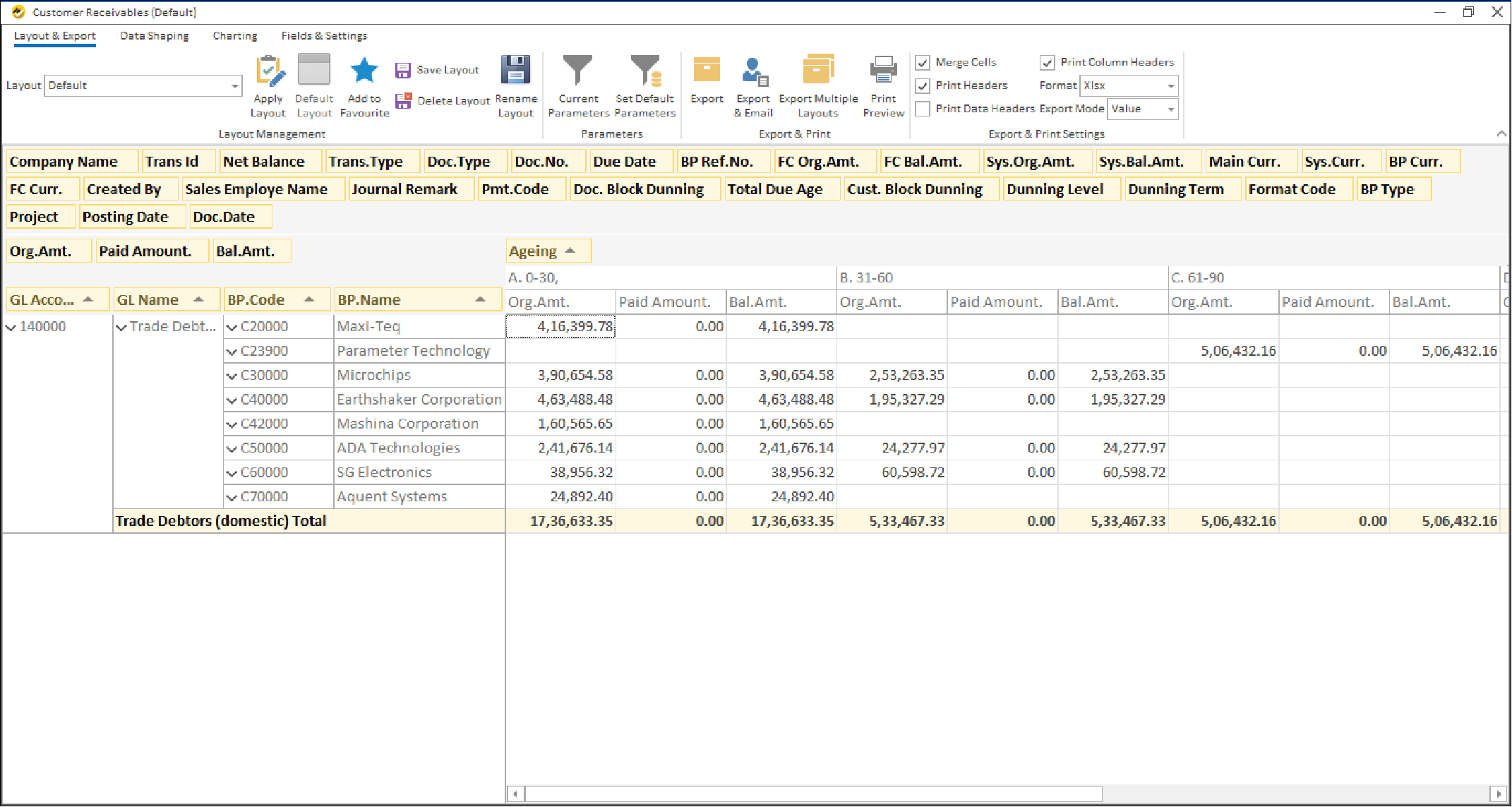
Key Features of Customer Ageing Report for SAP B1 with EasyReports
The provided screenshot highlights these EasyReports features:
1. Clear Ageing Buckets for Quick Analysis
The report categorizes outstanding invoices into ageing buckets like 0-30, 31-60, and 61-90 days, helping users instantly identify delayed payments and focus on recovery. You can also change the ageing brackets as required or filter the brackets to show only specific outstanding periods, e.g. invoices which are due for more than 90 days.
2. Reporting Breakdown
You can see ageing customer-wise (BP Name), making it easy to follow up with specific clients whose payments are overdue. You can also drag and drop fields in the report layout and save different layouts which help you automate different reporting formats.
3. Real-Time Outstanding Visibility
Columns like Original Amount, Paid Amount, and Balance Amount offer a clear view of how much is still pending from each customer.
4. Customizable Layout & Export Options
You can save layouts, color by rules (e.g. mark all outstanding greater than 100,000 in red) filter by parameters, and export the report to Excel, PDF, etc., making it easy to share with management or use in meetings.
5. No Manual Calculations Needed
Automated ageing calculations and balances save time and eliminate errors compared to Excel-based reporting.
Try EasyReports Yourself: Ready to utilize the customer ageing report from SAP B1 in a reporting tool? Get your demo get scheduled here & visit EasyReports website for more: www.easyreports.in
Frequently Asked Questions (FAQ)
1. What is a Customer Ageing Report in SAP B1?
A Customer Ageing Report in SAP B1 shows outstanding customer invoices grouped by how long they’ve been unpaid, such as 0–30, 31–60, or 60+ days. It helps businesses track overdue payments and improve collection efforts.
2. How do I generate a Customer Ageing Report from SAP B1 in a reporting tool?
To generate a Customer Ageing Report from SAP B1 in a reporting tool, connect your SAP B1 database to the tool, open the report template, apply filters or customization, and export or schedule the report.
3. Why should I use a reporting tool instead of SAP B1’s default ageing report?
SAP B1 provides basic ageing reports, but reporting tools add automation, customization, drag-and-drop options, dynamic ageing buckets, and scheduled reports — making reporting more flexible and faster.
4. Can I change ageing buckets in the Customer Ageing Report?
Yes. Reporting tools like EasyReports allow you to customize ageing brackets (e.g., 0–15, 15–45, 45+ days) and filter invoices based on overdue periods.
5. Can I generate a customer-wise outstanding summary?
Yes. You can generate customer-wise outstanding summaries showing original amount, paid amount, and balance amount for every customer.
6. Does EasyReports support real-time SAP B1 data?
Yes. EasyReports connects directly to SAP B1 so your Customer Ageing Report always shows the latest outstanding balances without manual refresh.
7. Can I schedule Customer Ageing Reports to be emailed automatically?
Yes. You can schedule ageing reports on a daily, weekly, or monthly basis and send them to management or finance teams automatically.
8. Which users benefit from Customer Ageing Reports?
Finance teams, business owners, accounts receivable staff, and sales managers use Customer Ageing Reports to follow up on overdue payments and improve cash flow.